WeLastseen: Online Tracking
Utilities

WeLastseen: Online Tracking
WanXing Technology · released 25 Mar 2026 · Open in App Store ↗

Revenue 30d not estimated
Downloads 30d not estimated
Rating 2.60 5 reviews

No in-app products collected for this app.

Rating
United States40%23.00
Brazil20%11.00
United Kingdom20%11.00
Solomon Islands20%15.00
United Arab Emirates<1%0
Afghanistan<1%0
Antigua And Barbuda<1%0
Anguilla<1%0
Albania<1%0
Armenia<1%0

The store shows a different set in every country

Description

WeLastseen helps you manage two chat accounts on one phone, receive online status alerts, compare activity patterns, and keep your personal content private.

From separating work and personal conversations to reviewing contacts’ activity, comparing overlapping online times, and keeping private photos, videos, and contacts securely stored, WeLastseen gives you a simpler and more secure way to stay in control.

What you can do with WeLastseen

[Online Status Updates & Instant Alerts]

Stay updated with selected contacts’ online and offline status in real time. Receive instant alerts when their status changes, and create custom activity windows to review online events during a specific period.

[Custom Activity Windows]

Set a time range, such as nighttime or working hours, and view online/offline events, active duration, and activity frequency within that period.

[Compare Online Patterns]

Choose another contact and compare overlapping online events to better understand activity patterns.

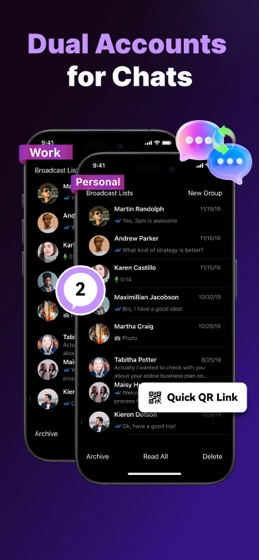
[Dual Accounts for Work and Personal]

Log in to a chat account inside WeLastseen and switch anytime, making it easier to separate work and personal conversations.

[Keep Photos and Videos Private]

Move personal photos and videos into Secret Album and keep them out of sight.

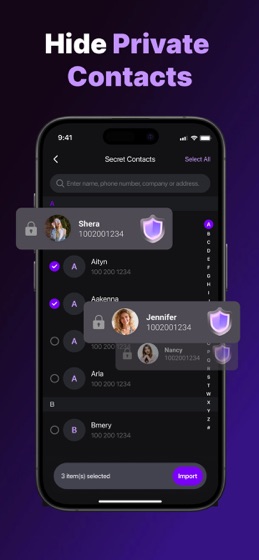
[Protect Private Contacts]

Store selected contacts in a separate hidden space for extra privacy.

[Lock Access with Face ID and PIN]

Add an extra layer of protection with secure unlock options.

========================

How to use

[Online Status Alerts]

● Follow the quick pairing flow to link your account.

● Choose the contacts you want to follow inside WeLastseen.

● Enable online and offline notifications to stay informed about status changes.

[Dual Accounts]

● Go to Dual Accounts inside WeLastseen.

● Follow the quick pairing flow to link your account.

● Tap to switch between accounts whenever you need.

[Private Space]

● Create your private space and secure it with PIN or Face ID.

● Add the content you want to protect into Secret Album or Secret Contacts.

● After importing, you can remove the original items from your main album or phonebook for better privacy.

● Open your private space whenever you need to view or manage your hidden content.

========================

WeLastseen is designed for privacy without complexity: simple, secure, and easy to use.

User Policy: https://www.wondershare.com/company/end-user-license-agreement.html

Privacy Policy: https://www.wondershare.com/privacy.html