Expense Tracker: CoinBox
FinanceUtilities

Expense Tracker: CoinBox
Dmitriy Biserov · released 16 Sept 2025 · Open in App Store ↗

Revenue 30d not estimated
Downloads 30d not estimated
Rating 4.90 692 reviews

No in-app products collected for this app.

Rating
Russia68%4744.91
United States6%394.85
Ukraine5%354.97
Kazakhstan3%204.95
Belarus2%124.75
Italy1%105.00
Portugal1%84.88
Turkey1%84.75
Indonesia1%75.00
Mexico1%75.00

The store shows a different set in every country

Description

Hey! Ever wonder where your money actually goes? I did, so I built an app where you can log expenses in a second and instantly see the full picture of your finances.

Key features:

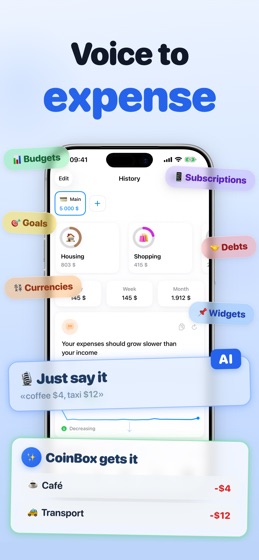
AI Voice Input — say "coffee 4, cab 12, lunch 15" and all three transactions get added at once. The AI figures out the category, amount, and currency on its own. Works in 30+ languages and understands natural speech. The fastest way to track your spending

Accounts — split your money across cards, cash, and savings. Full control over your finances

Income tracking — add your salary, side gigs, and any other money coming in. See the full picture: how much you earned and how much you spent

Monthly budgets — set limits for categories and watch your progress in real time

Goals — saving up for something? Create a goal and track your progress

Subscriptions — all your recurring payments in one place. See exactly how much goes out every month

Debt tracking — keep track of who owes you and who you owe. All in one place

Travel mode — switch to a local currency and expenses convert automatically

Clean and minimal — simple design, everything works fast and smooth

Stats — spending by category and month, nice and clear

Month comparison — see how your spending changed compared to last month

Widgets — income, spending trend, financial tips — put what matters on your home screen

Custom categories — set them up your way, archive the ones you don't need

Powerful search — find transactions by notes, categories, amounts, and dates

Extra currencies — add up to 3 currencies with automatic conversion

Smart notifications — reminders that adapt to your habits

Customizable interface — choose widgets, set up your tab bar, change the app icon, pick your keyboard

CSV import and export — bring in data from other apps or save a backup

Thanks for reading all the way down here! If you have ideas or suggestions, feel free to reach out — there's a "Send Feedback" button right in the settings.