Digital Ocean Mobile — Ocean
Developer ToolsUtilities

Digital Ocean Mobile — Ocean

FarFetched · released 17 Jul 2025 · Open in App Store ↗

Revenue 30d not estimated
Downloads 30d not estimated
Rating 3.52 23 reviews

No in-app products collected for this app.

Rating
United States57%133.77
United Kingdom9%23.00
Azerbaijan4%11.00
Brazil4%15.00
Canada4%11.00
Czech Republic4%14.00
Denmark4%12.00
South Korea4%13.00
Russia4%15.00
Singapore4%15.00

The store shows a different set in every country

Description

Manage your Digital Ocean droplets, databases, spaces and much more. Take DigitalOcean anywhere you go with Ocean!

◆ DROPLETS

View Droplet Info

Check Droplet Stats (Bandwidth, CPU, Memory, Disk)

Browse Droplets on all your project(s)

Rename Droplet

Reset root password on a Droplet

Turn on/off Droplet

Destroy Droplet

◆ DATABASES

View DB Cluster Info

Browse DBs on all your project(s)

Destroy DB Cluster

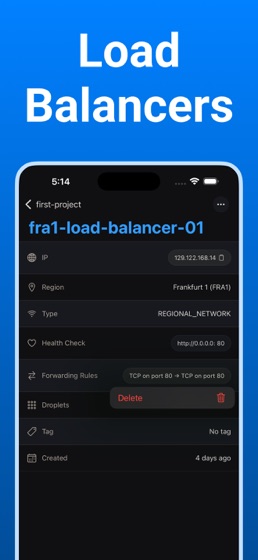
◆ LOAD BALANCERS

View Load Balancer Info

Browse Load Balancers on all your project(s)

Detach Droplets

Remove Forwarding Rules

◆ APPS

View App Info

Browse Apps on all your project(s)

View Logs in real time

◆ DOMAINS

View Domain Records

Browse Domains on all your project(s)

◆ VOLUMES

View Volume Info

Browse Volumes on all your project(s)

Resize Volume

Detach Droplet

That’s it folks!

This text isn't gonna get any more interesting. I mean, I think we've pretty much covered all the good stuff. Still here? Ummmm, ok. How's everything? Good? Cool cool cool.

What are you looking for? The app description is over. For real, check out the app. It's way better than hanging out in the App Store this long.

Wow, you're dedicated. Do you just love app descriptions? Weird. OK, we're gonna go now. Bye.

NOTICE & ACKNOWLEDGMENT

1. API tokens are stored locally on your device, and never leave it.

2. Ocean is OSS (Open Source Software), feel free to open an Issue or PR at github.com/get-ocean/ocean

3. This is not a replacement for the DigitalOcean website. Certain actions, such as creating new projects, should be done directly in the web dashboard.

© FarFetched 2025. All trademarks and copyrights belong to their respective owners.

Terms of Service: https://farfetched.global/ocean/terms