TV Screenshare: Connect View
Photo & VideoEntertainment

TV Screenshare: Connect View

Regina Garcia · released 5 Aug 2025 · Open in App Store ↗

Revenue 30d not estimated
Downloads 30d not estimated
Rating 4.37 183 reviews

No in-app products collected for this app.

Rating
United States55%1004.56
Australia11%204.45
France8%144.29
Canada7%124.25
Germany5%103.80
Italy5%103.40
Netherlands3%53.80
Austria1%25.00
United Kingdom1%21.00
Anguilla<1%15.00

The store shows a different set in every country

Description

Screen Share App: Smart Way to View and Cast from Phone to TV

Turn your phone into a powerful screen sharing tool. With Screen Mirroring, you can wirelessly connect your device to any smart TV, mirror your entire screen, or cast videos, photos, games, and more — all in just a few taps. No cables, no complicated setup, and no extra hardware needed.

Screen Mirroring is the easiest way to share your screen in real time, whether enjoying a movie night, showing a presentation, or making a video call.

How to Use:

1. Make sure your phone and TV are connected to the same WiFi network.

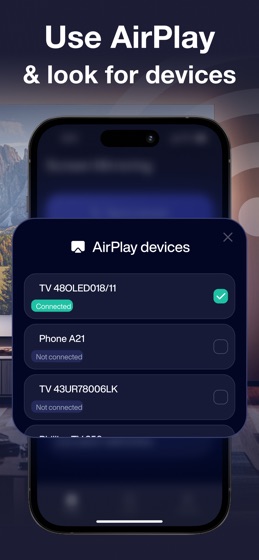
2. Open Screen Mirroring and choose your smart TV or streaming device from the list.

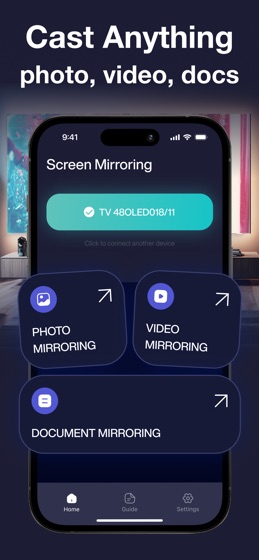
3. Pick what you want to share — your screen, videos, photos, or apps — and start casting.

Key Features:

Mirror Phone Screen to TV

Wirelessly project your phone screen onto your TV in real-time — great for games, chats, or browsing.

Cast Videos & Photos

Instantly cast your favorite videos, movies, and photos from your phone gallery or the web to the TV.

Stream Content from the Web

Browse and stream videos directly from websites and watch them on a larger screen.

Share Documents & Presentations

View PDF, PPT, and other docs on your TV for easier group sharing and collaboration.

Play Games on the Big Screen

Turn your TV into a gaming display by mirroring your gameplay in real-time.

Big-Screen Video Calls

Enhance your video call experience by connecting your phone to your TV and seeing everyone on a bigger screen.

Easy IPTV Support

Use the built-in IPTV player to access your favorite streaming services.

Compatibility:

Works with all major smart TVs: Samsung, LG, Sony, TCL, Hisense, and more

Supports popular streaming devices: Chromecast, Roku, Fire TV, and Apple TV

Requires no additional hardware or software

Why Choose Screen Share App?

Fast and stable screen sharing without delays

Seamless TV connection via WiFi

Cast everything from your phone — videos, photos, games, documents

User-friendly interface that anyone can use

Ideal for both home entertainment and business purposes

Screen Share App is your all-in-one smart cast tool to transform any screen into a wireless projector. Connect your phone, mirror your screen, and enjoy smooth streaming experiences across devices.

We Value Your Feedback

Have suggestions or issues? Our team is here to help improve your mirroring, casting, and streaming experience. Let us know how we can serve you better!

We share anonymized app usage data with Apple for security and refund fraud prevention. Our Privacy Policy and Terms of Use contain our complete refund policy.

Contact us: [email protected]

Privacy Policy: https://docs.google.com/document/d/1_ZH3s4cG3fHFeZBOoBuc45t4twpO_njkXZ2O3ApV-ho/edit?usp=sharing

Terms of Use: https://docs.google.com/document/d/15-FQX2Ec5CDgNX9ZUMJQj8Vdd4XcyDD9IwvU9jclVk8/edit?usp=sharing