PDF Maker & Document Scanner
UtilitiesProductivity

PDF Maker & Document Scanner

ZOHIAGADA LTD · released 30 Mar 2025 · Open in App Store ↗

Revenue 30d not estimated
Downloads 30d not estimated
Rating 4.64 708 reviews

No in-app products collected for this app.

Rating
United States16%1134.63
Taiwan11%784.76
Germany9%644.39
China6%464.24
Vietnam6%444.98
Egypt4%314.68
Mexico4%284.64
Hong Kong3%224.73
Sri Lanka3%214.43
Canada2%174.76
Australia2%164.75
Brazil2%154.93
India2%154.47
Japan2%135.00
Malaysia2%134.69
Ghana1%105.00
Zimbabwe1%104.80
Singapore1%94.56
Thailand1%94.89
Nepal1%84.25

The store shows a different set in every country

Description

Someone needs it as a PDF, but you only have a photo, scan, or file? Turn it into a PDF from your camera, gallery, or imported files, then fix the order, rename the document, and share the final version. Get the file ready before the next thing interrupts you!

Most PDF jobs are not big projects. It is usually one form, a few pages from class, a receipt, a signed paper, or several pictures that would look better as a single file. Most of the time, it is easier to use a simple PDF creator than open a larger editor just to handle one quick file.

Create PDFs from everyday files

The app is built around simple PDF creation from everyday phone content. Use photos, images, camera scans, or imported files, then make a PDF you can rename, reorder, and export when the document looks right.

Scan paper documents

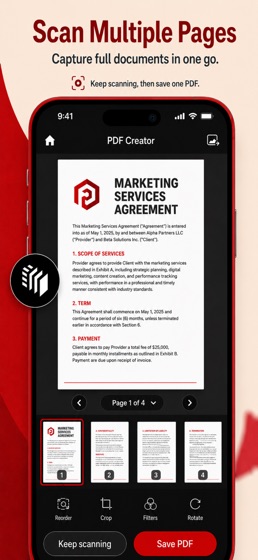
For pages you still have in front of you, the camera scanner keeps things simple. Capture printed documents, school notes, forms, receipts, letters, or office papers, then save them as PDF files instead of sending plain photos.

Convert photos and images

A lot of documents start as pictures now. Use the image converter to take photos from your gallery, place them in the right order, and make a PDF that looks cleaner when you need to send, upload, print, or store it.

Import saved files

For saved files, you do not need to scan anything again or turn the file into images first. Import the supported file, make it into a PDF, rename it if the name is too vague, and keep the finished document ready for sharing or later use.

What you can do:

Create PDF files from photos, images, scans, and files

Scan paper documents with your camera

Convert pictures from your gallery into PDF files

Import supported files and save them as PDFs

Start a PDF from a blank canvas

Rename files so they are easier to recognize

Reorder pages before exporting

Manage pages inside your PDF documents

Keep a history of created PDFs

Share or export files quickly

Everyday PDF tasks

The app works well for everyday situations, not only office work. You might use it for class notes, homework, signed papers, forms, invoices, receipts, personal records, travel documents, confirmations, or quick camera scans. It is also useful when someone asks you to “send it as a PDF” and you only have the original as a photo or file.

Photo to PDF, scan to PDF, file to PDF

Photo to PDF is simple: choose images, check the page order, and create the document. Scan to PDF is just as direct: use the camera, capture the paper, and save it as a PDF. File to PDF is there when you want to import a supported file and turn it into something easier to share.

Organize pages before sharing

The page tools are useful when the first version is not quite right. Move pages around, give the PDF a clearer name, keep track of recent files, and send the final version without digging through a confusing workflow.

Simple PDF creation

This is more of a practical PDF creator than a complicated document workspace. You can scan, import, create, rename, reorder, and share, without getting pulled into a long editing process. For everyday PDFs from photos, images, files, and paper scans, that is usually what matters most.

Use it to:

Turn photos into one PDF

Scan a paper document

Save images as a PDF file

Create a PDF from imported files

Reorder pages before sending

Rename a document for easier tracking

Share a clean PDF instead of loose images

Keep recent PDF files in one place

A good PDF tool should save time, not add more steps. This app gives you the basic workflow most people need: choose the source, create the PDF, fix the order, rename it, and share or export the result.

Download our app when you need a PDF from photos, scans, images, or files without opening a complicated editor. Create documents from your camera, gallery, blank canvas, or imported files, then organize pages and share the finished PDF. Turn the thing you have into the file they need!