FlowPix: Preview for Instagram
Photo & VideoGraphics & Design

FlowPix: Preview for Instagram

Vladislav Novoloake · released 21 Nov 2024 · Open in App Store ↗

Revenue 30d not estimated
Downloads 30d not estimated
Rating 4.46 57 reviews

No in-app products collected for this app.

Rating
United States51%294.62
Russia23%134.69
Belarus5%33.67
Colombia4%23.00
Poland4%25.00
Brazil2%15.00
Czech Republic2%11.00
Germany2%15.00
Kazakhstan2%11.00
Moldova2%15.00
Netherlands2%15.00
Thailand2%15.00
Uruguay2%15.00

The store shows a different set in every country

Description

FlowPix — Powerful Content Planner for Instagram, Reels & Stories, Collage Maker

Visual content planner and scheduler for Instagram. Perfect for influencers, marketers, SMM professionals, content creators, agencies, and anyone striving to build a stunning Instagram feed. Plan, preview, and auto-post your posts, reels, stories, and carousels — all with one powerful tool powered by the official Instagram API and an intuitive visual editor.

What You Can Do with FlowPix:

Plan Instagram content — design and schedule Posts, Reels, Stories, and Carousels

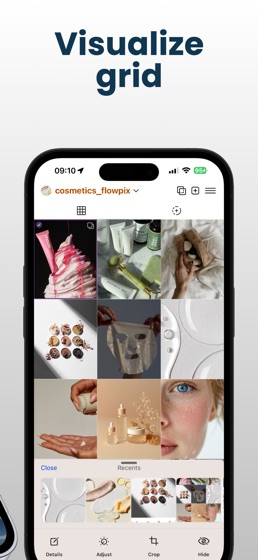
Visual grid layout editor — drag & drop to reorder posts, tune colors, curate a cohesive feed

Auto-post scheduling — set dates and times, and FlowPix auto-posts your content for you

Post creation tools — upload photos and videos, write captions, create cover thumbnails for Reels

Stories planning — arrange Stories visually, group by topic, generate story sequence

Multiple-photo carousels — upload and order multiple images or videos into one carousel post

AI content generator — generate engaging captions

Grid analysis & feed scoring — get smart feed layout tips and aesthetic evaluation from AI

Team collaboration — invite teammates or clients, edit content together in real-time

Secure Instagram API integration — safe login via Instagram API, no ban risk, secure authentication

Manage multiple accounts — switch or manage multiple Instagram profiles effortlessly

Save drafts — store unpublished posts or ideas, and return to them later

Feed preview mode — see how your grid looks before any post goes live

Visual content calendar — track posting schedule, deadlines, and publication date overview

Template library — use and save post templates, repeat layouts, maintain brand consistency

Design theming — apply filters, styles, color palettes for a unified Instagram brand look

Reminders & deadlines — never miss an important publish moment or campaign timeline

Premium features unlocked:

Additional templates & layout tools — expand your design capabilities

History tracking & revert — view edits history and revert changes easily

Exclusive filter and theme packs — unique branding designs and visual packs

Unlimited team collaboration — invite more team members, assign roles, work together without limits

Unlimited scheduled posts — plan without restrictions on post frequency

Priority support — fast-track help from the FlowPix support team

Why FlowPix stands out:

No ads — truly free basic plan

Works without Instagram login — you can visualize and design your feed offline without connecting an IG account

Optimized for individual creators, agencies, small businesses, and social media managers

Multilingual support — English and Russian interfaces available

Regular updates based on user feedback — new features and improvements rolled out frequently

FlowPix isn’t just a planner — it’s your complete content management suite for Instagram, including Stories planner, Reels scheduler, feed layout editor, caption generator, visual analytics tool, publishing calendar, multi-account manager, team collaboration platform, and AI-powered design assistant.

Start using FlowPix to plan your Instagram feed like a pro — publish with confidence, optimize your reach with smart scheduling, scale your engagement, and build a consistent, professional visual brand with ease.

Get FlowPix today — simple. intelligent. beautiful.

Privacy Policy: https://flowpix.app/privacy_policy

Terms of Use: https://www.apple.com/legal/internet-services/itunes/dev/stdeula