
Appwe
Expert in Smart TV app install



How much does Appwe cost?
Prices are current as of 3 Oct 2026.
3 one-time purchases from $0.99
In the United States, Appwe has 3 one-time purchases priced $0.99 – 9.99.
| Product | Price |
|---|---|
| 下载加速卡 24小时 | $0.99 |
| 下载加速卡 30 天 | $0.99 |
| VIP 会员 30 天 | $9.99 |
10+ alternatives to Appwe
| Appwe |   APTV APTV |   电视直播-高清网络电视剧电视直播软件 电视直播-高清网络电视剧电视直播软件 |   atvTools atvTools |   悟空遥控器-电视空调遥控器 悟空遥控器-电视空调遥控器 |   拦截猫 - 骚扰电话与垃圾短信拦截 拦截猫 - 骚扰电话与垃圾短信拦截 |   当贝家 - 大屏看世界杯,投屏超便捷 当贝家 - 大屏看世界杯,投屏超便捷 |   115 115 |   小酷互联 小酷互联 | |
|---|---|---|---|---|---|---|---|---|---|
| Rating / 5 | 4.9 | 4.6 | 4.7 | 4.6 | 4.6 | 4.5 | 2.8 | 2.5 | 2.1 |
| Reviews | 11K | 10K | 4.7K | 1.7K | 1.6K | 1.5K | 331 | 205 | 130 |
| Released | 2024 | 2022 | 2021 | 2023 | 2024 | 2024 | 2019 | 2024 | 2022 |
| Monthly price | — | — | — | — | — | $0.99 | — | — | — |
| Annual price | — | — | — | — | — | $6.99 | — | — | — |
| One-time price | $0.99 | $4.99 | — | — | — | $19.99 | — | — | — |
The going rate for each plan in United States, in its own currency, shaded from the cheapest price on the row to the dearest.
Appwe reviews
4.9 out of 5, based on 11,354 reviews.
What people like
- Clean and simple interface
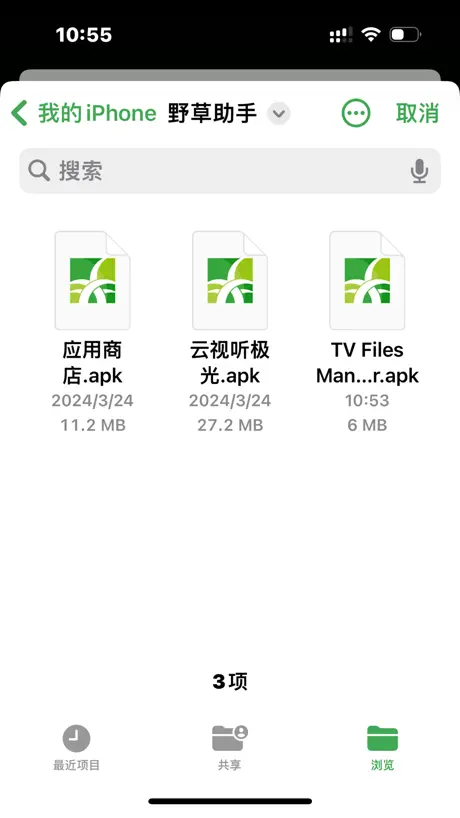
- Supports installing APK files
- Works well if configured right
What they complain about
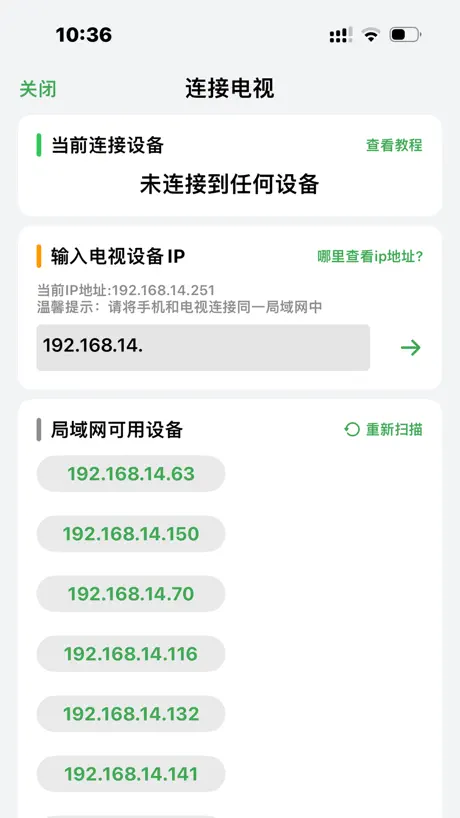
- Hard to connect to TV
- App crashes immediately after connecting
- Login screen does not respond
- Downloaded apps won't open
好软件
很好用,感谢作者,好人一生平安!
没反应
野草助手用不了,输入口令没反应
可以加下载到百分之几的提示
加下载提示
总是闪退
要么连接不上,一连上就闪退
闪退
iOS 26.4 闪退
用不了
用不辽了已经
垃圾软件
垃圾软件
充值后登录不了账号
打开登录界面没反应,口令下载 app 界面也没反应
小米连不上
小米电视,捣鼓了一天,看了很多视频,连接和手机统一的无线网,一直连接中,电视重启也不行,反正就是连不上
nice
总体来说很好,页面简洁,支持安装Apk文件,希望可以增加adb shell功能
垃圾
等了五分钟连不上,好不容易连上了软件还闪退,就这个质量还好意思收费
2.0版本更新时间
2.0.8手机版没有更新,电视升级也是安装失败
很好用
🉑
闭了吗?
是不是不能用了?
要么连接不上,要么连接上就闪退
要么连接不上,要么连接上就闪退
口令
口令怎么没有了
难用
很难连接电视📺📺📺
安卓电视的神器
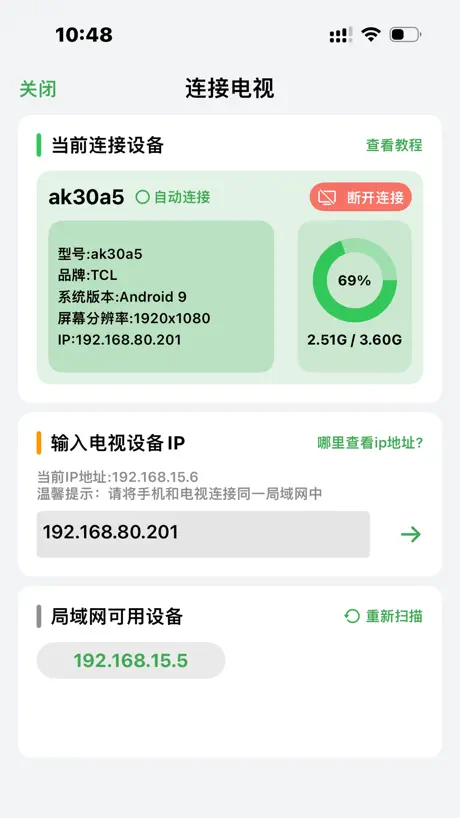
电视机要开启adb和调试才能使用。电视端安装了野草助手输入口令直接起飞
~
下载完里面的软件打开不了
牛牛牛,简单,好用,推荐推荐
都给我去用野草🌿🌿🌿
下载了电视上根本没有 骗人!
垃圾
正在尝试好用
第一次用以后评论
很好用
下次别用了
回复
回复一下那些装开不了的那是电视不适配
无语
我真服了一开始能连接上电视 突然连不上了 删了又下还是连不上 连上后一秒闪退打开又连不上了 到底想干干嘛啊
很好用
牛
小米没办法链接
小米没办法连接
Appwe price by country
A one-time purchase costs $0.70 in Canada and $1.88 in Taiwan — 3× more for the same thing. Below is the going rate for each plan in every country that sells it — the middle price of what the app charges there, in the country's own currency with the dollar equivalent beneath it.
| Country | One-time |
|---|---|
| Afghanistan | $0.99 |
| Albania | $0.99 |
| Algeria | $0.99 |
| Angola | $0.99 |
| Anguilla | $0.99 |
| Antigua And Barbuda | $0.99 |
| Argentina | $0.99 |
| Armenia | $0.99 |
| Australia | A$1.99$1.38 |
| Austria | €0.99$1.12 |
| Azerbaijan | $0.99 |
| Bahamas | $0.99 |
| Bahrain | $0.99 |
| Barbados | $0.99 |
| Belarus | $0.99 |
| Belgium | €0.99$1.12 |
| Belize | $0.99 |
| Benin | $0.99 |
| Bermuda | $0.99 |
| Bhutan | $0.99 |
| Bolivia | $0.99 |
| Bosnia & Herzegovina | €0.99$1.12 |
| Botswana | $0.99 |
| Brazil | R$6.90$1.33 |
| British Virgin Islands | $0.99 |
| Brunei Darussalam | $0.99 |
| Bulgaria | €0.99$1.12 |
| Burkina Faso | $0.99 |
| Cambodia | $0.99 |
| Cameroon | $0.99 |
| Canada | CA$0.99$0.70 |
| Cape Verde | $0.99 |
| Cayman Islands | $0.99 |
| Chad | $0.99 |
| Chile | CLP 990$1.02 |
| China | CN¥9.90$1.48 |
| Colombia | COP 4,900$1.48 |
| Congo | $0.99 |
| Congo, Democratic Republic | $0.99 |
| Costa Rica | $0.99 |
| Cote Divoire | $0.99 |
| Croatia | €0.99$1.12 |
| Cyprus | €0.99$1.12 |
| Czech Republic | CZK 29.00$1.34 |
| Denmark | DKK 9.00$1.36 |
| Dominica | $0.99 |
| Dominican Republic | $0.99 |
| Ecuador | $0.99 |
| Egypt | EGP 49.99$0.96 |
| El Salvador | $0.99 |
| Estonia | €0.99$1.12 |
| Fiji | $0.99 |
| Finland | €0.99$1.12 |
| France | €0.99$1.12 |
| Gabon | $0.99 |
| Gambia | $0.99 |
| Georgia | $0.99 |
| Germany | €0.99$1.12 |
| Ghana | $0.99 |
| Greece | €0.99$1.12 |
| Grenada | $0.99 |
| Guatemala | $0.99 |
| Guinea-bissau | $0.99 |
| Guyana | $0.99 |
| Honduras | $0.99 |
| Hong Kong | HK$8.00$1.02 |
| Hungary | HUF 499$1.53 |
| Iceland | $0.99 |
| India | ₹99.00$1.03 |
| Indonesia | IDR 19,000$1.06 |
| Iraq | $0.99 |
| Ireland | €0.99$1.12 |
| Israel | ₪2.90$0.94 |
| Italy | €0.99$1.12 |
| Jamaica | $0.99 |
| Japan | ¥150$0.95 |
| Jordan | $0.99 |
| Kazakhstan | KZT 499.00$1.13 |
| Kenya | $0.99 |
| Kosovo | €0.99$1.12 |
| Kuwait | $0.99 |
| Kyrgyzstan | $0.99 |
| Lao Peoples Democratic Republic | $0.99 |
| Latvia | €0.99$1.12 |
| Lebanon | $0.99 |
| Liberia | $0.99 |
| Libya | $0.99 |
| Lithuania | €0.99$1.12 |
| Luxembourg | €0.99$1.12 |
| Macao | $0.99 |
| Macedonia | $0.99 |
| Madagascar | $0.99 |
| Malawi | $0.99 |
| Malaysia | MYR 4.90$1.20 |
| Maldives | $0.99 |
| Mali | $0.99 |
| Malta | €0.99$1.12 |
| Mauritania | $0.99 |
| Mauritius | $0.99 |
| Mexico | MX$19.00$1.04 |
| Micronesia | $0.99 |
| Moldova | $0.99 |
| Mongolia | $0.99 |
| Montenegro | €0.99$1.12 |
| Montserrat | $0.99 |
| Morocco | $0.99 |
| Mozambique | $0.99 |
| Myanmar | $0.99 |
| Namibia | $0.99 |
| Nauru | $0.99 |
| Nepal | $0.99 |
| Netherlands | €0.99$1.12 |
| New Zealand | NZ$1.99$1.12 |
| Nicaragua | $0.99 |
| Niger | $0.99 |
| Nigeria | NGN 1,500.00$1.13 |
| Norway | NOK 9.00$0.93 |
| Oman | $0.99 |
| Pakistan | PKR 300$1.08 |
| Palau | $0.99 |
| Panama | $0.99 |
| Papua New Guinea | $0.99 |
| Paraguay | $0.99 |
| Peru | PEN 4.90$1.42 |
| Philippines | ₱49.00$0.78 |
| Poland | PLN 4.99$1.28 |
| Portugal | €0.99$1.12 |
| Qatar | QAR 2.99$0.82 |
| Romania | RON 4.99$1.07 |
| Russia | RUB 99.00$1.19 |
| Rwanda | $0.99 |
| Sao Tome & Principe | $0.99 |
| Saudi Arabia | SAR 4.99$1.33 |
| Senegal | $0.99 |
| Serbia | €0.99$1.12 |
| Seychelles | $0.99 |
| Sierra Leone | $0.99 |
| Singapore | SGD 0.98$0.77 |
| Slovakia | €0.99$1.12 |
| Slovenia | €0.99$1.12 |
| Solomon Islands | $0.99 |
| South Africa | ZAR 19.99$1.20 |
| South Korea | ₩1,100$0.81 |
| Spain | €0.99$1.12 |
| Sri Lanka | $0.99 |
| St. Kitts and Nevis | $0.99 |
| St. Lucia | $0.99 |
| St. Vincent & The Grenadines | $0.99 |
| Suriname | $0.99 |
| Swaziland | $0.99 |
| Sweden | SEK 9.00$0.90 |
| Switzerland | CHF 1.00$1.20 |
| Taiwan | NT$60.00$1.88 |
| Tajikistan | $0.99 |
| Tanzania | TZS 2,900.00$1.10 |
| Thailand | THB 29.00$0.86 |
| Tonga | $0.99 |
| Trinidad and Tobago | $0.99 |
| Tunisia | $0.99 |
| Turkey | TRY 49.99$1.02 |
| Turkmenistan | $0.99 |
| Turks and Caicos | $0.99 |
| Uganda | $0.99 |
| Ukraine | $0.99 |
| United Arab Emirates | AED 2.99$0.81 |
| United Kingdom | £0.99$1.31 |
| United States | $0.99 |
| Uruguay | $0.99 |
| Uzbekistan | $0.99 |
| Vanuatu | $0.99 |
| Venezuela | $0.99 |
| Vietnam | ₫29,000$1.12 |
| Yemen | $0.99 |
| Zambia | $0.99 |
| Zimbabwe | $0.99 |
Appwe FAQ
- Is Appwe free?
- Yes. The app and its basic features are free, in all 175 countries it sells in. Premium features are paid: they start from $0.99 (US), across 3 one-time purchases.
- Does Appwe have a free trial?
- No. None of its offers (US) come with a free trial.
- Where is Appwe cheapest?
- A one-time purchase costs CA$0.99 (≈$0.70) in Canada and NT$60.00 (≈$1.88) in Taiwan, its cheapest and dearest countries.
- What are the best alternatives to Appwe?
- APTV (4.6 from 10,382 reviews, premium from $4.99), 电视直播-高清网络电视剧电视直播软件 (4.7 from 4,698 reviews) and atvTools (4.6 from 1,713 reviews).
Appwe download
Last updated 3 months ago.
Appwe sells in 175 countries. It was released 2 years and 6 months ago, on 27 Mar 2024. It holds a 4.9 rating from 11,354 reviews.
Supports 2 languages: English, Chinese.
How much does Appwe make?
Third-party estimates for the last 30 days, worldwide — not the store's own figures, which Apple publishes for nobody.
Revenue by plan
- One-time 100%
Revenue by country
- China 95%
- United States 2%
- Hong Kong 1%
- Singapore 0%