VectorMotion
Graphics & Design

VectorMotion

Remotion Apps Inc. · released 28 Feb 2024 · Open in App Store ↗

Revenue 30d not estimated
Downloads 30d not estimated
Rating 3.75 4 reviews

No in-app products collected for this app.

Rating
China25%15.00
Mexico25%13.00
Serbia25%14.00
United States25%13.00
United Arab Emirates<1%0
Afghanistan<1%0
Antigua And Barbuda<1%0
Anguilla<1%0
Albania<1%0
Armenia<1%0

The store shows a different set in every country

Description

VectorMotion is a completely free (and Ad-Free) tool for all your design and animation needs.

Features :

-Vector design : Create and edit vector shape layers with the provided pen and direct select tools.

-Multi scene support : Create as much scenes as you need in a project without any restrictions on size or animation length.

-Saveable projects : Continue where you left off.

-Layers : Create shapes, texts, images, and edit their properties (Style, Geomtry, Effects).

-Animation : If you can edit it, you can animate it. Just long click any property and select the option to make it animatable.

-Advanced Timeline : Add, copy, reverse, delete keyframes and edit their easing for all layers at once.

-Layer Effects : Add style to your layers with effects such as blur, shadow, glow, glare, perspective deformation, bezier deformation…

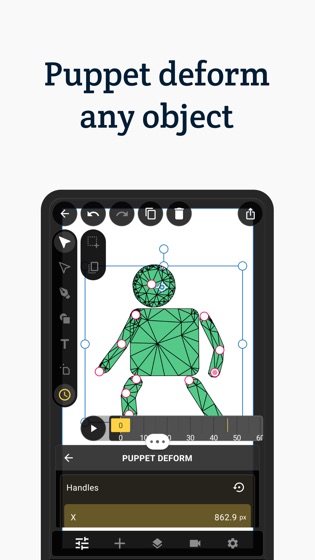
-Puppet deformation : Create cool character animations with ease using the puppet deformation effect.

-Geometry Effects : Transform your shape’s geometry by applying effects such corner rounding and path trimming.

-Text Effects : Make your text animation standout by adding effects such as character rotation and blur.

-Shape Morphing : Copy-paste an animated path into another, to get that cool shape morphing effect.

-Path Masks : Mask any layer using the pen tool with the masking mode.

-Typography : Per character styles, external font support, texts on paths, range based animatable effects… It’s all here.

-Simple 3d : Transform your layers in 3d with perspective.

-Advanced 3d : Extrude your shapes and texts to enable 3d rendering with PBR support.

-Image library : Manage, crop, transform, tag your images and insert them into your projects.

-Font Library : Import supported fonts to your library, and use them in your designs.

-Remove image backgrounds : Create alpha masks for you images with ease.

-Sequencer : Create sequences out of your scenes and add audio tracks to create your final movie.

-Export your scenes or sequences in high quality. Supported output formats are : animations (MP4, GIF), images(JPEG, PNG, GIF), documents (SVG, PDF).

Support:

If you have any questions or feedback, please send an email to [email protected]