SeClock: Seconds Clock Widget
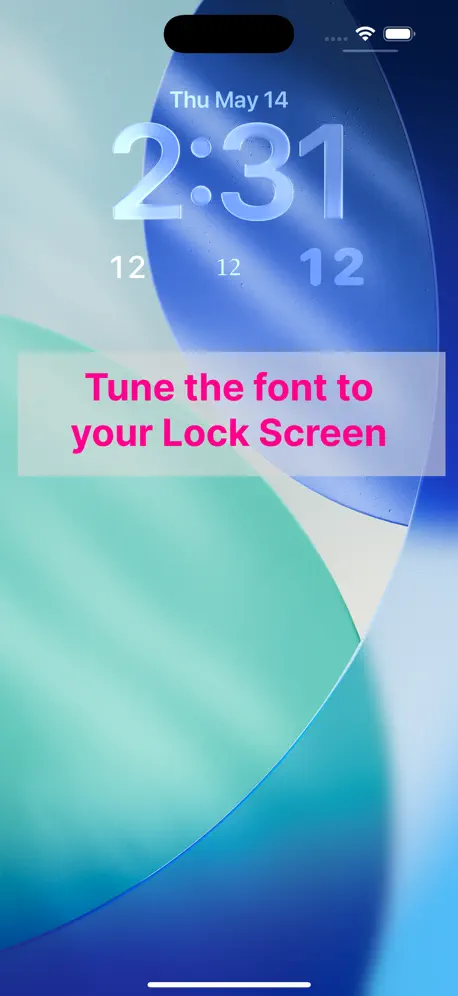
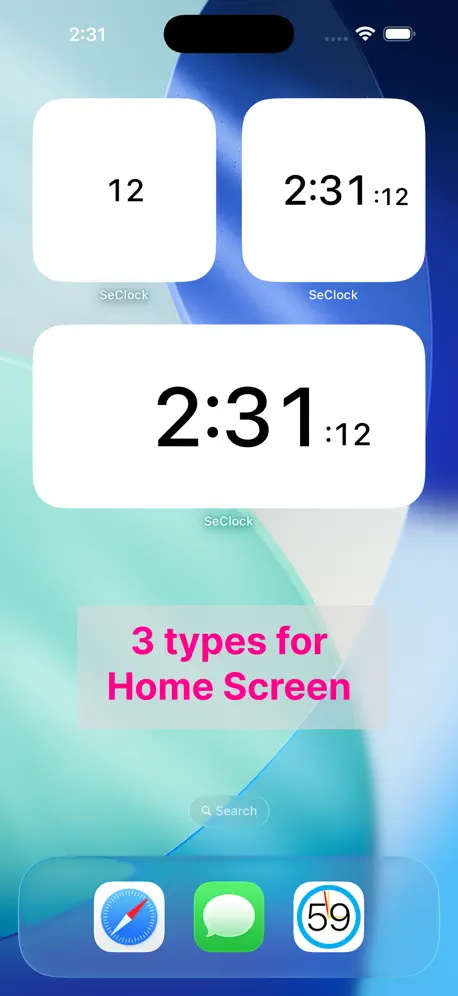
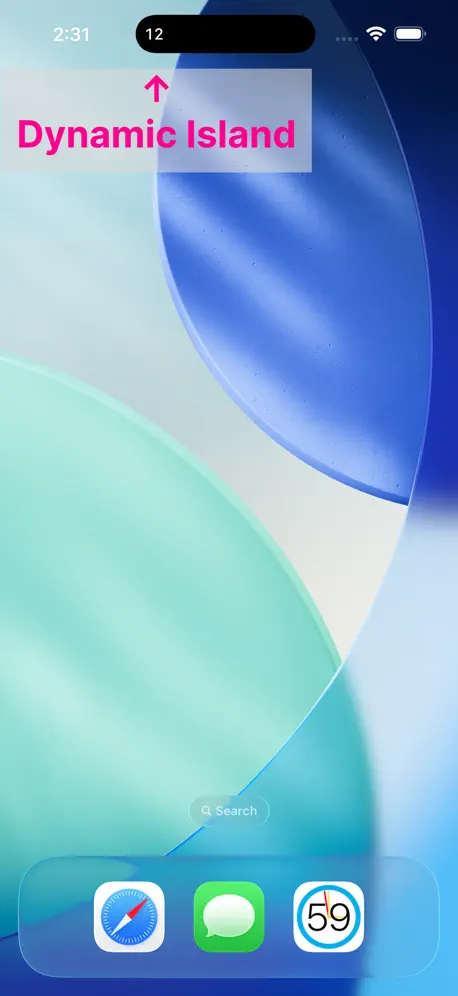
Lock Screen & Live Activity
How much does SeClock: Seconds Clock Widget cost?
Prices are current as of 6 Oct 2026.
1 one-time purchase from $2.99
In the United States, SeClock: Seconds Clock Widget has 1 one-time purchase priced $2.99.
| Product | Price |
|---|---|
| Lock Widget Customization | $2.99 |
See what SeClock: Seconds Clock Widget costs in all 175 countries →
10+ alternatives to SeClock: Seconds Clock Widget
| SeClock: Seconds Clock Widget |   Mugen Clock Mugen Clock |   Widgets SD - Photo & Calendar Widgets SD - Photo & Calendar |   電話帳ナビ-迷惑電話やメールを自動判定(迷惑電話ブロック) 電話帳ナビ-迷惑電話やメールを自動判定(迷惑電話ブロック) |   Data Remaining Data Remaining |   MeroTalk | LINE Analysis MeroTalk | LINE Analysis |   My Number Card Check App My Number Card Check App |   Digital Clock - Neo Digital Clock - Neo |   Split Screen Browser - TwookuL Split Screen Browser - TwookuL |  CalCs - Calendar Complications CalCs - Calendar Complications |   Smart Digital & Analog Clock Smart Digital & Analog Clock | |
|---|---|---|---|---|---|---|---|---|---|---|---|
| Rating / 5 | 4.2 | 4.5 | 4.3 | 4.4 | 4.4 | 4.6 | 3.5 | 4.5 | 4.3 | 3.6 | 4.2 |
| Reviews | 236 | 43K | 35K | 15K | 12K | 6.9K | 1.8K | 1.1K | 881 | 347 | 43 |
| Released | 2023 | 2015 | 2020 | 2015 | 2018 | 2026 | 2024 | 2022 | 2020 | 2024 | 2020 |
| Monthly price | — | — | $2.99 | $1.99 | $0.99 | $11.99 | — | $1.99 | — | — | — |
| Annual price | — | — | $19.99 | $24.99 | $7.99 | $79.99 | — | $19.99 | — | — | — |
| One-time price | $2.99 | $5.99 | $24.99 | — | $2.99 | $2.99 | — | $5.99 | — | $1.99 | — |
The going rate for each plan in United States, in its own currency, shaded from the cheapest price on the row to the dearest. Plans fewer than four in ten of the priced apps sell are left out.
SeClock: Seconds Clock Widget reviews
4.2 out of 5, based on 236 reviews.
What people like
- Simple design with no data tracking.
- Developer fixes bugs very quickly.
- Great for Dynamic Island support.
What they complain about
- Clock is slightly behind real time.
- Text gets cut off on lock screen.
- Seconds jump before minutes change correctly.
これ作った人天才
iPhone15からダイナミックアイランドになったからめちゃくちゃいいですほんとにありがとう
常に画面をオンで秒が表示されない
常に画面をオンの状態にした時に待ち受けで秒が更新されないのない。そういう仕様なのか、使い方を間違えているのか?
フォントを選びたい
欲しかったウィジェットです。出来れば文字を少し大きくして欲しい。
ロック画面の案内表示
Dynamic islandに秒を表示する場合、ロック画面に“秒時計アプリを開く○→”が表示されます。違和感を覚えます(必要無し)と思います。 設定画面の”Dynamic islandに秒を表示をする“の右側にOn/Off のスイッチを表示するのは如何でしょうか。 _________________________ Ver 1.2.1 を使用しての要望です。 Dynamic island 表示を設定するとロック画面の下部に時計表示が追加されます。 元々時計表示がありますので私にとっては必要ありません。 秒表示を設定すれば事足ります。Dynamic iland 表示とロック画面の時計表示を切り離して欲しいです。 ___________________________ 勝手な要望に対するコメント有難うございます。切り離し不可については了解です、Dynamic iland表示が必要な場合のみ”ON”とする対応をします。
みんなが言ってるように
分見切れだけ直してくれー! 秒だけ表示するロック画面ウィジェットの中で唯一周りの円がなくてシンプルなデザインですごい気に入ってるのでそこだけすんごい勿体無い
要望です
ロック画面の時刻の上のウィジェットを追加して頂けないでしょうか? よろしくお願い致します。 他のアプリでロック画面の時刻の上に時刻を表示出来るウィジェットは有るのですが、このアプリのようにタイミングを調整する機能が無いので、是非このアプリで実現して欲しいです!
バグってる
ウィジェットに表示されない
Off by 1 seconds
I have always wanted a seconds clock on my iPhone, and this is a pretty good widget for it. It doesn't collect data, which is fantastic (why would a clock app need my data anyway?). My one qualm is that it is behind by around 1 second, so it doesn't sync perfectly when I'm looking between my Apple Watch and my phone, which I do quite a bit because my job is measured in seconds. Overall though, this is a pretty great free widget app.
00秒になった瞬間の表示がバグる
ロック画面のウィジェットにて、00秒になった瞬間、例えば26分だったら左端に6が一瞬見切れて表示されるのはバグですか?
ロック画面のウィジェット
ロック画面に1×1のウィジェットを追加したとき、分の部分が見切れてしまいます
たまに消えてる事がある
のでアプデ忘れずに
改善求む
以前まではロック画面でちゃんと秒表示あったのですが今日のアプデ後から表示されなくなりました。 どうやら有料で見た目を変えれるようになったみたいですが不必要です。 課金しないと使えなくなったのでしょうか。
One of the best apps
This is my favriote app because first of all it’s stupid that having seconds isn’t a apple feature but now i get super good luck at 11:11:11
表紙されなくなった→表示されたが…
アップデートしたらロック画面の秒が表示されなくなったことは設定し直すことで表示されるようになったが、秒が59から00に変わる前に分が変わる。地味にストレス。
良
東証カジノで役に立ってます
ゴミアプリ
意味不明
秒だけになった、、?
愛用していたのですが、ロック画面に表示するwidgetで、秒だけ表示になりましたか、、? 以前は何時何分何秒、まで表示されていて、何時何分かまでの情報もこのwidgetの確認で完結していたのですが、秒だけ表示だとiPhoneの何時何分をみてからその後widgetに目線を移さないといけない手間があります、、。 大した視線移動ではないのでしょうが、主な使途が公共交通機関へ間に合うかどうかというシーンだったので、一刻も争う場面が多く,走りながら見る時には何時何分何秒までのフルの表示がとてもありがたかったのです。 秒だけ表示もそれはそれで需要あると思いますので、以前と同様の何時何分何秒まで表示できるよう、一部の機能を復活させていただけませんか? とても愛用していたので、お願いします🙇🏻 【レビュー更新】 このレビューをした2日後、早速何時何分何秒表示を復活していただきました😭 ご対応のスピード感、柔軟さに驚愕です。 文句なしの星5にさせていただきます! これからも愛用いたします🙇🏻♀️
スタンバイ画面の表示
スタンバイ画面に「時計を表示しますか」のような通知が表示されたままでないと使えない。 秒を確認するよりも毎回見るスタンバイ画面に表示されるのはウザい!
他のアプリ使用中でも秒数が確認できてよい
Dynamic Island対応機種だけだけど、まさに必要としていたステータスバーへの秒数表示ができてよい
杜撰な実装
秒のみ表示するウィジェットで、時間が59秒から00秒に切り替わった時、一瞬分が表示されます。 おおかた、時:分:秒のウィジェットを使い回しているのでしょう。 あと、アプリアイコンのようなアナログで秒を表示してくれるサークルはありません。
Almost perfect.
Plz fix the second after 59 cuz it shows a number and a colon before showing 00. Also, plz add a control center widget. 🙏
秒数表示OK!
00秒になって分になる時にバグるのだけ修正して下さい。ロック画面にきちんと秒単位表示されて求めていたアプリです!素晴らしい!!
必要十分
まさに求めていたものであり、シンプルで良いアプリだと思います。 欲を言えば、ロック画面の雰囲気に合わせられるよう、フォントを選べるなど、わずかばかりカスタマイズ機能があると良いなと思いました。 これから利用させていただきます。
SeClock: Seconds Clock Widget price by country
A one-time purchase costs $2.74 in Qatar and $4.76 in Colombia — 1.7× more for the same thing. Below is the going rate for each plan in every country that sells it — the middle price of what the app charges there, in the country's own currency with the dollar equivalent beneath it.
| Country | One-time |
|---|---|
| Afghanistan | $2.99 |
| Albania | $3.99 |
| Algeria | $2.99 |
| Angola | $2.99 |
| Anguilla | $2.99 |
| Antigua And Barbuda | $2.99 |
| Argentina | $2.99 |
| Armenia | $3.99 |
| Australia | A$4.99$3.59 |
| Austria | €2.99$3.48 |
| Azerbaijan | $3.99 |
| Bahamas | $2.99 |
| Bahrain | $2.99 |
| Barbados | $3.99 |
| Belarus | $3.99 |
| Belgium | €2.99$3.48 |
| Belize | $2.99 |
| Benin | $3.99 |
| Bermuda | $2.99 |
| Bhutan | $2.99 |
| Bolivia | $2.99 |
| Bosnia & Herzegovina | €2.99$3.48 |
| Botswana | $2.99 |
| Brazil | R$19.90$3.90 |
| British Virgin Islands | $2.99 |
| Brunei Darussalam | $2.99 |
| Bulgaria | €2.99$3.48 |
| Burkina Faso | $2.99 |
| Cambodia | $2.99 |
| Cameroon | $3.99 |
| Canada | CA$3.99$2.89 |
| Cape Verde | $2.99 |
| Cayman Islands | $2.99 |
| Chad | $2.99 |
| Chile | CLP 2,990$3.20 |
| China | CN¥22.00$3.27 |
| Colombia | COP 14,900$4.76 |
| Congo | $2.99 |
| Congo, Democratic Republic | $2.99 |
| Costa Rica | $2.99 |
| Cote Divoire | $3.99 |
| Croatia | €2.99$3.48 |
| Cyprus | €2.99$3.48 |
| Czech Republic | CZK 79.00$3.79 |
| Denmark | DKK 29.00$4.51 |
| Dominica | $2.99 |
| Dominican Republic | $2.99 |
| Ecuador | $2.99 |
| Egypt | EGP 149.99$2.94 |
| El Salvador | $2.99 |
| Estonia | €2.99$3.48 |
| Fiji | $2.99 |
| Finland | €2.99$3.48 |
| France | €2.99$3.48 |
| Gabon | $2.99 |
| Gambia | $2.99 |
| Georgia | $3.99 |
| Germany | €2.99$3.48 |
| Ghana | $3.99 |
| Greece | €2.99$3.48 |
| Grenada | $2.99 |
| Guatemala | $2.99 |
| Guinea-bissau | $2.99 |
| Guyana | $2.99 |
| Honduras | $2.99 |
| Hong Kong | HK$22.00$2.81 |
| Hungary | HUF 1,490$4.76 |
| Iceland | $3.99 |
| India | ₹299.00$3.15 |
| Indonesia | IDR 49,000$2.78 |
| Iraq | $2.99 |
| Ireland | €2.99$3.48 |
| Israel | ₪9.90$3.28 |
| Italy | €2.99$3.36 |
| Jamaica | $2.99 |
| Japan | ¥500$3.17 |
| Jordan | $2.99 |
| Kazakhstan | KZT 1,790.00$3.94 |
| Kenya | $3.99 |
| Kosovo | €2.99$3.48 |
| Kuwait | $2.99 |
| Kyrgyzstan | $2.99 |
| Lao Peoples Democratic Republic | $2.99 |
| Latvia | €2.99$3.48 |
| Lebanon | $2.99 |
| Liberia | $2.99 |
| Libya | $2.99 |
| Lithuania | €2.99$3.48 |
| Luxembourg | €2.99$3.48 |
| Macao | $2.99 |
| Macedonia | $2.99 |
| Madagascar | $2.99 |
| Malawi | $2.99 |
| Malaysia | MYR 14.90$3.65 |
| Maldives | $2.99 |
| Mali | $2.99 |
| Malta | €2.99$3.48 |
| Mauritania | $2.99 |
| Mauritius | $3.99 |
| Mexico | MX$69.00$4.08 |
| Micronesia | $2.99 |
| Moldova | $3.99 |
| Mongolia | $2.99 |
| Montenegro | €2.99$3.48 |
| Montserrat | $2.99 |
| Morocco | $2.99 |
| Mozambique | $2.99 |
| Myanmar | $2.99 |
| Namibia | $2.99 |
| Nauru | $2.99 |
| Nepal | $3.99 |
| Netherlands | €2.99$3.48 |
| New Zealand | NZ$4.99$2.92 |
| Nicaragua | $2.99 |
| Niger | $2.99 |
| Nigeria | NGN 4,900.00$3.71 |
| Norway | NOK 39.00$4.22 |
| Oman | $2.99 |
| Pakistan | PKR 900$3.24 |
| Palau | $2.99 |
| Panama | $2.99 |
| Papua New Guinea | $2.99 |
| Paraguay | $2.99 |
| Peru | PEN 12.90$3.85 |
| Philippines | ₱199.00$3.18 |
| Poland | PLN 14.99$4.04 |
| Portugal | €2.99$3.48 |
| Qatar | QAR 9.99$2.74 |
| Romania | RON 14.99$3.32 |
| Russia | RUB 249.00$2.88 |
| Rwanda | $2.99 |
| Sao Tome & Principe | $2.99 |
| Saudi Arabia | SAR 12.99$3.46 |
| Senegal | $3.99 |
| Serbia | €2.99$3.48 |
| Seychelles | $2.99 |
| Sierra Leone | $2.99 |
| Singapore | SGD 3.98$3.16 |
| Slovakia | €2.99$3.48 |
| Slovenia | €2.99$3.48 |
| Solomon Islands | $2.99 |
| South Africa | ZAR 59.99$3.75 |
| South Korea | ₩4,400$3.27 |
| Spain | €2.99$3.48 |
| Sri Lanka | $2.99 |
| St. Kitts and Nevis | $2.99 |
| St. Lucia | $2.99 |
| St. Vincent & The Grenadines | $2.99 |
| Suriname | $2.99 |
| Swaziland | $2.99 |
| Sweden | SEK 39.00$4.07 |
| Switzerland | CHF 3.00$3.70 |
| Taiwan | NT$90.00$2.86 |
| Tajikistan | $2.99 |
| Tanzania | TZS 9,900.00$3.74 |
| Thailand | THB 99.00$3.01 |
| Tonga | $2.99 |
| Trinidad and Tobago | $2.99 |
| Tunisia | $2.99 |
| Turkey | TRY 149.99$3.09 |
| Turkmenistan | $2.99 |
| Turks and Caicos | $2.99 |
| Uganda | $3.99 |
| Ukraine | $3.99 |
| United Arab Emirates | AED 12.99$3.54 |
| United Kingdom | £2.99$4.05 |
| United States | $2.99 |
| Uruguay | $2.99 |
| Uzbekistan | $2.99 |
| Vanuatu | $2.99 |
| Venezuela | $2.99 |
| Vietnam | ₫99,000$3.82 |
| Yemen | $2.99 |
| Zambia | $3.99 |
| Zimbabwe | $3.99 |
SeClock: Seconds Clock Widget FAQ
- Is SeClock: Seconds Clock Widget free?
- Yes. The app and its basic features are free, in all 175 countries it sells in. Premium features are paid: they start from $2.99 (US), across 1 one-time purchase.
- Does SeClock: Seconds Clock Widget have a free trial?
- No. None of its offers (US) come with a free trial.
- Where is SeClock: Seconds Clock Widget cheapest?
- A one-time purchase costs QAR 9.99 (≈$2.74) in Qatar and COP 14,900 (≈$4.76) in Colombia, its cheapest and dearest countries.
- What are the best alternatives to SeClock: Seconds Clock Widget?
- Mugen Clock (4.5 from 42,612 reviews, premium from $5.99), Widgets SD - Photo & Calendar (4.3 from 35,312 reviews, premium from $2.99) and 電話帳ナビ-迷惑電話やメールを自動判定(迷惑電話ブロック) (4.4 from 14,893 reviews, premium from $1.99).
SeClock: Seconds Clock Widget download
Last updated 4 months ago.
SeClock: Seconds Clock Widget sells in 175 countries. It was released 3 years and 7 months ago, on 23 Feb 2023. It holds a 4.2 rating from 236 reviews.
Supports 2 languages: English, Japanese.
How much does SeClock: Seconds Clock Widget make?
Third-party estimates for the last 30 days, worldwide — not the store's own figures, which Apple publishes for nobody.
Revenue by plan
- One-time 100%
Revenue by country
- Japan 90%
- United States 3%
- Canada 2%
- Italy 1%