
Hyperduck
Send links from iOS to a Mac
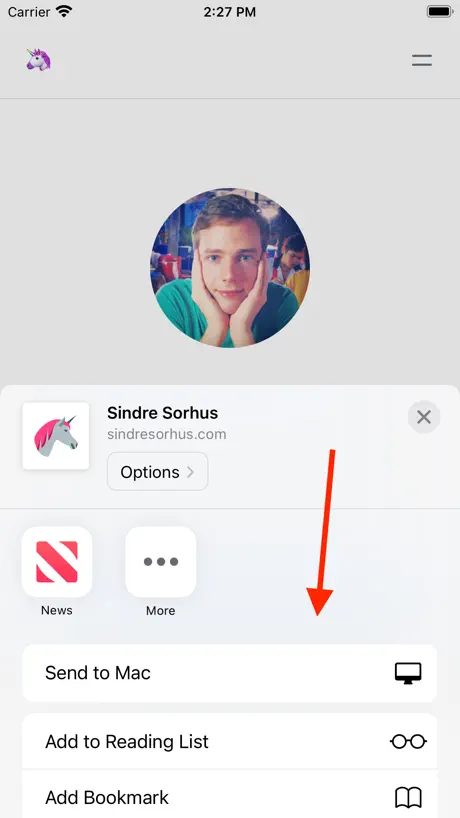
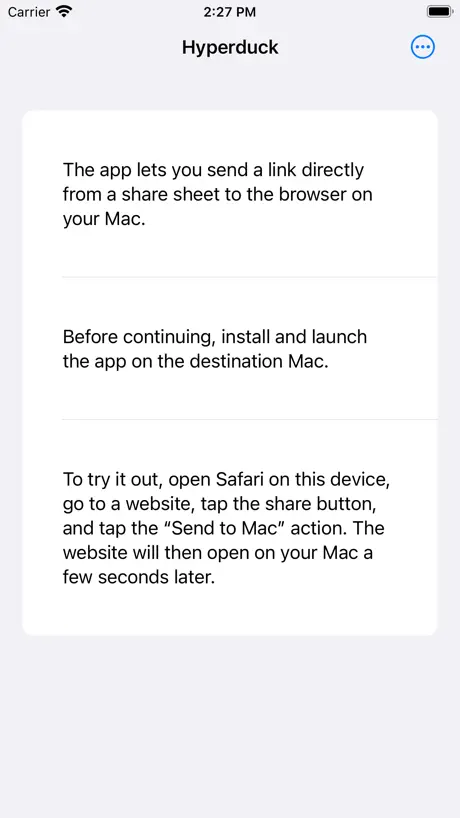
How much does Hyperduck cost?
Prices are current as of 11 Sept 2026.
Hyperduck has no in-app products on record in the United States.
Hyperduck download price by country
| Country | Price |
|---|---|
| United States | $5.00 |
| Germany | €6.00 |
| China | CN¥38.00 |
| United Kingdom | £5.00 |
| Canada | CA$7.00 |
| Italy | €6.00 |
| Brazil | R$29.90 |
| India | ₹499.00 |
| Japan | ¥800 |
| Taiwan | NT$150.00 |
| France | €6.00 |
| Austria | €6.00 |
| Australia | A$8.00 |
| Spain | €6.00 |
| South Korea | ₩7,700 |
| Russia | RUB 449.00 |
| Ukraine | $6.00 |
| Switzerland | CHF 4.00 |
| Czech Republic | CZK 129.00 |
| Mexico | MX$99.00 |
| Netherlands | €6.00 |
| Poland | PLN 24.99 |
| United Arab Emirates | AED 19.99 |
| Belarus | $6.00 |
| Hong Kong | HK$38.00 |
| Indonesia | IDR 89,000 |
| Madagascar | $5.00 |
| Norway | NOK 59.00 |
| Portugal | €6.00 |
| Romania | RON 29.99 |
| Turkey | TRY 249.99 |
| South Africa | ZAR 99.99 |
| Afghanistan | $5.00 |
| Antigua And Barbuda | $5.00 |
| Anguilla | $5.00 |
| Albania | $6.00 |
| Armenia | $6.00 |
| Angola | $5.00 |
| Argentina | $5.00 |
| Azerbaijan | $6.00 |
| Bosnia & Herzegovina | €6.00 |
| Barbados | $6.00 |
| Belgium | €6.00 |
| Burkina Faso | $5.00 |
| Bulgaria | €6.00 |
| Bahrain | $5.00 |
| Benin | $6.00 |
| Bermuda | $5.00 |
| Brunei Darussalam | $5.00 |
| Bolivia | $5.00 |
| Bahamas | $5.00 |
| Bhutan | $5.00 |
| Botswana | $5.00 |
| Belize | $5.00 |
| Congo, Democratic Republic | $5.00 |
| Congo | $5.00 |
| Cote Divoire | $6.00 |
| Chile | CLP 5,990 |
| Cameroon | $6.00 |
| Colombia | COP 24,900 |
| Costa Rica | $5.00 |
| Cape Verde | $5.00 |
| Cyprus | €6.00 |
| Denmark | DKK 39.00 |
| Dominica | $5.00 |
| Dominican Republic | $5.00 |
| Algeria | $5.00 |
| Ecuador | $5.00 |
| Estonia | €6.00 |
| Egypt | EGP 249.99 |
| Finland | €6.00 |
| Fiji | $5.00 |
| Micronesia | $5.00 |
| Gabon | $5.00 |
| Grenada | $5.00 |
| Georgia | $6.00 |
| Ghana | $6.00 |
| Gambia | $5.00 |
| Greece | €6.00 |
| Guatemala | $5.00 |
| Guinea-bissau | $5.00 |
| Guyana | $5.00 |
| Honduras | $5.00 |
| Croatia | €6.00 |
| Hungary | HUF 1,990 |
| Ireland | €6.00 |
| Israel | ₪17.90 |
| Iraq | $5.00 |
| Iceland | $6.00 |
| Jamaica | $5.00 |
| Jordan | $5.00 |
| Kenya | $6.00 |
| Kyrgyzstan | $5.00 |
| Cambodia | $5.00 |
| St. Kitts and Nevis | $5.00 |
| Kuwait | $5.00 |
| Cayman Islands | $5.00 |
| Kazakhstan | KZT 2,990.00 |
| Lao Peoples Democratic Republic | $5.00 |
| Lebanon | $5.00 |
| St. Lucia | $5.00 |
| Sri Lanka | $5.00 |
| Liberia | $5.00 |
| Lithuania | €6.00 |
| Luxembourg | €6.00 |
| Latvia | €6.00 |
| Libya | $5.00 |
| Morocco | $5.00 |
| Moldova | $6.00 |
| Montenegro | €5.00 |
| Macedonia | $5.00 |
| Mali | $5.00 |
| Myanmar | $5.00 |
| Mongolia | $5.00 |
| Macao | $5.00 |
| Mauritania | $5.00 |
| Montserrat | $5.00 |
| Malta | €6.00 |
| Mauritius | $6.00 |
| Maldives | $5.00 |
| Malawi | $5.00 |
| Malaysia | MYR 22.90 |
| Mozambique | $5.00 |
| Namibia | $5.00 |
| Niger | $5.00 |
| Nigeria | NGN 7,900.00 |
| Nicaragua | $5.00 |
| Nepal | $6.00 |
| Nauru | $5.00 |
| New Zealand | NZ$9.00 |
| Oman | $5.00 |
| Panama | $5.00 |
| Peru | PEN 22.90 |
| Papua New Guinea | $5.00 |
| Philippines | ₱299.00 |
| Pakistan | PKR 1,300 |
| Palau | $5.00 |
| Paraguay | $5.00 |
| Qatar | QAR 19.99 |
| Serbia | €6.00 |
| Rwanda | $5.00 |
| Saudi Arabia | SAR 19.99 |
| Solomon Islands | $5.00 |
| Seychelles | $5.00 |
| Sweden | SEK 69.00 |
| Singapore | SGD 6.98 |
| Slovenia | €6.00 |
| Slovakia | €6.00 |
| Sierra Leone | $5.00 |
| Senegal | $6.00 |
| Suriname | $5.00 |
| Sao Tome & Principe | $5.00 |
| El Salvador | $5.00 |
| Swaziland | $5.00 |
| Turks and Caicos | $5.00 |
| Chad | $5.00 |
| Thailand | THB 199.00 |
| Tajikistan | $5.00 |
| Turkmenistan | $5.00 |
| Tunisia | $5.00 |
| Tonga | $5.00 |
| Trinidad and Tobago | $5.00 |
| Tanzania | TZS 14,900.00 |
| Uganda | $6.00 |
| Uruguay | $5.00 |
| Uzbekistan | $5.00 |
| St. Vincent & The Grenadines | $5.00 |
| Venezuela | $5.00 |
| British Virgin Islands | $5.00 |
| Vietnam | ₫149,000 |
| Vanuatu | $5.00 |
| Kosovo | €6.00 |
| Yemen | $5.00 |
| Zambia | $6.00 |
| Zimbabwe | $6.00 |
10+ alternatives to Hyperduck
| Hyperduck |   Yoink - Improved Drag and Drop Yoink - Improved Drag and Drop |   Remind Me Faster Remind Me Faster |   Anybox - Bookmark & Read Later Anybox - Bookmark & Read Later |   Tot Pocket Tot Pocket |   Zavala Zavala |   Dropshare - File Sharing Tool Dropshare - File Sharing Tool |   Rocket Typist Rocket Typist |   Funnel - Quick Capture Funnel - Quick Capture |   Surfed - Browser & Bookmark Surfed - Browser & Bookmark |   Godspeed – To Do List Godspeed – To Do List | |
|---|---|---|---|---|---|---|---|---|---|---|---|
| Rating / 5 | 4.9 | 4.7 | 4.9 | 4.6 | 4.5 | 4.8 | 4.2 | 4.0 | 4.6 | 3.8 | 4.4 |
| Reviews | 184 | 4.2K | 1.4K | 1.3K | 473 | 209 | 199 | 112 | 89 | 70 | 48 |
| Released | 2023 | 2017 | 2015 | 2022 | 2020 | 2021 | 2014 | 2023 | 2023 | 2022 | 2024 |
| Monthly price | — | — | — | $1.99 | — | — | — | — | — | — | — |
| Annual price | — | — | — | $14.99 | — | — | — | — | — | — | — |
| One-time price | — | — | $7.99 | $9.99 | — | — | — | — | — | — | — |
The going rate for each plan in United States, in its own currency, shaded from the cheapest price on the row to the dearest.
Hyperduck reviews
4.9 out of 5, based on 184 reviews.
What people like
- Sends URLs from phone to Mac.
- Simple, clean, and does one thing well.
- Great for saving articles to read later.
What they complain about
- It often fails to send links.
- No log shows what you sent.
- Support is rude and unhelpful.
Absolutely perfect
I wish I could pay for this app every month so that I could ensure it would never go away. I need this app, it’s all I’ve ever wanted!
Unnütz und funktioniert gar nicht
UPDATE 2: nachdem ich auf die äußerst unfreundliche unprofessionelle Rückmeldung des Anbieters eingegangen bin, hat er heute den Kommentar noch mal bearbeitet, damit es nicht auf ihn zurückfällt. Ich finde es immer noch ein Unding, seine Kunden so zu behandeln, äußerst unfreundlich und unprofessionell. Meine Meinung ist weiterhin, die Finger davon zu lassen. — UPDATE: Ich glaube, ich brauch nicht viel mehr zu sagen, da man an der Rückmeldung schon merkt, wie freundlich er ist, dass er mir unterstellt, dass ich herum trollen würde..?! Danke für nichts!!! Bitte spart euch das Geld oder wirft es lieber aus dem Fenster raus, anstatt diese App zu kaufen. —- Ich verstehe die ganzen Bewertungen gar nicht. Die App funktioniert nicht mal richtig und das Service ist Mega schlecht und unfreundlich.
Great app
Great app but sometimes it just doesn’t send the things over even if I send it more than one time.
Fails more than succeeds
Maybe it's my complicated VPN setup or maybe it's because I use a lot of tab groups on Safari, but this process fails to send the webpage more than it works. And without a log of what I sent, it fails in a spectacularly, unfixable way. Software that acts like it works, but doesn't is the most annoying.
Underrated app
By fave my favorite app to simple function ratio. Im always out and about, looking at something on my iPhone that I would prefer to look at when I have more time, a larger screen, or just later. This is a quick share function with no extra button presses required. I look at my computer later and whatever I shared is there waiting for me. Usually an article or YouTube video, but you can also use Mac internal URL schemes to have your computer at home do all kinds of things for you while you’re away.
Doesn’t work well
Poor experience
Great!
Very good app!
Just perfect
Instead of using long shortcuts i just can send links directly to my mac to deal with later
va di m...
non va e se va ci mette una vita! mi manca pushbullet!!! :(
Fantastic, perfect little utility
It does a simple job very well, just like small indie apps should do.
Horrible
Barely works.
Very useful for remote shortcuts
My main use case is to get my Mac to run shortcuts from my iPad. Works great and very cleanly done! I really do wish it was possible to choose a Mac to run the shortcut, as the workaround to doing this is quite complex within Shortcuts.
Absolutely Amazing App
I use it from my iPhone and it sends the URL to both my Macs. I now can't live without it.
exactly what I was looking for
I used to set up a shortcut to try and email myself links or things I wanted to look at later at on my MacBook, but this app makes it so much easier and so much better in every way
Can’t live without it
Does one thing perfectly.
Use it multiple times daily
You’ll find yourself using this all the time. I use Omnivore as my read-it-later app. But just as often as saving an article to read later, want to actually review a specific URL as soon as I’m back at my Mac. Hyperduck does this brilliantly. Awesome app.
Incredibly simple and helpfu
When I’m reading a page in iOS Safari on the subway and want to read it again when I get home, this app is perfect!
Hyperduck FAQ
- Is Hyperduck free?
- No. Hyperduck costs $5.00 (US) to download.
- Does Hyperduck have a free trial?
- No. None of its offers (US) come with a free trial.
- What are the best alternatives to Hyperduck?
- Yoink - Improved Drag and Drop (4.7 from 4,156 reviews), Remind Me Faster (4.9 from 1,449 reviews, premium from $5.99) and Anybox - Bookmark & Read Later (4.6 from 1,252 reviews, premium from $1.99).
Hyperduck download
Last updated 5 months ago.
Hyperduck sells in 175 countries. It was released 3 years and 8 months ago, on 27 Jan 2023. It holds a 4.9 rating from 184 reviews.
Supports 1 language: English.
How much does Hyperduck make?
Third-party estimates for the last 30 days, worldwide — not the store's own figures, which Apple publishes for nobody.