Perfect OCR
Document scanner with OCR
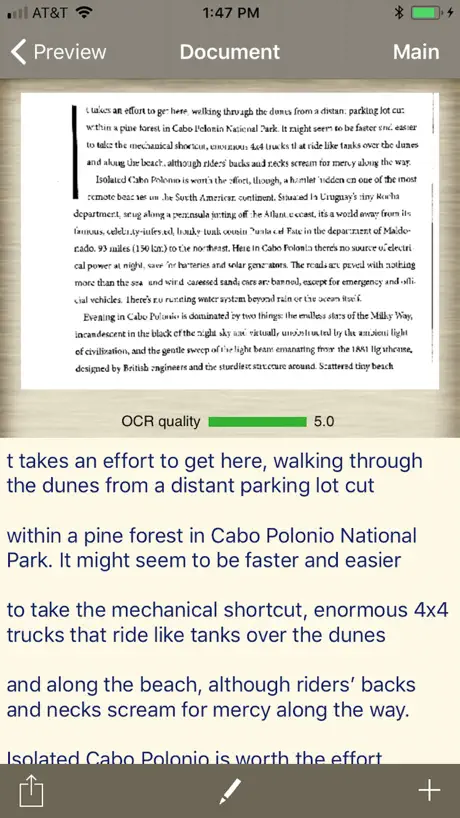
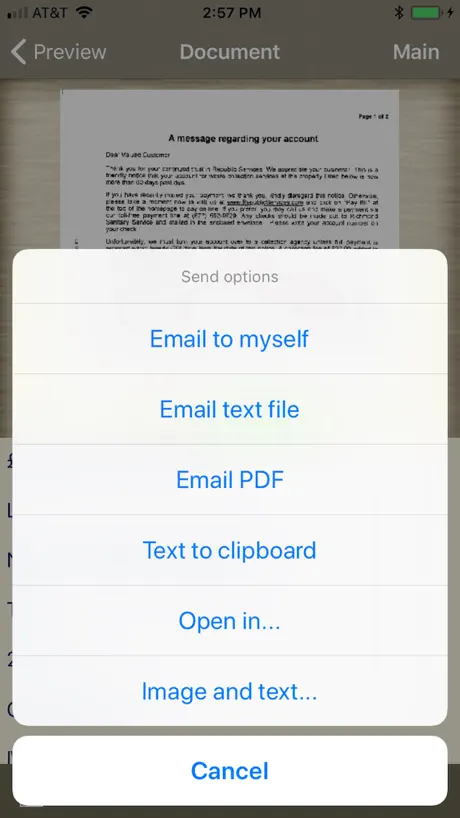
How much does Perfect OCR cost?
Prices are current as of 12 Sept 2026.
Perfect OCR has no in-app products on record in the United States.
Perfect OCR download price by country
| Country | Price |
|---|---|
| United States | $0.99 |
| Germany | €0.99 |
| Switzerland | CHF 1.00 |
| Mexico | MX$19.00 |
| United Kingdom | £0.99 |
| Spain | €0.99 |
| France | €0.99 |
| Australia | A$1.99 |
| Brazil | R$6.90 |
| Italy | €0.99 |
| Colombia | COP 4,900 |
| Canada | CA$0.99 |
| Sweden | SEK 9.00 |
| Argentina | $0.99 |
| Russia | RUB 99.00 |
| Chile | CLP 990 |
| Netherlands | €0.99 |
| Portugal | €0.99 |
| Belgium | €0.99 |
| South Africa | ZAR 19.99 |
| Costa Rica | $0.99 |
| Denmark | DKK 9.00 |
| Greece | €0.99 |
| Luxembourg | €0.99 |
| Turkey | TRY 49.99 |
| Ecuador | $0.99 |
| Guatemala | $0.99 |
| Hong Kong | HK$8.00 |
| Croatia | €0.99 |
| Indonesia | IDR 19,000 |
| Ireland | €0.99 |
| Philippines | ₱49.00 |
| Singapore | SGD 0.98 |
| Thailand | THB 29.00 |
| Venezuela | $0.99 |
| Vietnam | ₫29,000 |
| United Arab Emirates | AED 2.99 |
| Antigua And Barbuda | $0.99 |
| Anguilla | $0.99 |
| Albania | $0.99 |
| Angola | $0.99 |
| Austria | €0.99 |
| Bosnia & Herzegovina | €0.99 |
| Barbados | $0.99 |
| Bulgaria | €0.99 |
| Bermuda | $0.99 |
| Bolivia | $0.99 |
| Bahamas | $0.99 |
| Belarus | $0.99 |
| Belize | $0.99 |
| Cyprus | €0.99 |
| Dominica | $0.99 |
| Dominican Republic | $0.99 |
| Algeria | $0.99 |
| Finland | €0.99 |
| Grenada | $0.99 |
| Guyana | $0.99 |
| Honduras | $0.99 |
| Iceland | $0.99 |
| Jamaica | $0.99 |
| Cambodia | $0.99 |
| St. Kitts and Nevis | $0.99 |
| Cayman Islands | $0.99 |
| Lao Peoples Democratic Republic | $0.99 |
| St. Lucia | $0.99 |
| Montenegro | €0.99 |
| Macedonia | $0.99 |
| Myanmar | $0.99 |
| Montserrat | $0.99 |
| Malta | €0.99 |
| Maldives | $0.99 |
| Malaysia | MYR 4.90 |
| Nicaragua | $0.99 |
| Norway | NOK 9.00 |
| New Zealand | NZ$1.99 |
| Panama | $0.99 |
| Peru | PEN 4.90 |
| Papua New Guinea | $0.99 |
| Paraguay | $0.99 |
| Romania | RON 4.99 |
| Serbia | €0.99 |
| Solomon Islands | $0.99 |
| Seychelles | $0.99 |
| Suriname | $0.99 |
| El Salvador | $0.99 |
| Turks and Caicos | $0.99 |
| Trinidad and Tobago | $0.99 |
| Uruguay | $0.99 |
| St. Vincent & The Grenadines | $0.99 |
| British Virgin Islands | $0.99 |
| Kosovo | €0.99 |
10+ alternatives to Perfect OCR
| Perfect OCR |   SpeecherPro - Text To Speech SpeecherPro - Text To Speech |   Versatile Notes Pro Versatile Notes Pro |   Biona: Offline Planner Biona: Offline Planner |   Easy Sign: e Signature App Pro Easy Sign: e Signature App Pro |   Done On Time Done On Time |   Maxee App Maxee App |   App Lock : Secure Vault App Lock : Secure Vault |   InventoryFix: Inventory & Scan InventoryFix: Inventory & Scan |   TextOCR TextOCR |   Beeflex Beeflex | |
|---|---|---|---|---|---|---|---|---|---|---|---|
| Rating / 5 | 4.5 | 4.4 | 3.9 | 4.3 | 2.3 | 5.0 | 5.0 | 1.0 | 5.0 | — | — |
| Reviews | 466 | 35 | 15 | 6 | 3 | 1 | 1 | 1 | 1 | — | — |
| Released | 2010 | 2020 | 2019 | 2026 | 2025 | 2021 | 2025 | 2026 | 2026 | 2017 | 2024 |
Perfect OCR reviews
4.5 out of 5, based on 466 reviews.
What people like
- Very accurate on standard printed text
- Great value for less than a dollar
- Works well even in poor lighting
- Easy to use and simple interface
What they complain about
- Struggles with highlighted or colored text
- Fails to recognize images or graphics
- Needs updates for newer iPhone models
- Adds annoying line breaks in output
Gibberish
Didn’t work on my receipts
Does this need to update it keeps crashing
I have your TurboScan product and really love it but this one I’m thinking might not be up-to-date
Good Enough
I've compared about 6 OCR apps, and this one seems to have the highest accuracy rate for the documents I scan. It isn't perfect (more like 80%), but that seems to be where the technology currently tops out for phone OCR.
Lesser quality than TurboScan
Almost useless.
Abandonware
Can't even detect words in screenshots unless there are no other graphics or vectors inside it and even then it struggles with symbols like a preschooler being taught algebra.
Outstanding App!
This app is outstanding. OCR is very effective. Great deal for $.99. Are use it routinely.
Just didn’t work
Got it to scan a screen capture jpeg, tried a few different setting but I couldn’t recognise a single word!
Works well
Software works as advertised. Like most things, the more time you put into it the better the output is. Good product.
Had trouble recognizing a printed page
I used it to scan a printed page of text that had been created using MS Word and it had a lot of trouble. Not helpful to me at all.
Update
The app is working good but needs some updates and improvements to be optimized with iPhoneX.
Not perfect but good enough
Perfect OCR… maybe not perfect but I'm impressed. It works for me on this gen 5 iPod. It doesn't seem fussy, it's really very good… The text editing part of it could use some work but I just move to Writer and fix it. Thanks guys… I have an update: this thing still works on our new iPad generation six. Amazing.
Very good
We need update as soon as possible
Great app
I'd give it 4.5 if I could. It works very well on standard print, and I've even managed to scan and convert to text from Kindle for Windows 8. This has gotten out of tight spots when researching, writing and presenting. Smaller text, yellowed paper, and any fancier text produce poorer results. It is quite fast for OCR, and I rarely take more than one pic per scan. If I see one fault, it is the line breaks it puts in that don't seem to match what is on the page. That makes for some tedious editing.
Bad!
Typing text by hand works better!
Mäßig
Übersetzung recht ungenau bei perfekter Vorlage.
Perfect OCR 2.4.1 needs to be updated ASAP!
Perfect OCR 2.4.1 needs to be updated ASAP! It is not a 32 bit app and will not work on iPhone after the next version of iOS is released (probably next month, August, 2017). I love Perfect OCR, and would gladly pay for an upgraded version! Please!
Owner
I really liked the original but ABSOLUTELY HATE this one. The directions are totally ambiguous.
good
is perfect when the UI is improved
Please update for iPhone 5s/ IOS 7
Please update app for iPhone 5 with longer screen. And also design should be changed to IOS 7 design. You did a good job with Turboscan so you should do the same to this app. Thanks.
PLEASE UPDATE!!!
Very useful app but needs an update for the iPhone 6.
Works as designed
Accurate even though conditions were not ideal.
Useless on highlighted glossy print
I purchased this app specifically to grab citations from textbooks. It works ok if the text is not highlighted (but of course everything I want to OCR is highlighted). Once highlighted this app is incapable of performing OCR. I'm not going to scan before highlighting as it would disrupt my reading flow (I scan when done reading). This was a waste of money. Now I have to purchase another app.
Very good..!!
This app will do what it's supposed to do, and it will do it very well. The options and styles make it very convenient. Very satisfied with this app.
Schade ums Geld
Enttäuschend! Kommt nicht mal mit einem vierzeiler zurecht. Bedienung ist recht einfach nur an der Funktion mangelt es.
Pretty good, but note the limitations
I was trying to scan some old bulletins (typewritten, so pretty standard font). What I wanted was a searchable PDF file of the bulletin. This product will not help me with that. The OCR was OK. If the text was prose, then it did a good job. It fell down when the type was not perfectly clear, and when ALL CAPS were used (which the editor used often for people's names). Also the bulletins tended to have little pictures spread across the page. That tripped it up, and they were converted to random gibberish characters. My rating would have been higher, and I would find the app useful if it could mail the entire PDF when I was done, with the error-filled text, so that I could correct it offline. The description says it, but I'll be clear -- when you send a "image" PDF, your only option is to send an image of the last page. Nothing else. Not the first, nor all, just the last. If you send the _text_ as PDF, it can be multi-page, but I didn't catch that subtlety before purchasing.
It’s perfect!
This is exactly what I have been looking for!!! Works perfectly!!!! I strongly recommend it!!
Rubbish
3.99$ and not a single update since 2011!! It's a shame... Update: Almost July 2014, still not a single update...OCR is a joke!!
Perfect OCR.
It's not perfect and true one page at a time. But consider its in iPhone and not a scanner This makes a good clean PDF and or coverts to text. I had some dark gray originals and got a clean white page to email.
Einstellung,Sprache in deutsch?
Wie stelle ich die Sprache deutsch ein!!
Good
It's great.
Works Great
This app works exactly as advertised. Simple to use and extremely accurate.
Did not scan lists well
I tried this app to scan a list of printed names, phone numbers and addresses (less than 20). I'm sure that's a hard thing to scan, but the bottom line is, it did not do well even when using sure scan 3x. Many errors compared to a desktop app. I will update this review if I find it useful for another scan project.
Mi reseña
La aplicacion en cierto modo si me es muy buena. Para lo q fue creado, le he podido dar bastante uso. De todo el tiempo que tengo con la misma, puedo decir que NO es 100% confiable, pero el margen de error es un tanto bajo, solo queda hacer retoques en los textos que paso por el.
Can't work miracles
I read lots of reviews for OCR software, and ended up taking a chance on this one, since it seemed to have received the best reviews out of a load of apps that had generally got poor reviews. It may well be the best of a bad bunch. I have a 3GS. I found that it worked when tested with the following conditions: 1. The page must be on a flat surface. 2. There should be about 10 inches or so between the phone and the page being scanned. 3. Thick, glossy, very white paper seems to work the best. If you're planning on using this when you can't guarantee such conditions, then it's probably not for you. It wasn't for me.
Cheers
I'm happy to see it works again :-)
Working great!
I'm glad I ignored the couple of negative reviews and got it. It works great for me. Thanks for a decent ocr! I use it to scan in information and paste in notes for calendar events.
Hardly useful
Makes too many mistakes. Hardly useful!!!!
why not have chinese
the app is very good,but i think if add chinese will be better!
Not perfect like its name suggests!
It would be quicker to use dragon dictation and just dictate the document rather than take three shots, error correct etc.
Works but SLOOOOOW
Takes so long to actually do the OCR that it is effectively useless for most tasks, on the iPhone 3G. Probably better on the iPhone 4 as this has a faster processor.
Works as described!
I read and followed the Tips section and this app works great! Highly recommended! I own Adobe Acrobat and its OCR is not perfect either when scanning images with text. Follow the tips and you will be happy!
Review
This program could not even convert a simple string of numbers to a text fill. Tried it on multiple sources and print types and it never worked. POS, beware
Works fine
Ok so it's not PERFECT however this is the best OCR app I've seen. It takes a little time to set the image area however it goes quick once you get used to it. I like sending the text to the clipboard then copying the entire text from there once I have done all my scans.
Is the app's name ironic?
Far from perfect! Translated a letter on crisp white paper in a well lit room and in focus pictures into random characters that resembled something from The Matrix. However, after trying the same thing on a book the results were flawless. So in short, perfect it's not, but when it works it's good. Maybe 2 stars is harsh, but 3 stars (an average rating) for something that works sometimes is to much. Even so you can still save the document as a picture so all is not lost.
Ok
Have a 32gb 3gs and it keeps telling me I have low memory, the first test shot worked but you can not take a picture of a A4 page it needs to be a smaller section Rating:Ok
Perfect OCR
This app works as well as standalone scanner! Has great resolution and color reproduction . Is very easy to use
Don't buy
Not the best at all. Not worth paying for.
Very good app, could be better
This is the best PDF image converter I have used, it is a must have for me. Everything looks like it when through a professional scanning machine. However it could be better. It hasn't been updated for the iPhone 5 yet, doesn't support multiple pages, and it would be nice if you could rename the file instead of the generic "document"
Hmmm
mitteltoll
10% accuracy
Tried it with some very clean printed text.. no images, no frames or columns... (i) doesn't work in Landscape mode. (ii) Scan from Camera ~ 5% accurate (if that) (iii) Scan from SureScan ~ 80% Good but not great.
Perfect OCR FAQ
- Is Perfect OCR free?
- No. Perfect OCR costs $0.99 (US) to download.
- Does Perfect OCR have a free trial?
- No. None of its offers (US) come with a free trial.
- What are the best alternatives to Perfect OCR?
- SpeecherPro - Text To Speech (4.4 from 35 reviews), Versatile Notes Pro (3.9 from 15 reviews) and Biona: Offline Planner (4.3 from 6 reviews).
Perfect OCR download
Last updated 8 months ago.
Perfect OCR sells in 91 countries. It was released 16 years and 6 months ago, on 20 Mar 2010. It holds a 4.5 rating from 466 reviews.
Supports 2 languages: English, Russian.
How much does Perfect OCR make?
Third-party estimates for the last 30 days, worldwide — not the store's own figures, which Apple publishes for nobody.