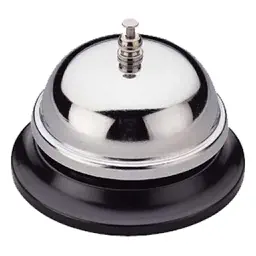
Presentation Timer
How much does Presentation Timer cost?
Prices are current as of 14 Nov 2026.
Presentation Timer has no in-app products on record in the United States.
10+ alternatives to Presentation Timer
| Presentation Timer |   Mugen Clock |   Simple Timer & Alarm ListTimer |   Mugen Transcribe: Voice Notes |   Qrio Lock |   Stopwatch + reading out loud |   Palmtop Bell 3 |   Presentation Clock TimeKeeper | 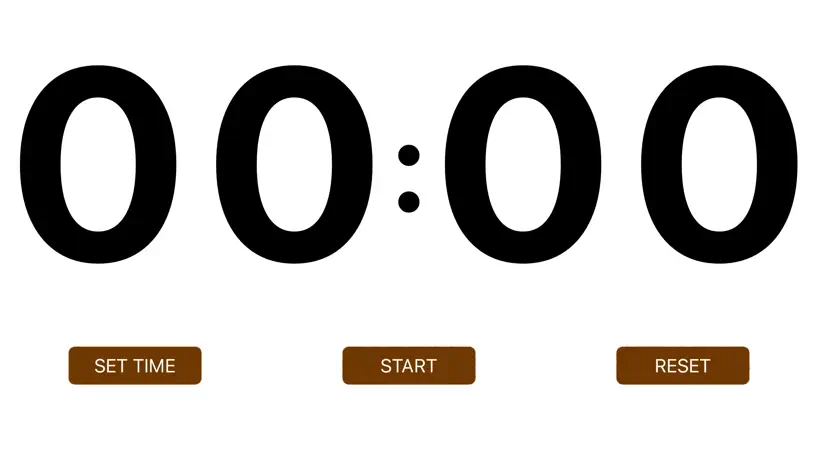  Big Timer - Simple |   CallBell | |
|---|---|---|---|---|---|---|---|---|---|---|
| Rating / 5 | 3.6 | 4.5 | 4.6 | 4.6 | 2.2 | 4.5 | 4.6 | 4.3 | 4.0 | 4.0 |
| Reviews | 260 | 44K | 28K | 5.4K | 1.1K | 479 | 323 | 240 | 146 | 72 |
| Released | 2019 | 2015 | 2014 | 2024 | 2018 | 2022 | 2013 | 2023 | 2022 | 2021 |
| Monthly price | — | — | $2.49 | $2.99 | — | — | — | $1.99 | — | — |
| Annual price | — | — | $14.99 | $34.99 | — | — | — | $12.99 | — | — |
| One-time price | — | $5.99 | $4.99 | $249.99 | — | — | $0.99 | $19.99 | — | — |
The going rate for each plan in United States, in its own currency, shaded from the cheapest price on the row to the dearest. Plans fewer than four in ten of the priced apps sell are left out.
Presentation Timer reviews
3.6 out of 5, based on 260 reviews.
What people like
- Large numbers are easy to read.
- No ads interrupt your presentation.
- Simple interface is very easy to use.
What they complain about
- Silent mode blocks the alarm sound.
- You cannot change the timer duration.
- App text switched to Japanese only.
Great free timer app!
I use this when my students give oral presentations in class. Simple interface, good clock display and bells! Great app with no ads.
Not enough options
Its so good EXCEPT there is only a few time options which makes no sense to only have a few
重宝してます
使い勝手がよく重宝しています。 星を削っている理由ですがもっとベルのタイミングが増やせれたら良かったところと、パターン登録ができれば良かったところです。 音が出ないバグが発生しましたが、アンインストールして入れ直したら直りました。参考までに
マナーモードで
プレゼンなのでマナーモードにしていると音が鳴らない。でも電話がかかって来ると困るので、マナーモード。イマイチ
一時停止とリセットのボタンをもっと大きくしてください
プレゼンから普段の遊びまで広く活用させていただいておりますが、ぜひボタンをもっと大きくして貰えると操作しやすいです。 また、カタン(ボードゲーム)で遊ぶ際にも活用させてもらっていますが、リセットして再スタートするボタンを増やして貰えるとより活用できますのでよろしくお願いします。
Simple, excellent, and in Japanese, but easy to adjust to.
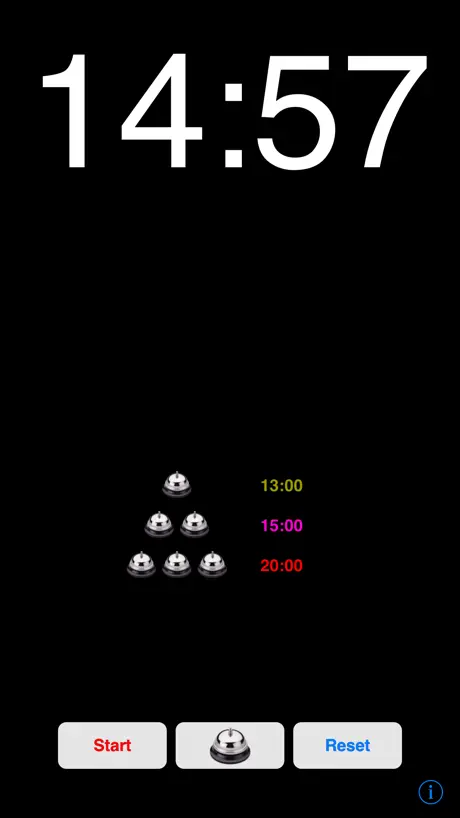
Red means start and stop. Blue means reset. Set time is in the middle. On the left is cancel, on the right is done. And underneath the time length is a statement that says use as presentation end time. Great app. I think I’ll learn some Japanese.
Used to be good, but now only renders in Japanese.
Had this for a long time and used it quite often. After an hiatus I came back to it only to find that the text was only in Japanese. Deleted it and downloaded it only to find the same problem.
Simple, easy-to-use excellent app
I’ve been using this app to keep time in conference sessions for a long time. The simple UI is excellent and I do not need to explain how to use to my colleagues or what is displayed to speakers. One thing to be fixed: the recent update forces to change UI and app name into Japanese, even in non-Japanese environment.
初回の音が小さい
起動後、初回のベル音が小さい 一回タイマーを短く設定して、鳴らしてリセットすれば2回目からはちゃんと大きな音出せるみたい?非常に手間 それ以外は問題なく使えているだけに本当に残念
時間設定の文字の色が見えない
しばらく前から、時間設定の際に青字の「プレゼン終了時間として使用」の文字しか見えなくなっており、不便だと感じていました。 今日、青字の上に動く感覚を発見し、適当に動かしたところ、ホームの黄色の時間設定が変わっていたので、時間設定の文字だということがわかりました。 しかし、現在文字の色が見えないので勘で時間設定をしています。元のように見える文字で表示してください。よろしくお願いします。
The Rod
Great App Very simple to use. Does everthing it says it will do!
Not Really
It might be good, but no English renders it useless
Simply good
This is a perfect timer for simple presentations. But it always has a red timer, doesn’t change colour. I’d like it white as shown and change colours as described. Fix this bug please
なかなかいいけど
ベル音のものが欲しかったので、その点ではバッチリなんですが、秒まで設定できると完璧でした。せめて30秒ごとに設定できるようにして欲しかったです。
時間設定ができない
ずっと重宝してきて久しぶりに使おうとしたところ、時間設定のところをタップしてもプレゼンの終了時間として設定という項目以外表示しなくなりました。
Excellent!
I use this app in meetings and at home! don't know how I managed without it all these years! I can relax and get things done knowing I can rely on this app to watch the clock for me! I love the fact you can set 3 timers! As a timekeeper for speakers no one can say I mis-timed them and as a nursing assistant I can track meds and procedures for three patients at once! Great app!
Used to be a great app, but...
This version is only in japanese. How do i set the language to english?
A hidden feature
I like this app and use it a lot for timing student presentations. I see other reviews asking for a countdown feature. It already exists! Swipe your finger horizontally across the time; it will switch between countup and countdown - even while running. I found this by accident. I've only tried it on iPad, but I suspect it works on iPhone/iPod too. The time that it counts down from can be set by the "Use as presentation end time" button in the bell settings.
音が鳴らない
とても、重宝しています。今回、新しいiPadで使うと、音が鳴らなくなっています。ぜひとも改善お願いします。
Good, but needs to show clock too
This timer is handy, but it doesn't show the clock ( I thought it used to, but I may be wrong). It would be more useful if it also showed the clock, with the current time, at the top of the screen. Otherwise it works great. Thank you.
great timer -- could make number of timers optional
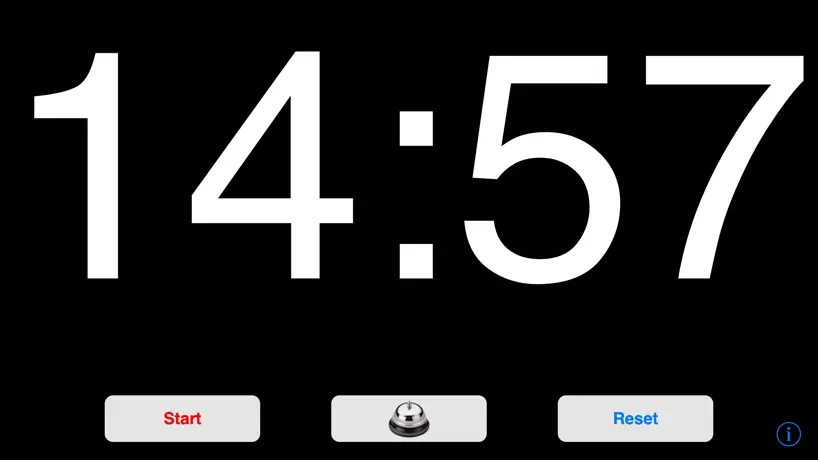
This is a very useful timer, works exactly as I wanted for my presentation. I walk around when I speak, into and with the audience, so I set up the timer and placed my iPod horizontally, on the speaker's table, facing out to the audience. The screen was large and clear enough to be visible across the medium-sized room, and the numbers were legible enough for me to see them through a quick scan even as I was speaking. Wonderfully designed!! I didn't want the sounds to interrupt my speech, so I simply turned the volume all the way down on the iPod itself. It would be good to have some kind of option on the app for this, so that I don't have to remember to turn the volume back up afterward. I love the multiple colors so that I can see at a glance during my speech what "zone" I am in during my talk. I would like the colors to be customizable, though -- so that I can set up, for example, a yellow zone as a warning color and a red zone as the wrap-up color. For the way I do my talks, the number of timers is too much, but I can see how I can simply set up fewer timers (by having the others afterward be the same time as the last one). It would be simpler for the app to give me an option of how many timers/zones I want to set up (with, perhaps, a max of 3). Overall, really really useful app! This is the first review I've written for an app, that's how useful I found this app to be! Keep up the terrific work!
Oops
My version just changed from English to Japanese. Can still use it and I love it but how do I change back?
Great
Great app, simple and large features A couple of suggestions for an update: - countdown would be a nice feature - hours and min are great, how about seconds? - can this app run in the background, I want to use my notes and have the app ding at me in the background
秒単位で使えれば★5
7分30秒予鈴、8分で終了という時間制限のある試合に向けての稽古で使ってます。 タイムキーパー役がいればいいですが、自主練では使えず残念です。
プロジェクターとの相性悪い?
iPad, iPhoneの両方で使用してます。アプリ自体は良いと思います。ただ、プロジェクターを使って表示をミラーリングしていると、スクリーン上の表示が止まることがあります。端末の表示は問題ありません。しばらくするとちゃんとした表示に戻るのですが、このフリーズー復活が繰り返されるので、試験時の時刻表示に使いたいのですが使えません。iPadやiPhoneにデフォルトで入っている時計のタイマーではこのようなことが起こらないので、本体とプロジェクターとの接続の問題ではないと思います。どなたか同じような症状に遭遇した方はいませんか?
Excellent app!
The 3 bell system, running during lock, and subtle looks are perfect for a presentation that can only run so long. Great work!
バグ
二週間前のメンテから設定時間の変更ができなくなりました。元に戻してください。
Worked perfectly
Highly recommended. Only complaint is that it requires just a tiny bit too much explanation/experimentation for a session chair to figure out on the fly. I just ran an international conference and I had multiple requests for the name of "that timer App" because it worked so flawlessly. THANK YOU for this great App!
Works as advertised, but no way to mute bell
The bell respects neither the ring/vibrate switch nor iOS 6's "do not disturb", ringing merrily away regardless. Only turning the volume all the way down worked. Being able easily to silence the bell with the ring/vibrate switch would benefit personal use as a speaker. Otherwise handy. It took some experimenting for me to understand the controls.
Works flawlessly
I love it and use it as a teacher. The only thing I would like to see in an update would be some better visuals, it's not the prettiest app.
タイマーの時間の変更ができない。
先日のアップデート後、タイマーの時間の変更が出来なくなっています。 現段階では使用不可能なアプリですのでご注意ください。
Overall Great App!
This FREE app does exactly what it says it does, so I don't understand the suggestions. As for the lack of color option: in most of Asia, red means go and green means stop. However you can reverse the order of timers, which works for me. There is second intervals when the clock counts down from minutes. There is an option of no bell if you turn your device's volume down yourself. There is a count down option, just tap the numbers before starting. I utilizing this app during massage sessions, it's great for rooms without clocks. I also use it as a personal timer for time management. However my favorite use was for empty bell-less service desks :-). That is, until the vazuzu app came out!
Any more?
Would you be kind to add at least the following functions for various types of presentation requirements, e.g. for the most famous non-profit public speaking learning platform - Toastmasters International: - adjustable count down/up intervals by not only hours and minutes but also seconds - the time interval colors could be user-defined, e.g. 1st green, 2nd yellow, and finally red for most popular color scheme of timing. - add user-definable alarm tones and length - add user-definable background colors with an extended choice of blinking (nice-to-have: user-definable blinking speed) - add user-definable font type and size
Excellent App!
No complaints; maybe fix it so that when you turn it sideways there is not a white border as it turns. Thanks!!!!
タイマーの時間設定ができません。
修正前のものでは終了時間を設定でき最高に使い勝手が良かったのですが、4.2の修正で出来なくなりました。どうせればいいでしょうか。
Does what it is supposed to, and does it well
The timer is as advertised. The display is large on the iPad (especially in landscape mode), and setting it is a breeze. There are a couple features I'd like to see, though: 1. An interval smaller than one minute, so that it can be used as a game timer for shorter intervals. 2. I wish it could be set to count down, instead of just up. These are suggested improvements, though, and not criticisms of what it is.
Great for free!
Works fine. I just wish author would stick with red, yellow, and green colors for numbers since those are the traditional colors used to time speeches. Otherwise it's simple and easy to use and easy to monitor during a presentation (except the pink color on the second timer set throws me).
:)
The bell is fun to play with
タイマー設定変更できません
iOS l3.5.l +v.4.2.0ではタイマーの時間を変更できないようです。 これは、iPadでも同じでした。 至急改善をお願い染ます。
Pretty darn cool
Thank you for offering this free app. I can use this while i am teaching, help me to pace my lesson. Works great. I love. How the timer changes colors according to the time left. My only wishes would be the ability to turn off the bells if I want and that if I set a time as the end time that the first and second warning time would automatically be calculated. But even without those i am grateful and I love the app.
Vibration
Support vibration mode also. This would make my review a 5 if app was still free. Might be distracting to me and audience hears a bell from my pocket.
Timer
Very good
Room for improvement
Considering the price this app is "Ok". I'd add a star for each of the following: 1. Continue the timer if I navigate to another application. I use my phone in my presentation, this bug surprised me. 2. Add vibrate and "no sound" so I can keep the phone in my pocket. 3. Make the number of alerts configurable. I may need 6 prompts rather than 3. 4. Save my settings. I give "standard" speaches and the timings are different for each one.
ima teacher
This is very usefull for presentations or ending them early cause there boring im in a kindagarden aid kid program thing im a junior in highschool and i go to the elementary school and be a class aid thing show and tell.... so boring
Good but can be better
Good but can be better. More laps could be great!!! Can you integrate this with presentation cues? Keep it up.
Presentation Timer FAQ
- Is Presentation Timer free?
- Yes. The app is free, in all 175 countries it sells in, and it sells nothing inside it.
- Does Presentation Timer have a free trial?
- No. None of its offers (US) come with a free trial.
- What are the best alternatives to Presentation Timer?
- Mugen Clock (4.5 from 44,245 reviews, premium from $5.99), Simple Timer & Alarm ListTimer (4.6 from 27,808 reviews, premium from $0.49) and Mugen Transcribe: Voice Notes (4.6 from 5,421 reviews, premium from $2.99).
Presentation Timer download
Last updated 3 years ago.
Presentation Timer sells in 175 countries. It was released 7 years and 9 months ago, on 1 Feb 2019. It holds a 3.6 rating from 260 reviews.
Supports 2 languages: English, Japanese.
How much does Presentation Timer make?
Third-party estimates for the last 30 days, worldwide — not the store's own figures, which Apple publishes for nobody.