
Epson Label Editor Mobile
How much does Epson Label Editor Mobile cost?
Prices are current as of 11 Nov 2026.
Epson Label Editor Mobile has no in-app products on record in the United States.
10+ alternatives to Epson Label Editor Mobile
| Epson Label Editor Mobile |   雲端智慧控 |   中華電信Wi-Fi全屋通 |   台灣電力 |   台灣自來水 |   Readiness TW e-APP |   ECOCO循環經濟 |   禾馨醫療 Dianthus | |
|---|---|---|---|---|---|---|---|---|
| Rating / 5 | 4.8 | 4.3 | 4.3 | 3.2 | 2.2 | 3.9 | 2.3 | 1.6 |
| Reviews | 13K | 6.5K | 2.6K | 2.1K | 854 | 603 | 205 | 121 |
| Released | 2022 | 2018 | 2019 | 2016 | 2021 | 2020 | 2018 | 2024 |
Epson Label Editor Mobile reviews
4.8 out of 5, based on 12,812 reviews.
What people like
- Easy to use for simple labels.
- Prints clear and crisp text.
- Labels stick well even on tough surfaces.
- Support team is actually helpful.
What they complain about
- App crashes often and deletes your work.
- Wastes half an inch of tape per label.
- Bluetooth connection is annoying and unreliable.
- Ads interrupt you constantly now.
Small learning curve
The machine works well with the app. Most aspects require some tinkering but overall it is fairly intuitive. On Epson’s end, I’m hoping for periodic updates that include either new categories or a second set under certain names. (a Life 2 group, etc) I have not tried the computer based version yet. It will be interesting to see how it functions compared to the iPhone iOS one I am using.
a max saved labels limit - no excuse for it
mar2026- same exact issues as below except now they added a bunch of ads when you open the app, still can't access my label history of prior labels, nor my saved labels. It just shows a spinning icon indefinitely- useless app unfortunately. mar2025- history doesn't work, saved labels doesn't work, both just have a spinning logo infinitely. The app frequently crashes. when is this app gonna be updated or re written?? nov 2024- latest version on iPhone ios18.1.1 , if you use Siri dictation (ie the microphone icon on your keyboard) in a text input field, the epson app crashes and you lose the entire label thay you're working on. every single time you try to use dictation it will crash. very disappointing. it also crashes more than 50% of the time when you go to choose one of your Wi-Fi label maker printers (i have 2x of the z5010 units). apr 26 2024- I love Epsop label makers, I've spent several thousand dollars on them happily- however there's no excuse for this app having a limit on the number labels you can save in the app/ to the iPhone. The reason it's so important to be able to save a label, is once you spend a decent amount of time creating a label there about a 40% chance that when you press print the app may crash and you'll lose all the label you worked on. The only way to guard against this is to press save before you click print, however, I get the message that you reach the maximum number of saved labels. (they are saved to the iPhone, NOT the cloud so this isn't some kind of cost issue/limitation). The other workaround is, Epson could fix the way the history feature works, currently your label is only saved to the history after printing is completed - instead it should be saved to the history either in realtime or as soon as you press print so that if the app crashes on / during print, you don't lose your entire label and have to start over. of course, the easier or more reasonable fix would be to just increase the arbitrary limit on the number of labels one can save. jun26 2023-happy to see an update released, however, it doesn't seem to address any of the major issues; 1-while my windows 11 laptop, via wifi, the epson label software always connects (and stays connected) to my Z5010-PX label printer (which is ethernet hardwired), this epson iOS app, almost never connects over Wi-Fi, it seems since one of the iOS 16.x updates this started 2-the arbitrary 100 X saved file limit (max 100 saved labels) has caused me to lose several labels i was in the process of creating. (the flow is: if I go to save the label before attempting to print, the max saved files error message will lock up the app, or if I attempt to print BEFORE saving, and if the printer is not connected (or has disconnected) it will lock up the app, both scenarios will cause you to lose the label you're currently editing/creating). these are both easy issues for The developers to resolve , and without which the app is pretty much is too unreliable to use.
Handy
The one thing I would change is the little piece of sticker that is wasted before it actually prints—my label.
更新至ios27就不能使用app
更新至ios27就不能使用app
Functional but unpleasant
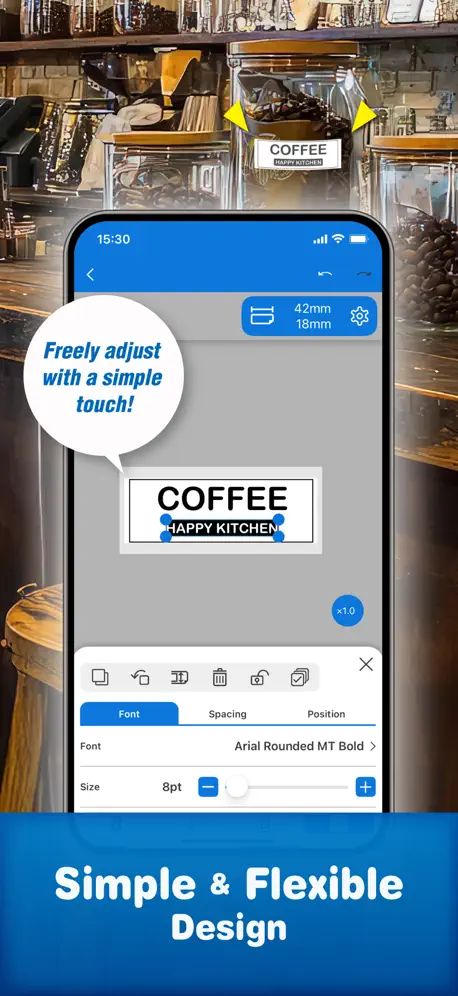
The software is good as far as manufacturer-mandated software goes. I’m not constantly bumping into breaking bugs or anything like that. It’s still unpleasant to use, though. Custom fonts mostly work, but sometimes have intermittent issues where text boxes lose their kerning. Saving/reloading the label usually fixes the problem. The alignment tools are sufficient for small labels, though more features for layout and placement, like adjustable grid lines at minimum, would be very helpful. The lack of any current label-specific features beyond size detection is really unfortunate, too. It would be great if the app could tell me what color of label the currently inserted cartridge is so I don’t have to open up my printer or do a test print to find out. And some specialty labels like the cable wrap labels would benefit a ton from having specialized UI for their specific limitations and features. I could go on, but small deficiencies in the feature set like explained above add up to the point where most of my saved labels aren’t for label content that I’d like to reuse, but instead are a set of templates I have made to work around various limitations of the software. The minimum functionality to print is there, I have yet to need to print a label where the software was totally incapable of getting the job done, but this has come at a great cost to my time and patience.
Absolutely Wonderful Label Maker
After owning several handheld label makers, I must say this little wonder has been a real breath of fresh air. Extremely easy to use and it prints wonderfully clear and crisp labels. I honestly couldn’t be more satisfied!
Template for different tapes
Should have templates for different tapes, I am using the cable 224vslpx and I wasting so much tape getting it set up.
希望可以新增標籤另存新檔功能,這樣就只要修正文字,不用改樣式了
希望可以新增標籤另存新檔功能,這樣就只要修正文字,不用改樣式了
使用困難
一直閃退無法順利列印⋯⋯
Overall great, but wasteful
Connection is always stable, software is pretty intuitive and easy to figure out. The main issue I have is that every time you print a label, it begins by feeding 1/2” of tape, then cuts it, then begins printing. So you end up wasting a half inch of unusable tape each time you hit print, and there is no way to turn that off. It’s an incredible waste, and if you are doing a lot of smaller jobs, you run out of label tape much faster. I would give this review 5 stars if there was a way to turn that function off, or maybe have it do it once when a roll is inserted, and then not do it again until a new roll is inserted. Of course, Epson wouldn’t do that as I’m sure it would have a hit on their label sales.
It works
This app does everything I need it to do and it’s simple to use. 5 Stars from me.
Poor app
This is a super slow application! It sends you garbage reminders constantly. The other big issue is trying to connect through Bluetooth. It is completely sporadic. There’s no clear way to connect it to the Wi-Fi. I really hate this app already.
更新後iOS內建的翩翩體不能使用
更新後iOS內建的翩翩體不能使用
Labelbreite
Versuche seit dem Kauf am 11.11. 25 Ersatzband in der breitesten Ausführung für Modell LW-C410 zu kaufen, auch auf der Epson Webseite nichts gefunden.
No mirror option can use
Previous version is Epson iLabel had mirror option, but this version has been gone , could it possible let it back ? Thanks
New App Interface So Much Better
So glad they redesigned the app! Easier to use, more updated fonts and intuitive …
Label force quits over and over again
Every time I use the microphone with my iPhone to write out the label. At the very end after making it. Over and over again and have to start over. Because there’s some bug or a glitch with the app where if you use the microphone, you’ll have to remake the tags over and over again 3 to 4 times. From the very beginning from scratch to print one. Nothing will be put in the history and nothing will be saved.
圖案列印較爲模糊
不確定是否因為剛開始使用,還是因為需要更寬的標籤列印的畫質才能較佳(清楚)
常會跳出系統,打好的文字不見
這兩個月系統常會自己登出打字打到一半,所有打的文字全部都不見了,讓人很困擾! 系統也還不用更新,找不出問題
Mcd
I wish the tape had a break to release the backing.
Works OK
This app is fairly simple once you learn how to use it. The history feature is very nice. It has some of the typical nuances that label printers have. I wish it had a good option for a continuous label with non-sequential values that I can space exactly to my specs. I can do sequential labels like that and just turn off the cut. Works half decent but it should have a simple option like this built right in.
NO CABLE WRAP LABELS!!
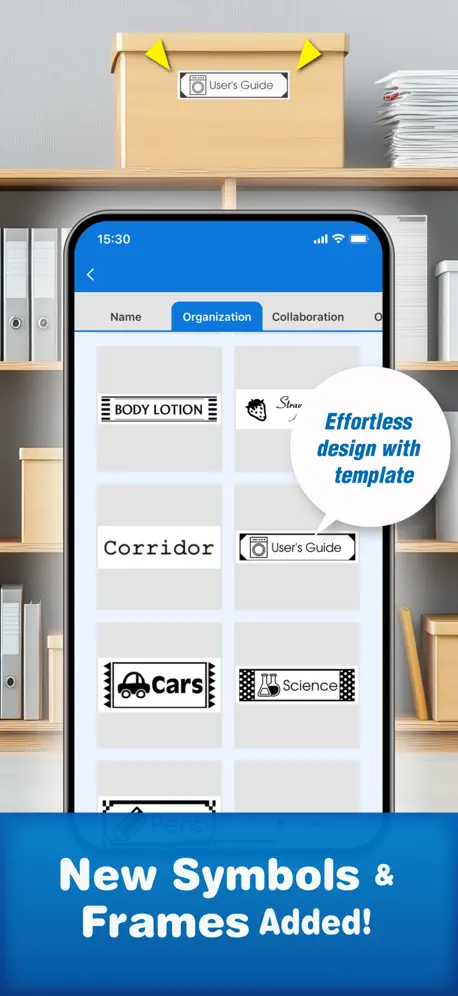
We used to use iLabel to print cable wraps and there is no template that allows you to do this in this version. The printer doesn’t recognize that labels that are wraps. We had to print 10 tests to get it to finally sit in the right location
藍牙容易斷掉
不知道是不是內部狀態機邏輯還是考慮到電池耗電量或是什麼協定的關係,稍微等一小段時間就會和手機解除藍牙連結,需要按開關重連
Printing
Works but clunky and printer waists 1/2 inch of label each print
Decent but I wish it supported ios shortcuts
This app works but I wish it supported ios shortcuts
What’s happened to this app?
I have been enjoying this LabelMaker for a couple of years. It has worked well and provided a tremendous creative outlet while helping me to be organized. Today I tried to make a label and the app crashes when I touch any part of the screen. I rebooted my phone, and deleted and reinstalled the app twice, of course, losing my saved data. It still crashes, and I am unable to make a label. Please fix the app so that my investment in the machine and the additional assorted tapes does not go to waste.
please add
I turn on printer. I already connected it before. App don't see printer. I have to go in bluetooth setting and connect it manual. Then go to app and press plus printer, bluetooth, choose printer. Are you kidding? Please make auto connect last printet after power on printer to the last device. Also please add time format in app 05.05.2025 ( without letters), groups/ folder for saved labels.
Great product
Wonderful tech support- a real person on the phone!She answered the question I had about minimizing front margin that was not clear to me in the video. Love that the labels actually stick on difficult surfaces and yet are not impossible to peel off when you want to. Thank you!
提示有新圖案但選不到
提示有新圖案但選不到
Blocky prints
Still trying to figure it out! So far it prints very blocky!
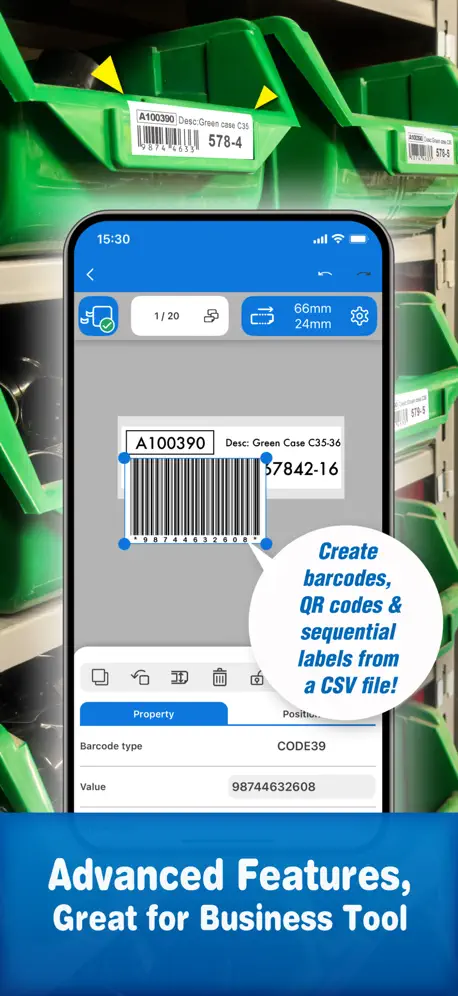
Great qr/bar code scanner
Very compact and almost seem to be rugged, easy to use and very user friendly.
Keeps asking for review
I don’t rate apps that ask for reviews multiple times nicely.
Ok, could be better
Definitely not ideal for industrial use, no way to name printers in the app. I have three LW-PX400s set up with different tapes, but have no way in the app to differentiate which one I’m printing to even if I rename the Bluetooth profile on my device.
App is clumsy
The app is so 1980’s. Sections come up in chunks with very little explanation. I can’t edit the most recent text.
Easy to use, lacks basic symbols
Easy to use but lacks some very basic symbols. Especially regarding fasteners. A basic improvement would be addition of symbols for screws, bolts, nuts, washers, drive types, etc. I’m really surprised these aren’t there already.
My
Love making my own labels
Photo feature useless
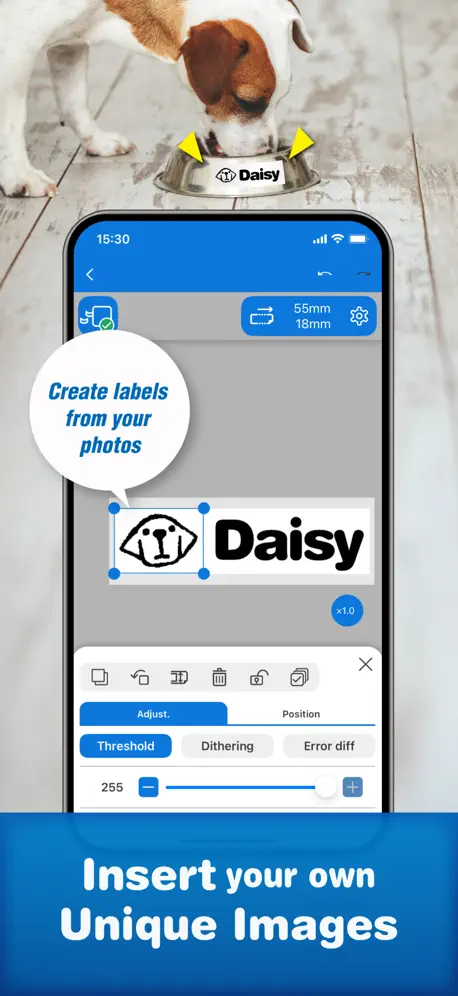
What point is there to have a photo option that when you upload PNGs the app somehow can’t recognize the image and puts randoms streaks behind everything. Unsure how this doesn’t get fixed because it renders the app useless
Great printer-App could be better
I have the LC-610, which is great. Each time I turn it off or it goes to sleep, one has to reconnect the printer in Bluetooth settings of the iPhone, and then select that connection in the Bluetooth section of the App itself. All my other Bluetooth devices connect automatically when powered on, and it would be great in this did that too. Otherwise great bit of kit. Nice quality printing on good labels, which stick well, even on freezer items.
Fehler beim Drucken von Bildern
Beim Drucken von Bildern entstehen Fehler. Diese entstehen sporadisch in der App als auch beim Drucken. Das Bild wird verschwommen angezeigt. Mit meinem iPad entstehen diese Fehler nicht. Nur mit meinem iPhone entstehen diese Fehler.
Buggy app
The label editor where you can manage end margins does not allow using the decimal point. An obvious bug and VERY annoying. Editing text is also problematic. Takes multiple screen pokes to get to where one can edit. Not sure what has improved from the old app.
Love the new App
The new app is easier to make a nice label from my laptop. I am still trying to figure out how to pull up a saved label and make changes to it, but overall much better than the previous app.
Waste
It cuts 3/8 of the tape off each time it does a label. What a waste of money.
Upload font feature
This would be a slam dunk for this app. I know it’s available for android, please enable this feature!
for as must as this cost
I cannot believe it’s not AirPrint compatible. One has to jump through multiple hoops that haven’t been a standard process since the 1980s and MSDos systems. Do not buy this printer.
Wasted tape
Hate the way it waste the tape before printing
So much fun!
I bought this to organize my office. I’m making adorable labels for my co-workers. It is very easy to use. I think I like it very much.
Disappointed
I’ve been using this app on my iphone and its worked well but I recently purchased a iPad Air and Magic Keyboard and discovered this app only works in portrait mode. That renders this app completely useless to me. Come on Epson, an app to make labels that you have to type in what you want the label to say that cant be used with a keyboard that would be in landscape mode ??????
Love it but
I love the blue tooth capability but I wish the labels were easy to peel, have researched but cannot seem to find easier peel labels!
Auflösung des Druckers wird nicht berücksichtigt
Wenn ich damit auf einem LW-600P einen code128 Barcode ausdrucke, kann ihn kein Scanner mehr lesen. Mit iLabel wird das Etikett soweit in die Länge gezogen, dass es auch lesbar ist.
Old version was better.
Layout changed, too many menus before able to print.
Epson Label Editor Mobile FAQ
- Is Epson Label Editor Mobile free?
- Yes. The app is free, in all 104 countries it sells in, and it sells nothing inside it.
- Does Epson Label Editor Mobile have a free trial?
- No. None of its offers (US) come with a free trial.
- What are the best alternatives to Epson Label Editor Mobile?
- 雲端智慧控 (4.3 from 6,523 reviews), 中華電信Wi-Fi全屋通 (4.3 from 2,637 reviews) and 台灣電力 (3.2 from 2,133 reviews).
Epson Label Editor Mobile download
Last updated 2 months ago.
Epson Label Editor Mobile sells in 104 countries. It was released 4 years and 5 months ago, on 13 Jun 2022. It holds a 4.8 rating from 12,812 reviews.
Supports 18 languages: English, Danish, Dutch, Finnish, French, German, Indonesian, Italian, Korean, Norwegian Bokmål, Portuguese, Russian, Chinese, Spanish, Swedish, Thai, Turkish, Ukrainian.
How much does Epson Label Editor Mobile make?
Third-party estimates for the last 30 days, worldwide — not the store's own figures, which Apple publishes for nobody.