LEDBadge
How much does LEDBadge cost?
Prices are current as of 26 Oct 2026.
LEDBadge has no in-app products on record in the United States.
10+ alternatives to LEDBadge
| LEDBadge |   RHXPlus |   iDotMatrix |   iledcolor |   Shining Glasses |   BS HT |   SpinDisplay |   HamAlert |   NN family |   E-Goods |   Badge Magic | |
|---|---|---|---|---|---|---|---|---|---|---|---|
| Rating / 5 | 2.8 | 2.9 | 3.0 | 2.7 | 3.2 | 2.9 | 2.1 | 4.5 | 2.4 | 1.4 | 4.7 |
| Reviews | 155 | 557 | 352 | 187 | 176 | 132 | 123 | 84 | 49 | 9 | 8 |
| Released | 2019 | 2019 | 2023 | 2024 | 2020 | 2018 | 2021 | 2017 | 2025 | 2025 | 2025 |
LEDBadge reviews
2.8 out of 5, based on 155 reviews.
What people like
- It does the basic job well enough
- Setup is quick once you figure it out
- Very cheap for a simple name tag
What they complain about
- You can't see what you type in dark mode
- Many error messages are stuck in Chinese
- App crashes often when sending data
- Bluetooth connection is unreliable and hit or miss
需要一點技巧
用了兩三次才抓到訣竅
闪退
一点发送就退出app了
How to use
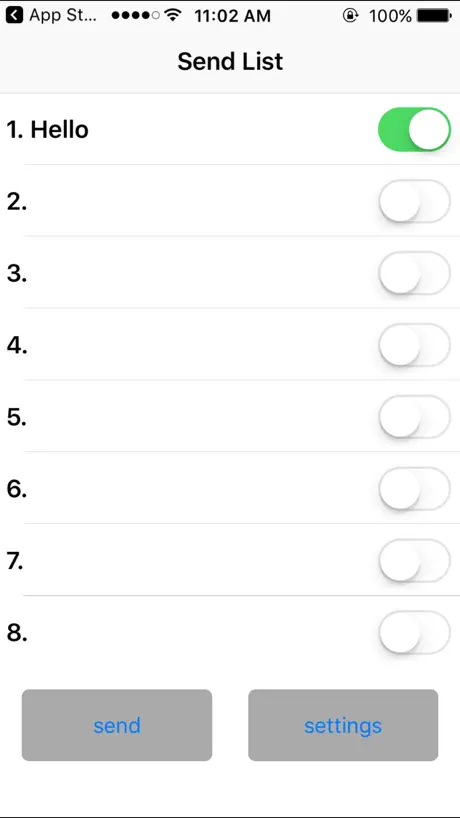
It wasnt clear to me how to use this for a while so if anyone needs it heres how to use the app: write what you want to add in the “send list” screen before hitting send. Flip the switches on (green). Hit send and allow the app to access bluetooth. You DO NOT need to connct your led badge to your phone through the apple/settings bluetooth menu. It is all done in app. Make sure your led badge is in bluetooth pairing mode and when it receives your messages the screen will change from the bluetooth symbol to m1-8 or something like that. To swap to your new strings of text hit the other button until your desired one plays
打字沒顏色白的看不到
看不到打的字
Leaving Spaces After Apostrophes
Once you get used to the app with some Chinese prompts and the badge buttons, setup is easy and painless. My only complaint is there is a space after apostrophes on the badge even if there isn’t one programmed in with the app, so “WE’RE” in the app appears as “WE’ RE” on the badge. 5 stars if this bug gets fixed.
Works well
Does what it needs to. Quick and easy to use.
Yendor
This is awful. I bought a different brand before hoping this would be as nice. Hardly any instructions. I still Amy figure everything out. Dose not say anything about charging
It works as intended
It does everything you need it to do. It is just a bit weird design wise
Led badge
Has a terrible glitch , you can’t see what your typing on iOS takes loads of attempts to get you message correct please fix issue !!! Apart from that it’s ok
打字看不見字只能用想像的
看到之前的評論原來3年了,堅持不改呀,但因為還是賣的不錯所以⋯⋯依然堅持不改👍
Inquiring
Where can you buy badge for this ?
Terrible
No clear English instructions. Terrible but it’s disposable at under $20
One broken animation
App works okay but I found one issue: The show mode “animation” does not work. Otherwise the app works fine, nothing fancy.
Where is the update?
I can’t seem to update my badge! There’s just a white page in the Data Transmission page. Please update to fix this!
Functional but rarely updated
Does not display correctly if your phone is in dark mode, so if you get a blank screen, switch to light mode.
VERY GOOD APP
I'm at the mega mini with my dad and this app was GREAT for my name tag and it's very fun to play around with(: 10/10
Not not connect to Bluetooth
We tried everything in instructions and from videos online. Never connected. A useless ripoff.
藍芽搜尋不到
我有兩支,一黃一紅,黃的可以連線紅的不行
Sort of works sometimes
I’ve tested the PC, Android, and iOS versions of this app and all versions were thrown together rather haphazardly. For example, on iOS, the error messages are in Chinese. For all mobile versions, Bluetooth connectivity is hit or miss and doesn’t follow API standards; you never really know if the connection has been established or not. A really amateurish piece of code overall, and the GUI is user hostile. Needs to be re-coded using top-down design.
看不到在编辑的文字
在文字编辑画面,输入后,看不到,可选中,选中后仍然看不到。返回文字列表可看到。
Just works
Works well iPhones in dark mode don’t show text when programming. I like how it needs to be in Bluetooth mode to program. Other badges are easily accessed.
Can not see, what I‘m typing
I can‘t see, what I‘m typing in the App, when creating new content. The text-colour and the background-colour are the same (white) on IPhone 12 Pro Max. Typing itself works, but you have to transfer and fix the mistakes afterwards instead of correcting while typing in. Please fix this for more stars!
求助帮改字
这个字到底怎么改呢,能不能求回复一下
Ok, but hoping someone makes a good one
This app allows multiple messages to be scrolled, but the text color in the app is white text on white background, so you cannot see what you are typing until you return to the main screen. Very annoying, making editing impossible. You need to put the name tag in Bluetooth mode before sending the text from the app. A detail not in the instructions. I sure hope someone makes a good one of these one day. Useful for conferences but low quality.
Text NOT visible
Hi GOOD CREATER, Currently i’m running iOS 17, however all the TEXT ARE NOT VISIBLE upon typing. Appreciate if you can look into it. Thank you!
Kind of works but poor experience
The area where you write the message doesn’t display the message content. The link on the App Store listing to contact the developer doesn’t work so I can’t even report the bug
Decent App
It's a decent app with a few bugs, but can you make it so I can make it faster? Thanks.
Looks like a good start
It seems to work but I can’t see the text that I’m typing in. But it does show up on the display and on the send screen. But if I make a mistake I have to start over. I can’t edit the text.
Works great
Works great need to connect with the app itself
This app is horrible
You can’t see what you’re typing. The font is the same color as the background. Also it gives you messages in Chinese which you’re supposed respond to. I don’t know Chinese.
希望可以鏡像翻轉字體
希望可以鏡像翻轉字體 謝謝
Works But Buggy
The app overall works, but it’s buggy. If the phone is in dark mode, the text is white on white when trying to edit it. The app needs an update to solve these bugs.
深色模式
希望可以對應深色模式 現在看 都是白的看不到
Absolutely crap
Doesn’t communicate well with the name tag, when u type in what you want it to say on the app the text doesn’t show up in the preview. When u finally get back to screen and are ready to send it to the name tag it doesn’t send and kicks you out of the app. I paid $20 for a name tag that can’t communicate with the app it’s supposed to come with! Garbage.
Worked fine
This is a relatively simple app to program LED name badge. It worked fine for the most part and was simple to use. However, the error messages are in Chinese. I had to use Google Translate to figure out that I had selected a blank message to upload.
Meh. Not all that great, but okay.
First off, the app name is not what the instructions say. I had to randomly try a few before stumbling upon the right app for the product. Second, it’s about as bare bones as you can get. That’s fine, I don’t need anything fancy or attractive, but it’s really plain. Half is written in Chinese. Lastly, you can only change the message when you put the tag itself into Bluetooth mode. That’s fine for the intended use, so I wouldn’t ding it for that, but I was hoping to put it near my son’s computer and be able to send messages to it at any time, like “dinner in 5 minutes” so he knows to finish up a game. It won’t work for that purpose, so I’ll be tossing it, but it was cheap enough that I figured I’d give it a shot.
Shop
Shop Currentdaytech
怎麼重置
沒辦法開機,要怎麼重置
Restricted compared to PC version
Generally: it works. The basics for my LED Badge are covered with this app. But some functions of the PC Software are missing, e.g. different fonts an animations. Add them (please) to get 5 stars. Sometimes the app crashes. Enable Bluetooth mode on the badge before sending, this should avoid most crashes.
The message is invisible during entry
When I go to the edit screen to change a message, the text is completely invisible. The cursor moves over, but you can’t read what you wrote. Also, if you edit one of the icons and press save, the confirmation box is not in English like the rest of the app is. I’ve learned what to look for when it works, but all the messages in the app should be the same language.
之前可以用,現在沒辦法用
更新之後,手機開啟藍芽一直收尋不到裝置
會閃退
按發送就閃退
Great badge, but a critique
Great app, but the software comes in the tiniest CD that doesn’t work on my iMac. If there was a website that I could use to download it, that would be fantastic.
Help!
Great while it worked but, My app doesn’t work any more! Any way to make it work for a badge I bought a couple of years ago?
LEDBadge FAQ
- Is LEDBadge free?
- Yes. The app is free, in all 175 countries it sells in, and it sells nothing inside it.
- Does LEDBadge have a free trial?
- No. None of its offers (US) come with a free trial.
- What are the best alternatives to LEDBadge?
- RHXPlus (2.9 from 557 reviews), iDotMatrix (3.0 from 352 reviews) and iledcolor (2.7 from 187 reviews).
LEDBadge download
Last updated 1 year ago.
LEDBadge sells in 175 countries. It was released 7 years and 6 months ago, on 8 May 2019. It holds a 2.8 rating from 155 reviews.
Supports 6 languages: English, French, German, Japanese, Korean, Chinese.
How much does LEDBadge make?
Third-party estimates for the last 30 days, worldwide — not the store's own figures, which Apple publishes for nobody.