
Breaker Box: Panel Directory
Circuit labels & printable PDF
How much does Breaker Box: Panel Directory cost?
Prices are current as of 16 Nov 2026.
1 one-time purchase from $9.99
In the United States, Breaker Box: Panel Directory has 1 one-time purchase priced $9.99.
| Product | Price |
|---|---|
| Lifetime Pro License | $9.99 |
See what Breaker Box: Panel Directory costs in all 175 countries →
10+ alternatives to Breaker Box: Panel Directory
| Breaker Box: Panel Directory |   ElectriCalc Pro |   Electric Toolkit - Calculator |   Mike Holt's Electrical Toolbox |   Electrical Calculator Plus |   Electrical Toolkit by HCP |   AWG Calculator: Wire Size |   Kopperfield |   Panel Legend 2 |   PanelMap: Breaker Finder |   PanelVue | |
|---|---|---|---|---|---|---|---|---|---|---|---|
| Rating / 5 | 4.4 | 4.9 | 4.8 | 4.6 | 4.6 | 4.6 | 4.7 | 4.2 | 3.0 | 5.0 | 5.0 |
| Reviews | 132 | 688 | 326 | 205 | 88 | 79 | 74 | 17 | 6 | 3 | 2 |
| Released | 2021 | 2012 | 2012 | 2019 | 2024 | 2025 | 2022 | 2024 | 2021 | 2026 | 2023 |
| Monthly price | — | $4.99 | — | — | — | — | — | — | — | — | — |
| Annual price | — | $39.99 | — | — | — | — | — | — | — | — | — |
The going rate for each plan in United States, in its own currency, shaded from the cheapest price on the row to the dearest. Plans fewer than four in ten of the priced apps sell are left out.
Breaker Box: Panel Directory reviews
4.4 out of 5, based on 132 reviews.
What people like
- Developer fixes issues very quickly
- Makes panel schedules look professional
- Great for documenting old wiring
What they complain about
- Syncing between devices often fails
- PDF export feature is broken
- Hard to find for complex panels
Easy convenient time saver
Took a little while to figure out how my house was wired but this app is easy to use and is super convenient. It saved me a bunch of time & hassle yet again today.
Can’t get started.
I tried to add a panel. After filling in every field (i think!), it wouldn’t let me add. Half the advanced settings I had no idea what to put. Not necessary for me. Just want to record what outlets and switches and light are on which circuit…
A Must for Organization and Safety
Having bought our house in 2023 from a seller who fancied himself a DIYer, it turns out he was awful at electricity (and also most all handyman skills). As I have played “whack-a-mole” fixing newly arising issues, while trying to make the house our own separately, I’ve worked on the electricity one area at a time. Figuring out the former owner’s logic, while also figuring out the two good sized additions he oversaw, has been a challenge, especially electricity wise. I was originally writing down what each breaker did in a notepad, but then another project/issue would pop up, or the notepad disappeared. That’s when I found the Breaker Box - Panel Tool. With room to add notes, and customize, I’m almost done (I have a main box and a separate box for my backup generator). I’d give the app 4.5 starts if it was an option, but it’s not a 5 only because it’s not really intuitive. You have to use it to figure it out, and then it’s great. If you’re reading this, just buy it and start using it - you’ll be glad your did.
Misleading description
The app is nice enough, and well thought out. Note that the free version is only marginally useful as the data cannot be printed out or exported. Since that was not clearly stated in the description, I ended up wasting almost an hour until I realized. I’d buy and rate higher, but I don’t want to reward potential dishonesty.
A great app to manage your breaker panel and electricals.
I’ve been using this app for several years now, and the author keeps making improvements. After documenting my last home with help from this tool, I was able to see and finally understand why certain outlets and fixtures were always giving me issues. With the data I provided, my electrician was able to quickly find and correct several wiring faults that a previous DIY owner of the home had introduced. The app has been worth every penny. I’ve passed this panel data on to my son, who bought that house from me, and now I’m busy mapping our newly purchased retirement home!
App PDF Export Doesn’t Work
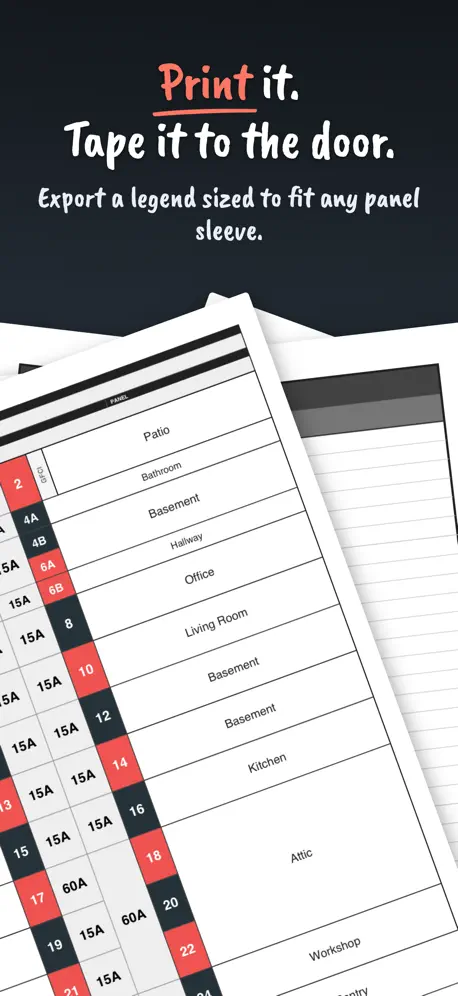
After paying for the pro version, and putting in all of my circuits - the export to PDF doesn’t work. I would like to print my panel out but the app doesn’t generate the pdf and described. Hope the developers can fix.
Great App
Very useful to map fixtures to breakers, and well worth the money for the pro features. Seems there may be an issue with search function - does not filter any results when searching a fixture, label, or notes. Would also be great if the labels would also show in the fixture list - for example if you have multiple receptacles and want to be able to label them (R1, R2,..) to be able to quickly map back to the breaker.
Great App
Great app does almost everything I need to make professional looking panel schedules. My only gripe is that I get panels that have 84 circuit breakers every so often and this maxes out at 80! Need 4 more spots added! Otherwise I love it
Finally, a circuit breaker mapping app!
I’ve been searching for this kind of app for a while but did not find one or a good one until now. Breaker box is an incredibly well thought out app. It has many options and configurations to meet the various different style of breaker boxes and breakers out there. I highly recommend this app. One thing that would be nice is to be able to add fixtures from the room view so that the room could be automatically selected. Also, to be able to add short names for rooms a fixture types as well as descriptions for each as well.
Suggestion
it would be interesting if we could see the description of the device on the virtual panel and if we could search for the device which will give us the associated circuit breaker
Love it, but want more!
Love the app so far but it would be awesome if you could add your own devices and link sub panels to main panels.
Electricx
This app are pretty nice to use does need some improvements i have done my legends schedule, the problem are when i have to print doesn’t print the way you done the legend schedule, the tandem breaks don’t print as you expect, i have printed few times and make some changes still the tandem breaks doesn’t print as you want to see individual information on them , i will give another try before requesting my refund for the premium
Great app!
Exactly what I was looking for to document the changes in a panel during my remodel. Thank you!
Last update broke the app
This last update broke the app for me. I lost my panel config. When click on the big green plus to add panels, the app crashes. When I click to sync to iCloud the app crashes again
I want to like & use
This app seems 70% of the way to being really useful. One of the first things I notice as I’m building out my panel is there is no Copy to replicate breakers, such as the two needed for my Oven. The app lets you label breakers but then doesn’t use that label on the main panel view. It just uses the room label, so it shows 4 breakers labeled “Kitchen”. I think this may be a bug. It should use the room and fixture; I.e. “Kitchen-outlets” or use the label you can add for the breaker.
Essential
Great app. I moved into a house with 4 unlabeled panels. This is perfect app to log as I learn and label.
Loving this app
Just starting to use this app and finding it very helpful to figure out the panel and document my house. Can you add a 25A option.
Great app but cannot transfer to new iPhone.
Love this app. I have no ability to transfer to a new iPhone. The normal iPhone to iPhone transfer did not carry the data over. Just sync the data to iCloud you don’t have to develop some sign in feature…
Very useful!
App is very useful for tracking a large breaker and a second panel
Handy & Time-Saving
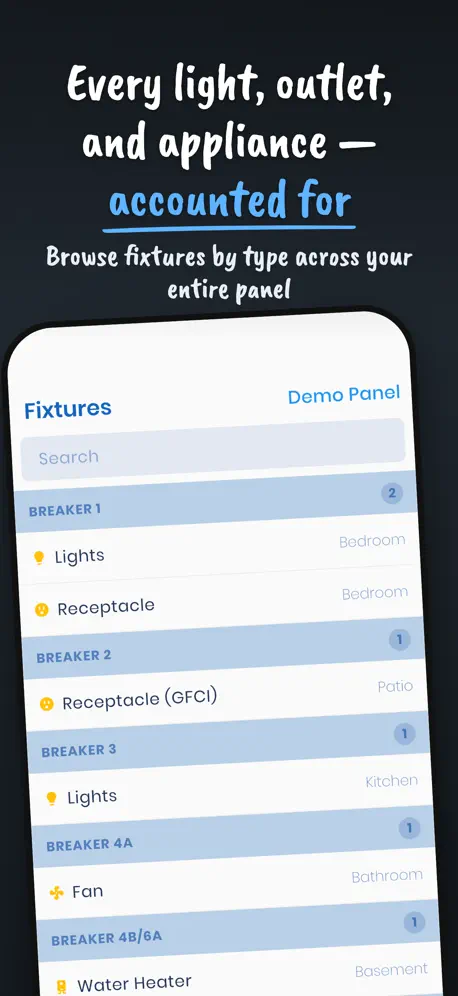
This app has proven very useful. It saves saves the excessive time and effort usually spent trying to figure out which breaker you need to turn off. My one criticism is that you cannot create fixtures without associating them with a breaker. The point of this app is figuring out/recording which breakers feed which fixtures, so it would be helpful to create a list of fixtures independent of a breaker association so you can match them up as you figure it out.
Need some work
I purchased the pro version because I needed some more options but those are not available. It would be great to make custom names for fixtures. I would also like to see a 15 amp double pole option.
Great app all around
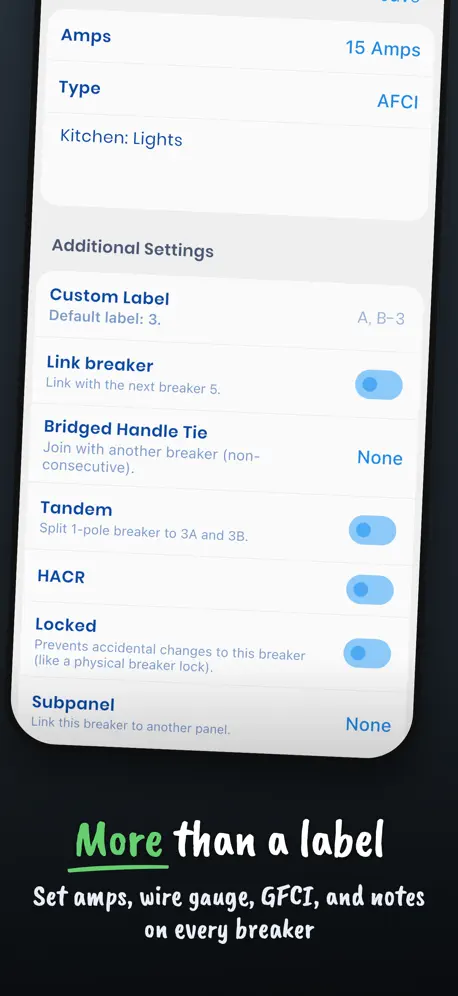
Pros: The ability to label all breakers, and able to create your own custom labels as well. Also able to create custom rooms. Shows/make individual amp sizes for breakers. The ability to color coat breakers for your own benefit. The ability to split a single pole, or combine two poles to make one breaker. The ability to print out all information, including the breaker layout. Able to use on multiple devices if logged into the same Apple account. Was able to restore purchase on another device and sync between the two devices, without having to pay twice (sign up required with email). Cons: Unable to find any yet.
Great app but pdf extract is a mystery
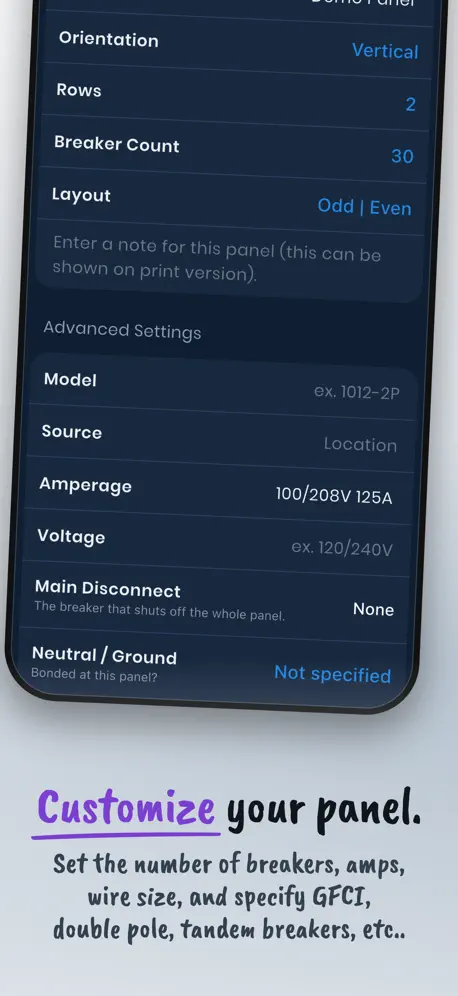
Just started using this app and as I get to a point where I need an additional feature, I find the app has already got it. Like allowing you to select how the numbering of your circuits is done in the breaker box. Seems like every combination is covered. I bought the Pro version for the pdf extract but don’t know how this works. I press the extract link and nothing happens.
Would like to see for three phase triple pull breaker added but seem decent
Building labels for a breaker panel was all excited until went to add a triple pull breaker and could not find for 60 amp
Great app but iCloud sync does not work
Great app but I paid for the pro version, installed it on both my iPhone and iPad, mapped out my breaker boxes on my iPhone, sync’d my iPhone to iCloud asking it to upload local data to iCloud, opened up the iPad version and asked it to overwrite local data with iCloud, but nothing happened. I would write the developer but he only seems to be on twitter which I don’t use. Changed five stars due to the quick response from the developer Many thanks!
Nice App, Needs custom Fixture names
Can you add the ability for creating custom fixture names.
Doesn’t work with FPE STAB-LOK load center panel.
My FPE STAB-LOK load center panel has 25 breakers that fill the 40 slots. I have full-sized single pole breakers that take up two slots and half-sized single pole breakers that take up one slot. Likewise, the double pole breakers take up four slots and two slots, respectively. I see no way to put my breakers in the app. I purchased the Pro version to no avail.
Essential
This is an essential tool for homeowners and DIYers. This has replaced my old, inaccurate panel sticker and sharpie annotated breakers. The developer has been very responsive, and it is well worth buying to support future development.
Works well
Need to change the numbering scheme for the panel. My Murray panel is labeled 1-20 on the left and 21-40 on the rght. Is there a way to to share data between devices(ipad&iphone)? Any method of adding new Fixture Types? I have several baseboard electric heaters, AC Comprssor, etc.
Not sure yet
Was excited to organize my electrical system. Bought the app and tried it immediately. Everything is drop down and not all of the options I wanted were there. First breaker is 20 amp but not double pole. Next two breakers are 70 amp each also not double pole, as far as I understand. And they are for the pool equipment for which there was no category. Hopefully there can be editable fields or more choices. Also, my panel is all in line. They are probably right and left but they appear in line physically.
The recent update is perfect.
I made a recent request for some updates, and the developer, is just amazing. Took what I asked and implemented it with easy and perfection. I am very impressed. I suggest all who read this review to download this app, immediately and use it to create you panel schedules. It will give a very professional look to your installs, and or updates. Thank you.
Very useful app
This is a great app, especially for those of us who aren’t the original owners of a home and have found that the breaker box has been labeled, well, less than accurately. I’m in the process of figuring out what the various breakers in my house actually control and labeling them appropriately and this app is a big help. Would love to see an update that allows syncing between devices. For example, I like to use my iPad to enter the information into the app but if I need to run into the garage and check a breaker it would be handy if I could just take my phone and all of the info that I had entered with my iPad would automatically be there. Also, I could use an option for 20 amp double pole breakers, as well. That would make this an absolute 5 star app.
Needs a little work. Love the concept.
Let me start off by saying I just downloaded this 20 minutes ago and immediately bought the pro version within 5 minutes of exploring it. I think that this is a great idea for an app and that almost every homeowner probably could use something like this. I will probably update this a bit more when I get further into mapping my main panel board for my home. One big issue for me and maybe others is that I have ‘tandem’ breakers in my QOM2 200A Square D main panel board. Tandem or slim line breakers are actually two independent breaker poles for every breaker. I have 18 total slots with 27 different breaker poles. So I have 1A and 1B, etc. Not sure how to make that work in this as it’s not a choice and you cannot edit the breaker slot name (Breaker 1, 3, etc). Any help on this would be appreciated. Immediately I found some general data structure implementation choices which are confusing that I thought at first were issues in the user interface. Basically it has to do with the way room and fixture lists are displayed and how you can edit them. There are a tab for Rooms and Fixtures that are blank with a + button to add new ones. Starting with the room tab I added one and gave it a name of master bedroom. but nothing was added to the tab of rooms I thought that odd. I added a couple other room names and they didn’t show up show up either. I moved to the Fixture tab and saw that you associate a fixture with a room and breaker. I select room field and up pops a list of all the rooms I added and a multitude of default ones that are great. They will only show on the room tab if they are associated with a fixture and a breaker. Cant edit, delete, or see them until you do. Seems not like a standard interface or data structure choice and it’s confusing and not user friendly. You have to add a room or fixture to a breaker just to delete it. A fixture is the same in terms that you cannot add a fixture unless it’s associated with a room and breaker. What if the user doesn’t know the breaker yet and is using this app to get it all sorted and is adding all their rooms and fixtures first to map them to breakers once traced? The lists should be visible and editable on their tabs whether used or not. Generic lists that are used as a template when the user chooses to create an instance of one to add to their panel, project, location, or whatever data structure that is holding all the collections of these. The app is definitely usable once you see that it doesn’t act like most other ones that you have used and will take a bit of extra effort. Did I mention that I really think that this is a great idea?
Breaker Box: Panel Directory price by country
A one-time purchase costs $9.08 in Canada and $15.05 in Colombia — 1.7× more for the same thing. Below is the going rate for each plan in every country that sells it — the middle price of what the app charges there, in the country's own currency with the dollar equivalent beneath it.
| Country | One-time |
|---|---|
| Afghanistan | $9.99 |
| Albania | $11.99 |
| Algeria | $9.99 |
| Angola | $9.99 |
| Anguilla | $9.99 |
| Antigua And Barbuda | $9.99 |
| Argentina | $9.99 |
| Armenia | $11.99 |
| Australia | A$14.99$10.13 |
| Austria | €9.99$11.01 |
| Azerbaijan | $11.99 |
| Bahamas | $9.99 |
| Bahrain | $9.99 |
| Barbados | $11.99 |
| Belarus | $11.99 |
| Belgium | €9.99$11.01 |
| Belize | $9.99 |
| Benin | $11.99 |
| Bermuda | $9.99 |
| Bhutan | $9.99 |
| Bolivia | $9.99 |
| Bosnia & Herzegovina | €9.99$11.01 |
| Botswana | $9.99 |
| Brazil | R$59.90$10.58 |
| British Virgin Islands | $9.99 |
| Brunei Darussalam | $9.99 |
| Bulgaria | €9.99$11.01 |
| Burkina Faso | $9.99 |
| Cambodia | $9.99 |
| Cameroon | $11.99 |
| Canada | CA$12.99$9.08 |
| Cape Verde | $9.99 |
| Cayman Islands | $9.99 |
| Chad | $9.99 |
| Chile | CLP 9,990$10.04 |
| China | CN¥68.00$10.18 |
| Colombia | COP 49,900$15.05 |
| Congo | $11.99 |
| Congo, Democratic Republic | $9.99 |
| Costa Rica | $9.99 |
| Cote Divoire | $11.99 |
| Croatia | €9.99$11.01 |
| Cyprus | €9.99$11.01 |
| Czech Republic | CZK 249.00$11.25 |
| Denmark | DKK 89.00$13.15 |
| Dominica | $9.99 |
| Dominican Republic | $9.99 |
| Ecuador | $9.99 |
| Egypt | EGP 499.99$9.30 |
| El Salvador | $9.99 |
| Estonia | €9.99$11.01 |
| Fiji | $9.99 |
| Finland | €9.99$11.01 |
| France | €9.99$11.01 |
| Gabon | $9.99 |
| Gambia | $9.99 |
| Georgia | $11.99 |
| Germany | €9.99$11.01 |
| Ghana | $11.99 |
| Greece | €9.99$11.01 |
| Grenada | $9.99 |
| Guatemala | $9.99 |
| Guinea-bissau | $9.99 |
| Guyana | $9.99 |
| Honduras | $9.99 |
| Hong Kong | HK$88.00$11.21 |
| Hungary | HUF 4,490$13.57 |
| Iceland | $11.99 |
| India | ₹999.00$10.58 |
| Indonesia | IDR 199,000$10.92 |
| Iraq | $9.99 |
| Ireland | €9.99$11.01 |
| Israel | ₪29.90$9.31 |
| Italy | €9.99$11.01 |
| Jamaica | $9.99 |
| Japan | ¥1,500$9.39 |
| Jordan | $9.99 |
| Kazakhstan | KZT 5,990.00$13.44 |
| Kenya | $11.99 |
| Kosovo | €9.99$11.01 |
| Kuwait | $9.99 |
| Kyrgyzstan | $9.99 |
| Lao Peoples Democratic Republic | $9.99 |
| Latvia | €9.99$11.01 |
| Lebanon | $9.99 |
| Liberia | $9.99 |
| Libya | $9.99 |
| Lithuania | €9.99$11.01 |
| Luxembourg | €9.99$11.01 |
| Macao | $9.99 |
| Macedonia | $9.99 |
| Madagascar | $9.99 |
| Malawi | $9.99 |
| Malaysia | MYR 49.90$12.20 |
| Maldives | $9.99 |
| Mali | $9.99 |
| Malta | €9.99$11.01 |
| Mauritania | $9.99 |
| Mauritius | $11.99 |
| Mexico | MX$199.00$10.73 |
| Micronesia | $9.99 |
| Moldova | $11.99 |
| Mongolia | $9.99 |
| Montenegro | €9.99$11.01 |
| Montserrat | $9.99 |
| Morocco | $11.99 |
| Mozambique | $9.99 |
| Myanmar | $9.99 |
| Namibia | $9.99 |
| Nauru | $9.99 |
| Nepal | $11.99 |
| Netherlands | €9.99$11.01 |
| New Zealand | NZ$19.99$11.04 |
| Nicaragua | $9.99 |
| Niger | $9.99 |
| Nigeria | NGN 14,900.00$11.02 |
| Norway | NOK 129.00$13.48 |
| Oman | $9.99 |
| Pakistan | PKR 2,900$10.47 |
| Palau | $9.99 |
| Panama | $9.99 |
| Papua New Guinea | $9.99 |
| Paraguay | $9.99 |
| Peru | PEN 44.90$13.17 |
| Philippines | ₱599.00$9.37 |
| Poland | PLN 49.99$12.50 |
| Portugal | €9.99$11.01 |
| Qatar | QAR 39.99$10.99 |
| Romania | RON 49.99$10.33 |
| Russia | RUB 899.00$10.89 |
| Rwanda | $9.99 |
| Sao Tome & Principe | $9.99 |
| Saudi Arabia | SAR 39.99$10.66 |
| Senegal | $11.99 |
| Serbia | €9.99$11.01 |
| Seychelles | $9.99 |
| Sierra Leone | $9.99 |
| Singapore | SGD 14.98$11.61 |
| Slovakia | €9.99$11.01 |
| Slovenia | €9.99$11.01 |
| Solomon Islands | $9.99 |
| South Africa | ZAR 199.99$11.81 |
| South Korea | ₩17,000$12.73 |
| Spain | €9.99$11.01 |
| Sri Lanka | $9.99 |
| St. Kitts and Nevis | $9.99 |
| St. Lucia | $9.99 |
| St. Vincent & The Grenadines | $9.99 |
| Suriname | $9.99 |
| Swaziland | $9.99 |
| Sweden | SEK 129.00$12.81 |
| Switzerland | CHF 9.00$10.73 |
| Taiwan | NT$320.00$9.72 |
| Tajikistan | $9.99 |
| Tanzania | TZS 29,900.00$11.33 |
| Thailand | THB 399.00$11.77 |
| Tonga | $9.99 |
| Trinidad and Tobago | $9.99 |
| Tunisia | $9.99 |
| Turkey | TRY 499.99$9.93 |
| Turkmenistan | $9.99 |
| Turks and Caicos | $9.99 |
| Uganda | $11.99 |
| Ukraine | $11.99 |
| United Arab Emirates | AED 39.99$10.90 |
| United Kingdom | £9.99$13.20 |
| United States | $9.99 |
| Uruguay | $9.99 |
| Uzbekistan | $9.99 |
| Vanuatu | $9.99 |
| Venezuela | $9.99 |
| Vietnam | ₫299,000$11.63 |
| Yemen | $9.99 |
| Zambia | $11.99 |
| Zimbabwe | $11.99 |
Breaker Box: Panel Directory FAQ
- Is Breaker Box: Panel Directory free?
- Yes. The app and its basic features are free, in all 175 countries it sells in. Premium features are paid: they start from $9.99 (US), across 1 one-time purchase.
- Does Breaker Box: Panel Directory have a free trial?
- No. None of its offers (US) come with a free trial.
- Where is Breaker Box: Panel Directory cheapest?
- A one-time purchase costs CA$12.99 (≈$9.08) in Canada and COP 49,900 (≈$15.05) in Colombia, its cheapest and dearest countries.
- What are the best alternatives to Breaker Box: Panel Directory?
- ElectriCalc Pro (4.9 from 688 reviews, premium from $4.99), Electric Toolkit - Calculator (4.8 from 326 reviews) and Mike Holt's Electrical Toolbox (4.6 from 205 reviews).
Breaker Box: Panel Directory download
Last updated 10 days ago.
Breaker Box: Panel Directory sells in 175 countries. It was released 5 years and 10 months ago, on 5 Jan 2021. It holds a 4.4 rating from 132 reviews.
Supports 9 languages: English, Croatian, French, German, Japanese, Serbian, Chinese, Spanish, Swedish.
How much does Breaker Box: Panel Directory make?
Third-party estimates for the last 30 days, worldwide — not the store's own figures, which Apple publishes for nobody.
Revenue by plan
- One-time 100%
Revenue by country
- United States 86%
- Canada 12%
- France 1%
- United Kingdom 1%