Interval Timer for Tasks
ProductivityUtilities

Interval Timer for Tasks

Foobar Creative · released 29 Jun 2019 · Open in App Store ↗

Revenue 30d not estimated
Downloads 30d not estimated
Rating 4.42 289 reviews

No in-app products collected for this app.

Rating
United States33%954.21
France7%214.52
Canada7%194.53
China5%155.00
Spain5%144.79
Japan4%133.92
Australia3%95.00
Mexico3%95.00
Colombia3%84.63
Chile2%75.00
Saudi Arabia2%74.14
Brazil2%64.67
Germany2%55.00
United Kingdom2%53.20
Italy2%53.40
Philippines2%55.00
Turkey2%55.00
Switzerland1%44.25
Netherlands1%44.50
New Zealand1%44.50
Peru1%35.00

The store shows a different set in every country

Description

Configure interval timers to keep you on task!

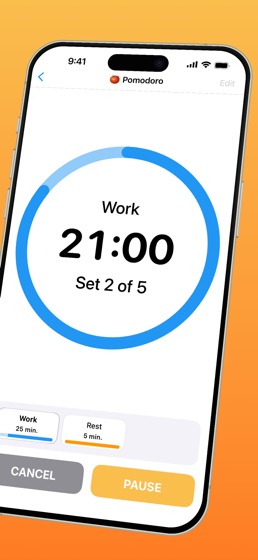
Interval Timer for Tasks lets you configure a timer that repeats with one or more intervals. You can add intervals to your timer and configure their name, sound, color and of course duration. When your interval ends, that sound will play. Keep the app open to see the timer progress circle wind down, or close the app and a notification will tell you when the current interval has ended.

You can configure and save multiple timers, and more than one timer can run at the same time. Timers can be configured with a start delay so you can get ready, and a finish delay so you can wrap up the task.

Great for:

studying or focused work

pomodoro technique

stretching

ADHD focus

taking breaks during the day

complex routines that have multi step timed processes

cooking recpies

mobility routines

Features:

create and save multiple timers that can run at the same time

support for Siri and the Shortcuts app

standalone Apple Watch app

uses local notifications to alert you when the app is running in the background

configure the timer precisely for your routine

change the name of your timer

lots of different alert sounds to choose from

support for multiple intervals on a single timer

start delay to get ready

finish delay to wrap up the task

Interval Timer Premium Subscription

Upgrade to access all features

Payment will be charged to your Apple ID account at the confirmation of purchase. Subscription automatically renews unless it is canceled at least 24 hours before the end of the current period. Your account will be charged for renewal within 24 hours prior to the end of the current period. You can manage and cancel your subscriptions by going to your account settings on the App Store after purchase.

Terms of Use:

https://www.apple.com/legal/internet-services/itunes/dev/stdeula/