
ISD Go
ISDT
How much does ISD Go cost?
Prices are current as of 25 Oct 2026.
ISD Go has no in-app products on record in the United States.
10+ alternatives to ISD Go
| ISD Go |   SkyRC |   HW Link V2 |   RC Gears |   Castle Link |   RC Pit Calc Pro |   RC AI Mechanic |   Goosky |   R1WURKS |   ELRS Mobile |   XDFLY | |
|---|---|---|---|---|---|---|---|---|---|---|---|
| Rating / 5 | 2.7 | 3.1 | 3.5 | 4.6 | 1.9 | 4.4 | 4.8 | 3.6 | 3.8 | 5.0 | 2.6 |
| Reviews | 126 | 195 | 174 | 134 | 49 | 43 | 37 | 35 | 15 | 10 | 5 |
| Released | 2018 | 2016 | 2020 | 2020 | 2018 | 2021 | 2022 | 2022 | 2019 | 2026 | 2023 |
ISD Go reviews
2.7 out of 5, based on 126 reviews.
What people like
- Bluetooth connection drops constantly and randomly
- App crashes frequently during setup or update
- Saved settings often get wiped out
- Mac app fails to detect many chargers
- Display shows incorrect voltage or percentage values
What they complain about
- Works well on Mac with USB-C
- Shows all battery details on one screen
- Firmware updates are possible and successful
- Connects quickly via Bluetooth when it works
- Clean interface that is easy to use
It does what it supposed to
This app had one task for me and that’s update the firmware. It did a good job with no error.
Old drivers?
I guess the drivers are too old for the current iOS. My FD – 200 doesn’t even recognize my iPhone.
ISDT N16 Firmware Update
I read some of the reviews, and I initially had an issue updating mine as well. But after typing in ‘How to update ISDT N16 on Mac’ in Google Search AI, it explained how to update it exactly, and my update went as expected. I’m only posting this to try and help others with this. 1. Download ISD Go App. 2. Plug wall power into ISDT N16. 3. Plug ISDT N16 USB-C into Mac USB-C. 4. Open the ISD Go App. 5. It should notice the charger. 6. It should show current version & new version. 7. Click ‘Update’ 8. It will start beeping. 9. If it doesn’t immediately start update, click ‘Update’ again. 10. Let it update. My update went fine after I ran into a snag at #8. Mine was beeping but not updating. So from my search on Google Search AI, I was directed to click ‘Update’ again, and all went fine. I hope this review is helpful.
Crashes when updating
The app crashes when updating 608PD charger.
Disappointed
This app is ruining the brand reputation
Works fine for me
I'm writing this review mostly to counteract the other bad ones, because it worked first time for me. I have an N8 charger, it detected it correctly, and correctly showed updates. Simple, works fine, and impressive that it's actually in the Mac App Store and not on some random download site.
No connection, Does not work
Can’t connect to my FD-200 Discharger
Terribly glitchy with the ESC70
Doesn't stay connected via BT, more Error messages than anything, not terribly intuitive, timeout messages etc, just a lousy non functioning app all around.
FD200 discharger problems.
1. It is impossible to discharge batteries up to 3.0 volts. They always discharge to 3.3 volts. When you change the tension, nothing changes. There is a very lack of the discharge function to a lower voltage to conduct full-fledged battery tests. There is not enough ability to kill batteries by discharging up to 0.0 volts. 2. It is also not enough to set the discharge current of 6,7,8,9 amperes. 3. Constant conflicts of presets and current changes in current and discharge voltage.
iPad 12.9 Successfully Repaired damaged FW for fd-200 !
Yes, you read that correct. I tried many devices a year ago to get this stupid device to work. Mine came titled as brand new but someone had opened previously. After this method I am having no disconnecting issues. It was simply an error on the devs programming. I tried my iPhone, SamsungS8 & S2, iPad 11”. Then recently after a year past my OG purchase I tried it on my iPad Pro 3rd gen 12.9 running iOS13.3
Will Corrupt a N16/N24 charger!
This app is signifficatly broken and only detects any N serise charger as an N8 and the subsiqunt firmware update will break your N16 or N24 charger.
Glitch and connection issues
Bought two ESC70s, installed one and am having issue after issue just trying to set the ESC up, the app either times out of R just loses connection constantly. Then when I do get it setup and save settings I recheck and it’s defaulted back to factory settings. Then went to run the truck after I thought it was setup right, I go run the truck and it glitches out, stops or just starts to move on its own with no outside input.
90A电调
电调无法连接app修好了没
建议H605锂电池增加充到3.75v保存电压
RT
Horrible App!
Every time I update the app, everything works for more poorly. I recently updated it and now even batteries with a 98% discharge are showing that they have been fully discharged. You cannot make this stuff up! For the record, the hardware is good if you can figure out how to use it without the garbage app poisoning the hardware.
BT Dropping Constantly
The Bluetooth is dropping all the time, it won’t stay connected to the unit and I’ve tried it on several different iPhones and also on an android phone with the app. This is unacceptable and makes this unit almost useless.
FD200 проблемы
После последнего обновления проблемы со связью Bluetooth, постоянно теряется связь . Некорректен отображается уровень заряда в процентах (например вместо 100% отображается 160%) Также добавьте пожалуйста возможность выбирать с 5 ампер до 15 ампер с шагом в 1 ампер а не с шагом в 5 как сейчас.
we need that app in kuwait
:(
Bluetooth will not connect
What ever you do don’t update the software because you will never connect to the discharger again through Bluetooth. These developers don’t even care to fix the issue. So don’t buy the ISDT FD-200 if your looking for the Bluetooth features.
Not very stable, very buggy
I have two FD200 dischargers, which work very well. My low rating here applies to the app, not the discharger hardware. Unfortunately the best I can say about the app is that it has some useful features. However they rarely work correctly so I’m not sure if it is worth using the app. All my presets regularly get wiped out. Worse are the bugs - I set the discharge amps and sometimes the discharger ignores the setting. When I launch the app it doesn’t show me the current settings in effect, so to be sure I have the correct settings I have to re-enter them. Also, the app regularly crashes on my iPad. Probably better just to use the buttons on the discharger to change the settings.
Problem with lost Bluetooth connect
Lost connect after paring, need delete h605 air and parring again. It helps me for a while.
Just what I expected
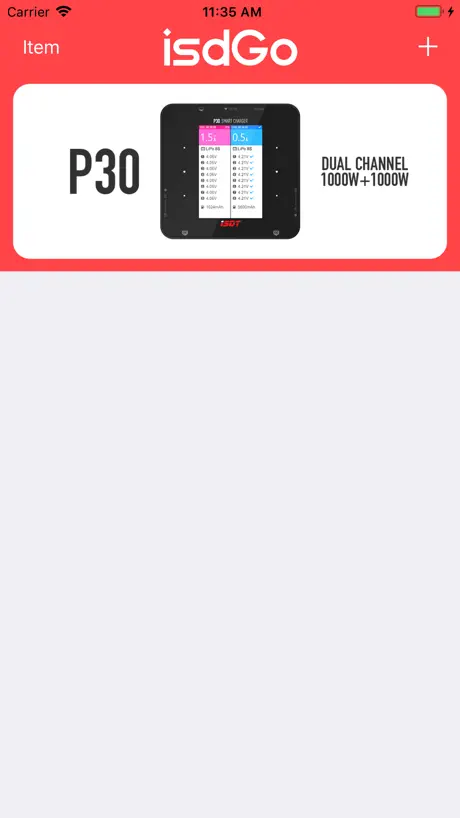
The app is great. Connects to the charger automatically seconds after opening the app and displays the values. It also has a quick refresh rate which is nice to see. I also like the detail that you get on one screen like input voltage, charger temperature, mah, cell voltages, total voltage, charge time and a percentage indicator. My regular (dumb) chargers would make you flip through multiple screens and this just shows everything on one screen. UI is also pleasing to look at and use.
Computer Doesn't Recognize
I just plugged in my N8 to my Mac OSX 14.2 and the app does not find or recognize that I have plugged in the charger. Charger does power up when connected just fine.
Will not stay connected
Drops the Bluetooth connection frequently. Difficulty in re-establishing BT connection after it disconnects. I have resigned to having to use the physical buttons on the discharger and drop the use of the app.
BT connection issue
Was able to connect BT by pressing the button while BT was scanning for charger. It connected and is working fine.
希望能增加605的放电功能
放点功能!!5w都可以 增加单独平衡功能 增加历史记录功能 增加储存电压功能 修改最低输入电压到7v 增加一位电压显示 希望可以出一款pd dc双供电 最大100w左右的充电器
Cannot update firmware
Useless. I have to use Windows app in virtualbox.
App won’t pair with Fd-200
The app won’t pair with my FD-200 discharger..... please update
Unreadable
The font size is too big on iPhone SE, the information just do not fit on screen
sc608怎么升级啊
sc608怎么升级啊
Does not support the Air A8 at all
On macOS, the A8 Air is not seen, whether cabled directly via USB-C nor as a Bluetooth device. Firmware cannot be updated because the device cannot be seen or found.
不错
支持FD200不错不错,期待更多的产品支持
Looks good, preforms bad
Downlaoded for 16N, shows 8n is device it is seeing. says latest firmware is N Series V1.2.0.5 and what is on the device that it destroyed 3500mAh Li Ion AA's says Current Version is V1.2.0.6 so version on device is newer that what is on website.
开发者首评
欢迎吐槽,竭力完善
Won’t Stay Connected
I just got the FD-200 and the app will sometimes connect and let you make changes but it always disconnects while discharging. Doesn’t matter where my phone is, next to it on either side, on top, in front or behind it still disconnects.
ISD Go FAQ
- Is ISD Go free?
- Yes. The app is free, in all 175 countries it sells in, and it sells nothing inside it.
- Does ISD Go have a free trial?
- No. None of its offers (US) come with a free trial.
- What are the best alternatives to ISD Go?
- SkyRC (3.1 from 195 reviews), HW Link V2 (3.5 from 174 reviews) and RC Gears (4.6 from 134 reviews).
ISD Go download
Last updated 2 years ago.
ISD Go sells in 175 countries. It was released 7 years and 11 months ago, on 19 Dec 2018. It holds a 2.7 rating from 126 reviews.
Supports 2 languages: English, Chinese.
How much does ISD Go make?
Third-party estimates for the last 30 days, worldwide — not the store's own figures, which Apple publishes for nobody.