
Onvis Home
How much does Onvis Home cost?
Prices are current as of 15 Nov 2026.
Onvis Home has no in-app products on record in the United States.
10+ alternatives to Onvis Home
| Onvis Home |   Starling Home Hub |   HomeDash |   Homemanager for Homebridge |   Home Widget for HomeKit · HW |   Flic App |   Thread Doctor - Matter |   Flame Services Browser |   Home Configurator |   Scrypted |   Lafaer | |
|---|---|---|---|---|---|---|---|---|---|---|---|
| Rating / 5 | 1.9 | 4.8 | 4.5 | 4.3 | 4.1 | 2.9 | 4.7 | 4.5 | 3.7 | 4.1 | 2.3 |
| Reviews | 294 | 3K | 1K | 802 | 587 | 215 | 86 | 81 | 54 | 42 | 15 |
| Released | 2018 | 2022 | 2016 | 2019 | 2021 | 2015 | 2026 | 2009 | 2020 | 2024 | 2025 |
| One-time price | — | — | — | $5.99 | $14.99 | $0.99 | — | — | — | — | — |
The going rate for each plan in United States, in its own currency, shaded from the cheapest price on the row to the dearest. Plans fewer than four in ten of the priced apps sell are left out.
Onvis Home reviews
1.9 out of 5, based on 294 reviews.
What people like
- Works perfectly with Apple HomeKit automations
- Hardware quality is solid and reliable
- Prices are much lower than competitors
What they complain about
- App crashes constantly when you use it
- Temperature history data is often wrong or missing
- User interface is ugly and confusing to navigate
Excellent Product
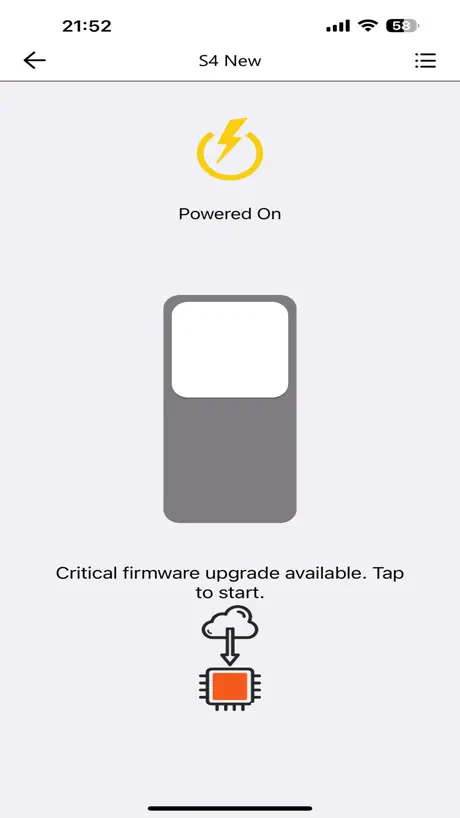
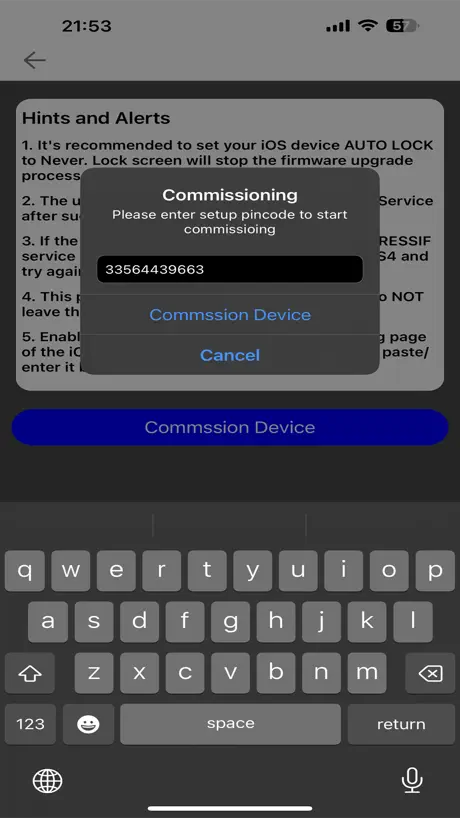
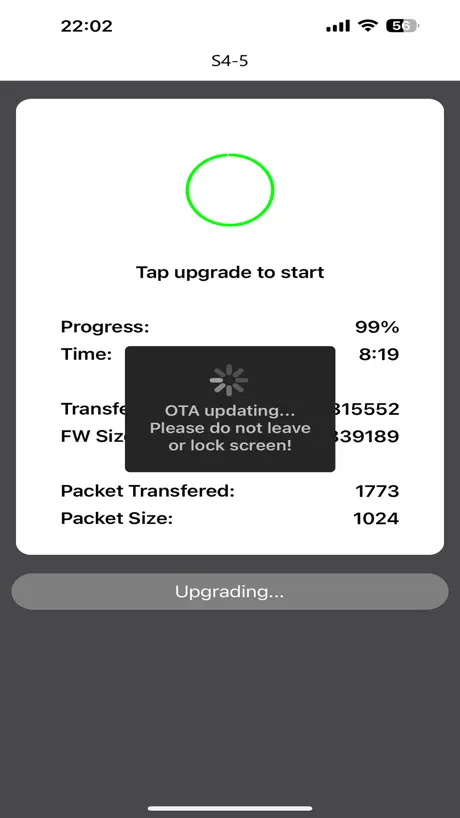
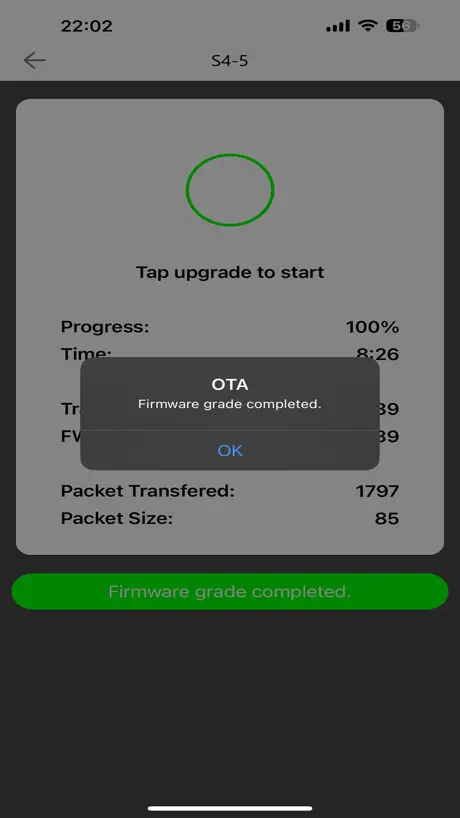
I had trouble with the new firmware upgrade but it was my fault for not reading the instructions properly. The process worked fine if a bit slow (about 14 min).
Not for prime time
Sad, but app is not working. It crashes on my iOS 27/ IPhone 17 Pro, it’s sad because I do not know how to update firmware with out it. I can attach to Amazon Alexa as ‘Matter’ device but all the features like energy usage is not available with out the App. Won’t be buying another device by then nor make any recommendations to friends for them. Stay Away
Daten Refresh Problem
Die Home Übersichtsseite ist sehr übersichtlich. Aber die angezeigten Werte sind oft nicht die aktuellen. Beispiel: Tür wird als offen dargestellt, aber wenn man in die Ereignisliste schaut, sieht man dass sie wieder geschlossen wurde. Dabei findet ein Refresh statt uns auch die übersichtsseite zeigt geschlossen an. Selbes mit Raum-Luftfeuchtigkeit: Erst wenn man die Tagesaufzeichnungen öffnet, findet ein refresh der Daten in der Übersichtsseite statt. Bitte macht einen Daten-Refresh Button in die Übersichtsseite.
4.4.2 is getting better but…
they have FINALLY made some firmware update improvements (for HS2 5-button/18-option controller). STILL NO Landscape mode for iPadOS, which i have asked them for several times and only Onvis and Nanoleaf won’t due it, even/hue/ikea/aqara/vocolinc/sonos/all others can do Landscape mode on iPad, yet Onvis just won’t do it. Because not all brands have macOS apps and isn’t a device option for adding devices, it’s a big deal. Many folks have mounted iPads for home control.
Motion sensors are good, the software is awful
This app has unreadable user interface. Fortunately, it's only rarely needed to install firmware updates (well hidden).
Ok ✅
Pour utiliser de nombreuses marque en domotique ce matériel est excellent . Le défaut peut être l'application mais personnellement je n'en utilise aucune autre que HomeBridge qui me permet de tout centraliser dans "maison" Bravo ! Continuez mais mettez un peut plus de cœur ♥️ dans le développement de l'application.
Broken
Bugs have definitely not been fixed. Firmware upgrade button doesn’t work. No explanation given
Good.
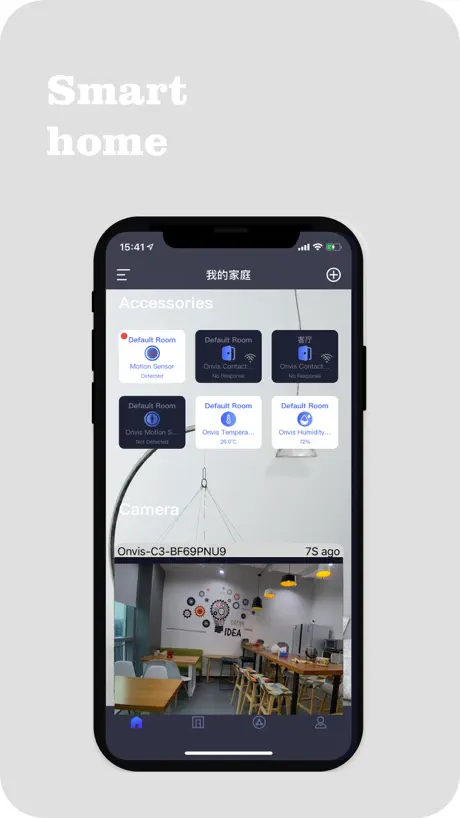
This is a good app. I have the motion sensor and it shows a history of motion events, plus temperature and humidity history. It isn’t the best app ever. Its design is a little weird, like the fact that the data with the time stamp of 00:00 hour is 24 hours off (email data feature). The chart temperature/humidity display is a little feeble, requiring a lot of tapping if you want to see a day other than today. It seems to store 2 months worth of history in hourly increments, but this might be somehow adjustable. But in general, it suffices. And most people will only use it for firmware updates, as the device works as expected over HomeKit.
Very bad app
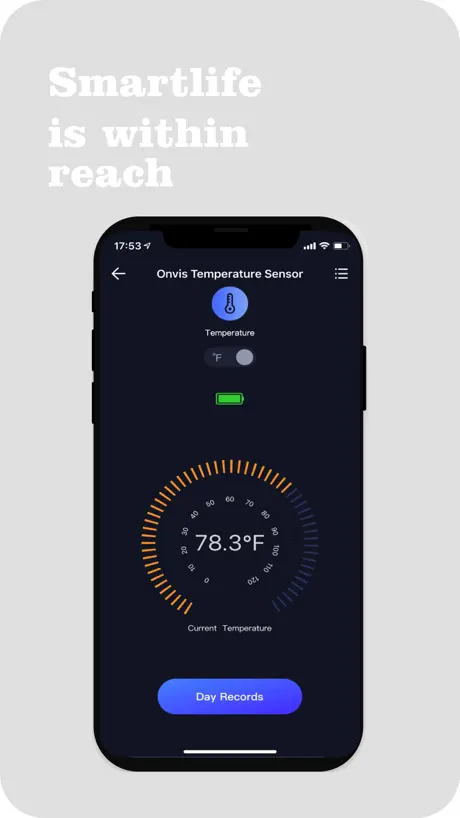
Added a star since the actual device is working fine, but the app is not helpful. Temperature history is totally broken, and is the main reason I’m trying this device. - it’s the wrong temperature - only allows emailing, why not pull up a share sheet for the CSV and let me decide how to share - UI spacing is super weird
Great Hardware - Terrible App
The hardware is great and has been rock solid for me so far. But this app is terrible, ugly confusing UI and the firmware upgrade procedure is really fiddly and annoying. I’ve read they are planning on switching updating through matter/the apple home app. If that’s true once that’s added I won’t have any complaints since the app won’t be required. Please do this Onvis!
Light strips are very creative
These light strips are some of the best they have really creative interface and really creative pre-done effects that you can’t see anywhere else, and guess what??? they’re Apple compatible!!! So you can play with Siri end these old at the same time.
Devices are good, app is not
App is hot garbage at best.
Fix the roll mode
The app work well, but please fix/add the possibility to save rolling effect into presets of draw mode. Because at the moment is impossible to create HomeKit scene with roll effect
Needs work for the motion/temperature sensor
The sensor works fine as a HomeKit sensor, I only installed the app to get logged temperature data off the app. Two problems, one is that even though it has two months of history, there seems to be no way to download it all at once. You can only email yourself a csv file one day at a time. Which makes incredibly tedious to use for pulling those logs (and motion data and humidity are separate, so you’d have to do it three times for each day). And just for fun, the logs have the wrong data. The data log shows exactly 30 degrees F colder than the actual temperature, so in addition to a several tap process to email yourself the logs 365 days a year if you want to get the data off continuously, you’ll need to add 30 to the logs on the other end. Mystifying (C is accurate apparently)
It’s okay
Led strips don’t aren’t that long and app is kinda weird to use but it works out for now
Funktioniert super
Ich nutze die App mit drei Onvis Bewegungssensoren seit nunmehr fast zwei Jahren ohne jegliche Unterbrechung oder anderweitiger Schwierigkeiten - top!
still absolute trash app and appliances
still absolute trash app and appliances
Funktioniert bei mir
Ohne Probleme. Wird für die Updates der Hardware benötigt. Auch so mal, wenn es per HomeKit keinen Zugriff drauf gibt.
Kaum zu gebrauchen
Ja, die App kann WLAN-Steckdosen ein- und ausschalten, aber sonst funktioniert momentan kaum was in der App. Beim auslösen der meisten Funktionen stürzt sie sofort ab. Mich stört das besonders bei der Verbrauchshistorie, wegen der ich die betreffenden Steckdosen überhaupt gekauft hatte. Hier zeigt die App entweder keine Daten oder sie stürzt ab. Meist beides.
App issues
Please fix this dysfunctional app. Too many errors.
Great app. And Products
All Onvis devices are amazing and offers more than any other Brand for decent prices and works properly with smooth connections... Love it
App is useless
I can’t believe this app is as broken as it is. There’s no way they actually tested it. I’d love to check my plugs for firmware updates since they are acting up, but I can’t do ANYTHING in the app (much less add the plugs). I hardly ever leave reviews but this one inspired me to share my experience.
Very disappointed
Works great when it works great. I think it’s very much time for a firmware update. This thing is more buggy than a Louisiana swamp.
Custom Animations
Allow us to do custom animations lol
Top!
Kann die Bewerbung mach anderer nicht nachvollziehen klar die App ist nicht die schönste und auch die Bedienung könnte Benutzer freundlicher sein. Allerdings hat dem Auge dass dieser Sensor deutlich günstiger als die Konkurrenz ist. Die App wird lediglich für Updates benötigt und dafür ist sie vollkommen ausreichend alles andere wird über die Home App erledigt von daher ignoriert die schlechten Bewertungen man muss das Teil natürlich auch bedienen können! Top verwende den SMS1 App stürzte bisher noch nie ab weder iPhone XS noch auf meinem iPhone 12 Mini
Zero accessibility with VoiceOver
This app is 100% inaccessible with the VoiceOver screen reader. That is why the low rating.
The lights are perfect but the app needs work asap
I love the way that these light look and I love all the options that they give you. There aren’t very many addressable strip lights that work with HomeKit like this one does but here is a list of things that the developers can do to the app to make it all it should be - make more scenes The app comes with about 5 different scenes including meteor shower, rose garden, and rainbow. And besides one exception, there are no customization options But Govee light strips on the other hand, have over 70 entirely customizable scenes for their light strips last time I checked. - resize the app interface I find that when I am on my phone, the app does not let me scroll all the way to the bottom of a particular page, this prevents me from adjusting brightness and and saving certain scenes to use in apple HomeKit. I remedy this by using my IPad instead but it really is such an unfortunate problem that could be fixed so easily. - save twinkle mode customizations. I enjoyed using the apps twinkle mode and I wanted to create a blue green twinkle to bring to HomeKit as well as a red-orange twinkle effect. While the first one worked well, I realized that it turned red when I went back to it a bit later. Bringing twinkle mode to apple HomeKit does not actually save the color and brightness selection for that setting it just makes your lights twinkle the colors that are currently selected on the apps interface. So while it works, you can only have 1 saved at a time Any of these changes would make me rate it higher but as of right now it gets 2 stars from me. Again the lights themselves are great. The app struggles
Landscape on iPad (v3.3.5)
THANK YOU! (Spread the word… please…)
Still works with HomeKit
The low ratings on the app gave me pause on updating the SMS1 motion sensors. Why update it when everything’s working fine. However, the red notification number on the home add finally got to me and made me do it. I’m glad to say everything still works perfectly fine. I updated from version 2.3.3 to 2.5.3 and there were no hiccups. HomeKit and all my automations still work just fine.
Defunct app
Completely broken. As another user mentioned, it doesn’t allow me to add and manage my Onvis product so that I can update its firmware.
It’s great when it works
The device and app are great when it works, which is less than half the time. The app either gets stuck with an hours old temperature, gives an incorrect reading of 32 F for the whole day or the app says the accessory is unavailable. But in Homekit, it displays the proper temperature. I was counting on the app to give me a history of temperature but not with the current state of the app.
History not working
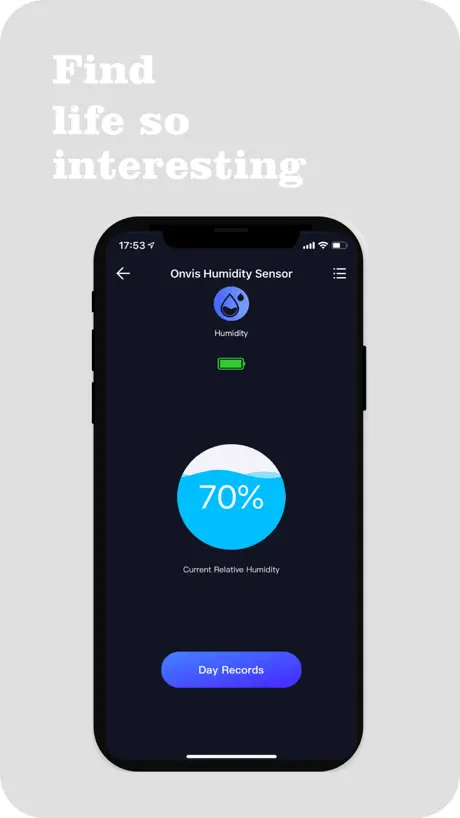
Whenever I try the Daily Records I get either no data at all, or all the data shows 0% humidity or 0C temperature.
Motion Sensors (SMS1) work better now
After updating the firmware of the SMS1’s, they now work better with Apple HomeKit. I have to say, I was worried it would do more damage than good. But it is actually made the motion sensor more successful at triggering other HomeKit Automations to take place...
Completely Broken
App is completely unresponsive to Add Accessory (+) button, and in fact, it seems to do nothing at all. Doesn't see or configure my HS2 switch, ever. The switch can be configured directly in Apple Homekit, but it becomes unresponsive to Homekit after anywhere from a few minutes to several days. When it becomes unresponsive, rebooting if the switch or Homekit does not make it responsive, so it must be deleted and Add Accessory used to reconfigure. Wasted way too many hours on the device trying to keep it working. Completely unreliable for me.
Crashes frequently
The app might be OK, but as it keeps crashing, I can’t be at all sure.
iHaper
Happy about iHaper support and update!
Does not work
Does not work
Used to be good
Now it won’t show the history log of temperature and if you try to export the data the app crashes.
Can no longer add to Home app
After finally getting latest firmware installed, one device can no longer be found in Home app. I removed it from the app, reset it, and now I can’t even add it back to Home or Onvis app. My other sensor (that I didn’t update the firmware on) still works fine.
Better now, but still buggy...
Managed to update firmware to v2.4.1 on my 5 SMS1 sensors. But app is still crashing when scrolling down in home view...
Sensor
Me funciono perfeto para lo quería
App needs improvement
Devices work well, especially directly from HomeKit. But the app is painful to use if you want to track history, and many times I need to back out of a device and then go back into it to see proper data.
Crashing a lot after update
App crashes every time going into the day records for temperature. Also humidity day records for past days show incorrect percentage. Getting worse with updates instead of better
Missing data export tool
It would be highly appreciated to be able to export measured date to e.g. csv file and send by email or download the file. Is possible to switche the temperature graph to Celsius degree?
Onvis Home FAQ
- Is Onvis Home free?
- Yes. The app is free, in all 175 countries it sells in, and it sells nothing inside it.
- Does Onvis Home have a free trial?
- No. None of its offers (US) come with a free trial.
- What are the best alternatives to Onvis Home?
- Starling Home Hub (4.8 from 2,975 reviews), HomeDash (4.5 from 1,046 reviews) and Homemanager for Homebridge (4.3 from 802 reviews, premium from $1.99).
Onvis Home download
Last updated 1 month ago.
Onvis Home sells in 175 countries. It was released 7 years and 11 months ago, on 21 Dec 2018. It holds a 1.9 rating from 294 reviews.
Supports 7 languages: English, French, German, Italian, Japanese, Chinese, Spanish.
How much does Onvis Home make?
Third-party estimates for the last 30 days, worldwide — not the store's own figures, which Apple publishes for nobody.