
PDF Scanner App: Scan Document
Scan Docs,QR Code,OCR・Editor
How much does PDF Scanner App: Scan Document cost?
Prices are current as of 28 Sept 2026.
9 subscriptions from $4.99
In the United States, PDF Scanner App: Scan Document has 9 subscriptions priced $4.99 – 59.99. It comes with a 3 days free trial.
| Subscription | Period | Price |
|---|---|---|
| Fax Premium (One Month) | MonthlyTrial: 3 days | $4.99 |
| Premium (One Week) | WeeklyTrial: 3 days | $6.99 |
| Premium (One Month) | Monthly | $7.99 |
| One Month -PDFScanner Premium | MonthlyTrial: 3 days | $9.99 |
| One Month -eScanner Premium | Monthly | $9.99 |
| Promotion PDF subscription | Annual | $19.99 |
| Fax Premium (One Year) | AnnualTrial: 3 days | $47.99 |
| One Year -PDFScanner Premium | Annual | $59.99 |
| Scanner APP Premium | AnnualTrial: 3 days | $59.99 |
1 one-time purchase from $69.99
In the United States, PDF Scanner App: Scan Document has 1 one-time purchase priced $69.99.
| Product | Price |
|---|---|
| Lifetime-PDFScanner Purchase | $69.99 |
See what PDF Scanner App: Scan Document costs in all 174 countries →
10+ alternatives to PDF Scanner App: Scan Document
| PDF Scanner App: Scan Document |   Scan Hero: PDF Scanner Scan Hero: PDF Scanner |   Scanner PDF – scan document Scanner PDF – scan document |   FineReader: PDF Scanner & OCR FineReader: PDF Scanner & OCR |   xScan : Document Scanner App xScan : Document Scanner App |   My Scans, best PDF Scanner App My Scans, best PDF Scanner App |   One Scan: PDF Doc Scanner One Scan: PDF Doc Scanner |   Document Scanner · Scan to PDF Document Scanner · Scan to PDF |   Scan to PDF: Converter Scanner Scan to PDF: Converter Scanner |   PDF Scanner App: Scanner+ Docs PDF Scanner App: Scanner+ Docs |   Scanner App: Fast PDF Doc Scan Scanner App: Fast PDF Doc Scan | |
|---|---|---|---|---|---|---|---|---|---|---|---|
| Rating / 5 | 4.5 | 4.6 | 4.6 | 4.7 | 4.5 | 4.7 | 4.6 | 4.8 | 4.7 | 4.6 | 4.6 |
| Reviews | 12K | 1.1M | 279K | 172K | 135K | 123K | 71K | 33K | 29K | 29K | 12K |
| Released | 2018 | 2016 | 2017 | 2012 | 2020 | 2015 | 2019 | 2020 | 2016 | 2020 | 2017 |
| Weekly price | $6.99 | $9.99 | $4.99 | — | $6.99 | — | $5.99 | $2.99 | $8.99 | $4.99 | $1.99 |
| Monthly price | $7.99 | $16.00 | $9.99 | $3.99 | $6.99 | $5.99 | $9.99 | $3.99 | $9.99 | $9.99 | $6.99 |
| Annual price | $47.99 | $89.99 | $99.99 | $20.99 | — | $36.99 | $49.99 | $19.99 | $49.99 | $39.99 | $39.99 |
| One-time price | $69.99 | $6.99 | — | $5.99 | $59.99 | $2.99 | — | $49.99 | $3.99 | — | $5.99 |
The going rate for each plan in United States, in its own currency, shaded from the cheapest price on the row to the dearest. Plans fewer than four in ten of the priced apps sell are left out.
PDF Scanner App: Scan Document reviews
4.5 out of 5, based on 11,705 reviews.
What people like
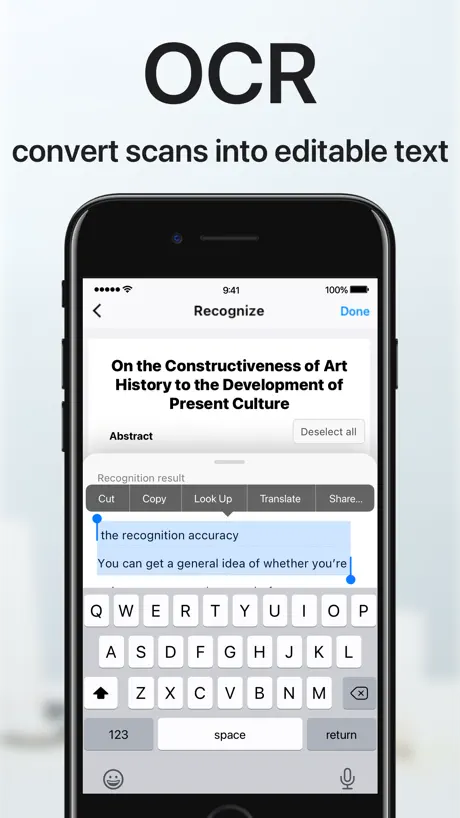
- OCR accuracy is really high
- Super easy to use
- Free and works great
- Fast scanning process
What they complain about
- Charges you even after cancelling
- Support never actually helps
- Ads interrupt you constantly
- Scans come out blurry or bad
Easy peasy
I love this app! Easy to use
Junk
App really worked good at 1st now it takes me forever to do my job!! I will be looking for a good dependable app!! This is not one!!
Pricing
How do you get a price for a used item
Проблема с экспортом
Не получается экспортировать файлы группой. Происходит какой-то глюк, приложение отправляет нужное количество файлов но одинаковых. Приходится каждый файл отправлять по отдельности. В чем проблема?
Love
Free and works great!
Being robbed
I NEVER SUBCRIBED FOR THIS IM BEING CHARGED 60$ monthly
Scanner impossible to use
Bought tonight; deleting tomorrow!!
Caption
Need to be able to write caption in pictures
E-Scanner
Best in this class.
Don’t waste your time
Poor quality conversions to pdf. Constant pop ups to get you to purchase the monthly subscription.
Hard to use
Couldn’t cancel paid for a year despite not using because I couldn’t get it to scan correctly
farnhamdyer
Wonderful Expo
Cancelling Subscription
I cancelled my subscription last month but I’m still getting charged until July. How is this possible?????
Best ever
This is a remarkable scanner converter. EZ to use.
Lowe’s card
Won’t scan to activate
Mr Manny
Merry Christmas and happy new year to everyone
Substandard
OCR in this app does not work as well as the free app that I already have. The idea of having all of the functions that they say this will do in one place is good. I don’t want to have to retype everything.
Good app
It is so good my kids like to put in the pin
Save your time and money
It’s free until you use it. Then I found it non functional—taking scans too fast, blurry, awkward angles, and poor lighting capture. Just don’t. You’d be glad you did
Excelente
Ex
Nightmare
Missed one month subscription payment because I had fraudulent activity on the card I usually use and now they are they are showing that I’m delinquent no matter how times I try to update my payment or contact them. Apple had now reduced use of my phone until they charge me for the service. I use my phone for work and I’m screwed right now. There is nobody running this thing so don’t expect support if something goes wrong.
🔥🔥🔥🔥
Lit
Awful
Very hard to use!!!
Life saver!
I’m disappointed with the reviews for this app :( I downloaded it a while ago and went through with the three day free trial and I knew I had to subscribe. I use it for turning my textbook and school notes into text. The scanning process is very quick and being able to have multiple documents to scan is so useful. I’ve scanned HUNDREDS, maybe even close to a thousand, of pictures of my notes and textbook and I would say the accuracy is about 99% which is incredible. And honestly I think it’s user error when it messes up because my picture could have been blurry. Also being able to import pictures from your camera roll makes the process so much nicer! This app is underrated and deserves more recognition. I would highly suggest giving it a try! One thing I would love to see is maybe more options for cropping the photos. Sometimes my textbook has charts in the middle of the page that I don’t want included in my text. Other than that I think it’s awesome!
N
No me gusta muy mala
PDF Scanner App: Scan Document price by country
A weekly subscription costs $0.31 in Turkey and $9.25 in the United Kingdom — 30× more for the same thing. Below is the going rate for each plan in every country that sells it — the middle price of what the app charges there, in the country's own currency with the dollar equivalent beneath it.
| Country | Weekly | Monthly | Annual | One-time |
|---|---|---|---|---|
| Afghanistan | $2.49 | $9.99 | $47.99 | $69.99 |
| Albania | $2.99 | $11.99 | $57.59 | $79.99 |
| Algeria | $2.49 | $9.99 | $47.99 | $69.99 |
| Angola | $2.49 | $9.99 | $47.99 | $69.99 |
| Anguilla | $2.49 | $9.99 | $47.99 | $69.99 |
| Antigua And Barbuda | $2.49 | $9.99 | $47.99 | $69.99 |
| Argentina | $2.49 | $9.99 | $47.99 | $69.99 |
| Armenia | $2.49 | $11.99 | $47.99 | $79.99 |
| Australia | A$11.49$8.03 | A$11.99$8.38 | A$77.99$54.54 | A$99.99$69.92 |
| Austria | €2.49$2.84 | €11.99$13.66 | €51.99$59.21 | €79.99$91.10 |
| Azerbaijan | $2.49 | $9.99 | $47.99 | $79.99 |
| Bahamas | $2.49 | $10.99 | $47.99 | $79.99 |
| Bahrain | $2.49 | $10.99 | $47.99 | $79.99 |
| Barbados | $2.49 | $11.99 | $47.99 | $79.99 |
| Belarus | $2.49 | $11.99 | $47.99 | $79.99 |
| Belgium | €2.49$2.84 | €11.99$13.66 | €51.99$59.21 | €79.99$91.10 |
| Belize | $2.49 | $9.99 | $47.99 | $69.99 |
| Benin | $2.49 | $9.99 | $47.99 | $79.99 |
| Bermuda | $2.49 | $9.99 | $47.99 | $69.99 |
| Bhutan | $2.49 | $9.99 | $47.99 | $69.99 |
| Bolivia | $2.49 | $9.99 | $47.99 | $69.99 |
| Bosnia & Herzegovina | €2.49$2.84 | €11.99$13.66 | €51.99$59.21 | €79.99$91.10 |
| Botswana | $2.49 | $9.99 | $47.99 | $69.99 |
| Brazil | R$9.50$1.83 | R$50.90$9.81 | R$187.90$36.20 | R$499.90$96.32 |
| British Virgin Islands | $2.49 | $9.99 | $47.99 | $69.99 |
| Brunei Darussalam | $2.49 | $9.99 | $47.99 | $69.99 |
| Bulgaria | €2.49$2.84 | €11.99$13.66 | €49.99$56.94 | €79.99$91.10 |
| Burkina Faso | $2.49 | $9.99 | $47.99 | $69.99 |
| Cambodia | $2.49 | $10.99 | $47.99 | $79.99 |
| Cameroon | $2.49 | $11.99 | $47.99 | $79.99 |
| Canada | CA$9.49$6.83 | CA$10.49$7.55 | CA$62.99$45.32 | CA$99.99$71.94 |
| Cape Verde | $2.49 | $9.99 | $47.99 | $69.99 |
| Cayman Islands | $2.49 | $9.99 | $47.99 | $69.99 |
| Chad | $2.49 | $9.99 | $47.99 | $69.99 |
| Chile | CLP 1,700$1.77 | CLP 10,900$11.33 | CLP 33,900$35.23 | CLP 79,990$83.13 |
| Colombia | COP 7,900$2.37 | COP 52,900$15.87 | COP 192,900$57.85 | COP 299,900$89.94 |
| Congo | $2.49 | $9.99 | $47.99 | $79.99 |
| Congo, Democratic Republic | $2.49 | $9.99 | $47.99 | $69.99 |
| Costa Rica | $2.49 | $9.99 | $47.99 | $69.99 |
| Cote Divoire | $2.49 | $9.99 | $47.99 | $79.99 |
| Croatia | €2.65$3.02 | €12.61$14.36 | €53.09$60.47 | €79.99$91.10 |
| Cyprus | €2.49$2.84 | €11.99$13.66 | €51.99$59.21 | €79.99$91.10 |
| Czech Republic | CZK 69.00$3.22 | CZK 299.00$13.97 | CZK 1,350.00$63.08 | CZK 1,990.00$92.99 |
| Denmark | DKK 20.00$3.05 | DKK 95.00$14.48 | DKK 405.00$61.74 | DKK 599.00$91.31 |
| Dominica | $2.49 | $9.99 | $47.99 | $69.99 |
| Dominican Republic | $2.49 | $9.99 | $47.99 | $69.99 |
| Ecuador | $2.49 | $9.99 | $47.99 | $69.99 |
| Egypt | EGP 49.99$0.97 | EGP 189.99$3.67 | EGP 799.99$15.46 | EGP 3,999.99$77.31 |
| El Salvador | $2.49 | $9.99 | $47.99 | $69.99 |
| Estonia | €2.49$2.84 | €11.99$13.66 | €51.99$59.21 | €79.99$91.10 |
| Fiji | $2.49 | $9.99 | $47.99 | $69.99 |
| Finland | €2.49$2.84 | €12.49$14.23 | €51.99$59.21 | €79.99$91.10 |
| France | €2.49$2.84 | €12.49$14.23 | €51.99$59.21 | €79.99$91.10 |
| Gabon | $2.49 | $9.99 | $47.99 | $69.99 |
| Gambia | $2.49 | $9.99 | $47.99 | $69.99 |
| Georgia | $2.49 | $11.99 | $47.99 | $79.99 |
| Germany | €2.49$2.84 | €11.99$13.66 | €51.99$59.21 | €79.99$91.10 |
| Ghana | $2.49 | $11.99 | $47.99 | $79.99 |
| Greece | €2.49$2.84 | €12.49$14.23 | €51.99$59.21 | €79.99$91.10 |
| Grenada | $2.49 | $9.99 | $47.99 | $69.99 |
| Guatemala | $2.49 | $9.99 | $47.99 | $69.99 |
| Guinea-bissau | $2.49 | $9.99 | $47.99 | $69.99 |
| Guyana | $2.49 | $9.99 | $47.99 | $69.99 |
| Honduras | $2.49 | $9.99 | $47.99 | $69.99 |
| Hong Kong | HK$20.00$2.55 | HK$78.00$9.95 | HK$378.00$48.21 | HK$588.00$75.00 |
| Hungary | HUF 899$2.80 | HUF 5,190$16.17 | HUF 17,990$56.06 | HUF 29,990$93.45 |
| Iceland | $3.09 | $12.39 | $59.51 | $79.99 |
| India | ₹199.00$2.08 | ₹969.00$10.14 | ₹3,949.00$41.32 | ₹6,900.00$72.19 |
| Indonesia | IDR 35,000$1.95 | IDR 169,000$9.43 | IDR 679,000$37.89 | IDR 1,299,000$72.48 |
| Iraq | $2.49 | $9.99 | $47.99 | $69.99 |
| Ireland | €2.49$2.84 | €12.49$14.23 | €51.99$59.21 | €79.99$91.10 |
| Israel | ₪9.90$3.25 | ₪31.90$10.46 | ₪167.90$55.05 | ₪199.90$65.54 |
| Italy | €2.49$2.84 | €12.49$14.23 | €51.99$59.21 | €79.99$91.10 |
| Jamaica | $2.49 | $9.99 | $47.99 | $69.99 |
| Japan | ¥750$4.76 | ¥880$5.59 | ¥5,100$32.38 | ¥11,000$69.85 |
| Jordan | $2.49 | $9.99 | $47.99 | $69.99 |
| Kazakhstan | KZT 949.00$2.14 | KZT 5,290.00$11.95 | KZT 18,490.00$41.77 | KZT 39,990.00$90.34 |
| Kenya | $2.49 | $11.49 | $47.99 | $79.99 |
| Kosovo | €2.49$2.84 | €11.99$13.66 | €51.99$59.21 | €79.99$91.10 |
| Kuwait | $2.49 | $9.99 | $47.99 | $69.99 |
| Kyrgyzstan | $2.49 | $10.99 | $47.99 | $79.99 |
| Lao Peoples Democratic Republic | $2.49 | $9.99 | $47.99 | $79.99 |
| Latvia | €2.49$2.84 | €11.99$13.66 | €51.99$59.21 | €79.99$91.10 |
| Lebanon | $2.49 | $9.99 | $47.99 | $69.99 |
| Liberia | $2.49 | $9.99 | $47.99 | $69.99 |
| Libya | $2.49 | $9.99 | $47.99 | $69.99 |
| Lithuania | €2.49$2.84 | €11.99$13.66 | €51.99$59.21 | €79.99$91.10 |
| Luxembourg | €2.49$2.84 | €11.99$13.66 | €51.99$59.21 | €79.99$91.10 |
| Macao | $2.49 | $9.99 | $47.99 | $69.99 |
| Macedonia | $2.49 | $9.99 | $47.99 | $69.99 |
| Madagascar | $2.49 | $9.99 | $47.99 | $69.99 |
| Malawi | $2.49 | $9.99 | $47.99 | $69.99 |
| Malaysia | MYR 10.90$2.68 | MYR 47.90$11.77 | MYR 199.90$49.12 | MYR 299.90$73.69 |
| Maldives | $2.49 | $9.99 | $47.99 | $69.99 |
| Mali | $2.49 | $9.99 | $47.99 | $69.99 |
| Malta | €2.49$2.84 | €11.99$13.66 | €51.99$59.21 | €79.99$91.10 |
| Mauritania | $2.49 | $9.99 | $47.99 | $69.99 |
| Mauritius | $2.49 | $9.99 | $47.99 | $79.99 |
| Mexico | MX$139.00$7.84 | MX$159.00$8.96 | MX$929.00$52.37 | MX$1,499.00$84.50 |
| Micronesia | $2.49 | $9.99 | $47.99 | $69.99 |
| Moldova | $2.49 | $11.99 | $47.99 | $79.99 |
| Mongolia | $2.49 | $9.99 | $47.99 | $69.99 |
| Montenegro | €2.49$2.84 | €9.99$11.38 | €51.99$59.21 | €69.99$79.72 |
| Montserrat | $2.49 | $9.99 | $47.99 | $69.99 |
| Morocco | $2.49 | $9.99 | $47.99 | $79.99 |
| Mozambique | $2.49 | $9.99 | $47.99 | $69.99 |
| Myanmar | $2.49 | $9.99 | $47.99 | $69.99 |
| Namibia | $2.49 | $9.99 | $47.99 | $69.99 |
| Nauru | $2.49 | $9.99 | $47.99 | $69.99 |
| Nepal | $2.49 | $9.99 | $47.99 | $79.99 |
| Netherlands | €2.49$2.84 | €11.99$13.66 | €51.99$59.21 | €79.99$91.10 |
| New Zealand | NZ$12.99$7.34 | NZ$13.49$7.62 | NZ$84.99$48.02 | NZ$129.99$73.44 |
| Nicaragua | $2.49 | $9.99 | $47.99 | $69.99 |
| Niger | $2.49 | $9.99 | $47.99 | $69.99 |
| Nigeria | NGN 900.00$0.68 | NGN 4,600.00$3.47 | NGN 17,500.00$13.18 | NGN 99,900.00$75.27 |
| Norway | NOK 79.00$8.31 | NOK 79.00$8.31 | NOK 539.00$56.68 | NOK 899.00$94.53 |
| Oman | $2.49 | $10.49 | $47.99 | $69.99 |
| Pakistan | PKR 350$1.26 | PKR 2,200$7.94 | PKR 7,700$27.81 | PKR 19,900$71.86 |
| Palau | $2.49 | $9.99 | $47.99 | $69.99 |
| Panama | $2.49 | $9.99 | $47.99 | $69.99 |
| Papua New Guinea | $2.49 | $9.99 | $47.99 | $69.99 |
| Paraguay | $2.49 | $9.99 | $47.99 | $69.99 |
| Peru | PEN 8.50$2.51 | PEN 38.90$11.47 | PEN 159.90$47.17 | PEN 299.90$88.47 |
| Philippines | ₱129.00$2.07 | ₱559.00$8.95 | ₱2,450.00$39.23 | ₱4,490.00$71.90 |
| Poland | PLN 11.99$3.12 | PLN 59.99$15.62 | PLN 229.99$59.89 | PLN 299.99$78.12 |
| Portugal | €2.49$2.84 | €12.49$14.23 | €51.99$59.21 | €79.99$91.10 |
| Qatar | QAR 8.99$2.47 | QAR 36.99$10.16 | QAR 174.99$48.07 | QAR 249.99$68.68 |
| Romania | RON 11.99$2.59 | RON 57.99$12.52 | RON 244.99$52.91 | RON 399.99$86.39 |
| Russia | RUB 199.00$2.31 | RUB 699.00$8.12 | RUB 3,750.00$43.56 | RUB 5,990.00$69.59 |
| Rwanda | $2.49 | $9.99 | $47.99 | $69.99 |
| Sao Tome & Principe | $2.49 | $9.99 | $47.99 | $69.99 |
| Saudi Arabia | SAR 9.99$2.66 | SAR 42.99$11.46 | SAR 189.99$50.66 | SAR 299.99$80.00 |
| Senegal | $2.49 | $9.99 | $47.99 | $79.99 |
| Serbia | €2.49$2.84 | €11.99$13.66 | €51.99$59.21 | €79.99$91.10 |
| Seychelles | $2.49 | $9.99 | $47.99 | $69.99 |
| Sierra Leone | $2.49 | $9.99 | $47.99 | $69.99 |
| Singapore | SGD 3.48$2.72 | SGD 14.98$11.70 | SGD 65.98$51.55 | SGD 99.98$78.11 |
| Slovakia | €2.49$2.84 | €11.99$13.66 | €51.99$59.21 | €79.99$91.10 |
| Slovenia | €2.49$2.84 | €12.49$14.23 | €51.99$59.21 | €79.99$91.10 |
| Solomon Islands | $2.49 | $9.99 | $47.99 | $69.99 |
| South Africa | ZAR 39.99$2.48 | ZAR 194.99$12.09 | ZAR 809.99$50.22 | ZAR 1,499.99$92.99 |
| South Korea | ₩3,000$2.21 | ₩15,000$11.06 | ₩63,000$46.46 | ₩110,000$81.12 |
| Spain | €2.49$2.84 | €11.99$13.66 | €51.99$59.21 | €79.99$91.10 |
| Sri Lanka | $2.49 | $9.99 | $47.99 | $69.99 |
| St. Kitts and Nevis | $2.49 | $9.99 | $47.99 | $69.99 |
| St. Lucia | $2.49 | $9.99 | $47.99 | $69.99 |
| St. Vincent & The Grenadines | $2.49 | $9.99 | $47.99 | $69.99 |
| Suriname | $2.49 | $9.99 | $47.99 | $79.99 |
| Swaziland | $2.49 | $9.99 | $47.99 | $69.99 |
| Sweden | SEK 29.00$2.92 | SEK 135.00$13.61 | SEK 579.00$58.37 | SEK 999.00$100.71 |
| Switzerland | CHF 2.50$3.02 | CHF 10.50$12.67 | CHF 51.00$61.52 | CHF 60.00$72.38 |
| Taiwan | NT$240.00$7.55 | NT$260.00$8.18 | NT$1,630.00$51.31 | NT$2,290.00$72.08 |
| Tajikistan | $2.49 | $11.49 | $47.99 | $79.99 |
| Tanzania | TZS 5,700.00$2.15 | TZS 22,900.00$8.62 | TZS 109,900.00$41.36 | TZS 199,900.00$75.23 |
| Thailand | THB 79.00$2.36 | THB 389.00$11.64 | THB 1,500.00$44.88 | THB 2,490.00$74.51 |
| Tonga | $2.49 | $9.99 | $47.99 | $69.99 |
| Trinidad and Tobago | $2.49 | $9.99 | $47.99 | $69.99 |
| Tunisia | $2.49 | $9.99 | $47.99 | $69.99 |
| Turkey | TRY 14.99$0.31 | TRY 229.99$4.70 | TRY 309.99$6.33 | TRY 3,999.99$81.72 |
| Turkmenistan | $2.49 | $9.99 | $47.99 | $69.99 |
| Turks and Caicos | $2.49 | $9.99 | $47.99 | $69.99 |
| Uganda | $2.49 | $11.99 | $47.99 | $79.99 |
| Ukraine | $2.49 | $11.99 | $47.99 | $79.99 |
| United Arab Emirates | AED 9.99$2.72 | AED 37.99$10.35 | AED 184.99$50.41 | AED 249.99$68.12 |
| United Kingdom | £6.99$9.25 | £7.49$9.91 | £46.99$62.16 | £69.99$92.58 |
| United States | $6.99 | $7.99 | $47.99 | $69.99 |
| Uruguay | $2.49 | $10.49 | $47.99 | $69.99 |
| Uzbekistan | $2.49 | $11.49 | $47.99 | $79.99 |
| Vanuatu | $2.49 | $9.99 | $47.99 | $69.99 |
| Venezuela | $2.49 | $9.99 | $47.99 | $69.99 |
| Vietnam | ₫59,000$2.27 | ₫239,000$9.21 | ₫1,119,000$43.14 | ₫1,999,000$77.07 |
| Yemen | $2.49 | $9.99 | $47.99 | $69.99 |
| Zambia | $2.49 | $9.99 | $47.99 | $79.99 |
| Zimbabwe | $2.49 | $11.99 | $47.99 | $79.99 |
PDF Scanner App: Scan Document FAQ
- Is PDF Scanner App: Scan Document free?
- Yes. The app and its basic features are free, in all 174 countries it sells in. Premium features are paid: they start from $4.99 (US), across 9 subscriptions and 1 one-time purchase.
- How much does PDF Scanner App: Scan Document cost per month?
- Fax Premium (One Month) is $4.99 – 9.99 (US). The annual plan works out cheaper per month: $19.99 – 59.99 a year.
- Does PDF Scanner App: Scan Document have a free trial?
- Yes — a 3 days free trial (US).
- Where is PDF Scanner App: Scan Document cheapest?
- A weekly subscription costs TRY 14.99 (≈$0.31) in Turkey and £6.99 (≈$9.25) in the United Kingdom, its cheapest and dearest countries.
- What are the best alternatives to PDF Scanner App: Scan Document?
- Scan Hero: PDF Scanner (4.6 from 1,074,609 reviews, premium from $1.99), Scanner PDF – scan document (4.6 from 279,433 reviews, premium from $4.99) and FineReader: PDF Scanner & OCR (4.7 from 172,123 reviews, premium from $2.99).
PDF Scanner App: Scan Document download
Last updated 1 year ago.
PDF Scanner App: Scan Document sells in 174 countries. It was released 8 years and 1 month ago, on 23 Aug 2018. It holds a 4.5 rating from 11,705 reviews.
Supports 10 languages: English, Arabic, French, German, Japanese, Korean, Portuguese, Russian, Chinese, Spanish.
How much does PDF Scanner App: Scan Document make?
Third-party estimates for the last 30 days, worldwide — not the store's own figures, which Apple publishes for nobody.
Revenue by plan
- Monthly 43%
- Weekly 28%
- Annual 21%
- One-time 8%
Revenue by country
- United States 77%
- United Kingdom 3%
- Canada 3%
- Australia 2%