Clipop: Video Editor & Maker
Photo & VideoUtilities

Clipop: Video Editor & Maker

晓乾 郑 · released 10 Jan 2018 · Open in App Store ↗

Revenue 30d not estimated
Downloads 30d not estimated
Rating 4.68 845 reviews

No in-app products collected for this app.

Rating
Taiwan62%5264.76
Hong Kong11%894.46
United States9%754.57
Macao5%454.69
United Kingdom<1%74.57
India<1%64.33
Malaysia<1%64.67
Turkey<1%64.33
Vietnam<1%65.00
United Arab Emirates<1%45.00

The store shows a different set in every country

Description

Clipop is a very efficient video clip processing software. With Clipop, you can quickly merge multiple videos, you can not only edit each video (add filter effects, reverse, acceleration, etc.), adjust the video at any time Starting and ending time points, you can also add to add background music.

Clip Videos

Support for adding pictures or videos

Drag to adjust video start and end times and preview the result in real time

Copy video clip to edit

Long press to move the video position

Edit video clip

Add Musics

Pick music from the music library

Drag to adjust the beginning and ending time of the music

Support for multiple musics merge

Copy music or long press to move the music

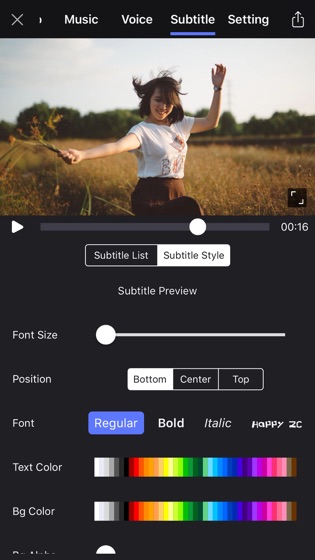
Add Subtitles

Add multiple subtitles to video for description

Edit subtitle style such as font, size, background, stroke etc.

Add Voices

Add voice recording to your video

Support multi voices composited

Export Settings

Set the global video volume and music volume

Change video content mode with aspect fit or aspect fill

Change video ratio with 16x9, 1x1, 9x16

Configure the quality of the output video

Edit video

Apply filter effect to your video with fantastic filter effects

Reverse the video

Speed up or slow down the video playback

Crop video screen

Mute volume

Music in the music library can be synchronized via the iTunes software

This app includes in-app purchases for auto-renewing subscriptions. The subscription fee is charged to your iTunes account when you confirm the purchase. The subscription will automatically renew unless the renewal is cancelled at least 24 hours in advance of the current subscriber. Your account will be debited for the renewal fee according to your plan within 24 hours before the end of the current subscription period. You can manage or turn off auto-renewal at any time in your Apple ID Account Settings after purchase.

Privacy Policy: https://note.youdao.com/s/ObRqU7gN

Terms of Service: http://note.youdao.com/s/RzEbe4PG