IPCam Plus
UtilitiesProductivity

IPCam Plus
ABUS Security Center GmbH & Co. KG · released 4 Apr 2017 · Open in App Store ↗

Revenue 30d not estimated
Downloads 30d not estimated
Rating 2.16 37 reviews

No in-app products collected for this app.

Rating
Germany81%302.33
Austria11%41.00
Switzerland3%11.00
Netherlands3%12.00
Turkey3%13.00
United Arab Emirates<1%0
Afghanistan<1%0
Antigua And Barbuda<1%0
Anguilla<1%0
Albania<1%0

The store shows a different set in every country

Description

IPCam Plus with improved user interface

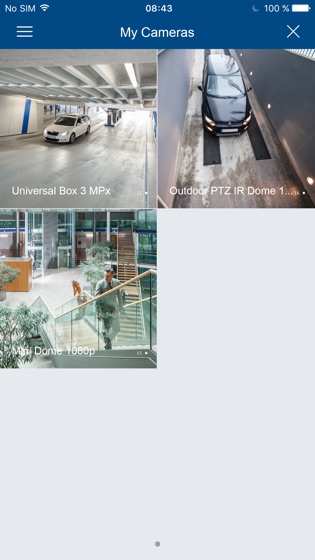
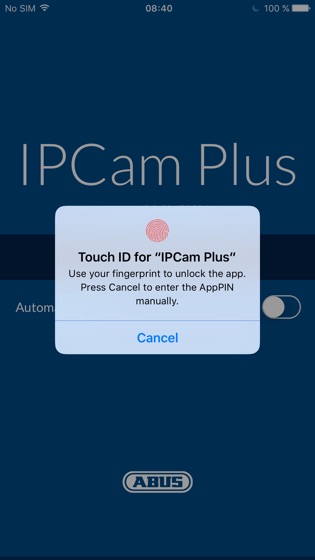
Convenient access to your ABUS IP cameras when out and about allows you to watch all videos live. The free Universal IPCam Plus app is optimised for smartphones and tablets and displays video images from up to six network cameras at once. Alarm outputs can also be controlled via the app. Users can log in both via touch ID or using a six-digit PIN code.

Camera view and online functions

The camera views can be selected individually by creating groups. If multiple cameras are saved in the app, you can switch between them in single or multi-screen simply by swiping. The integrated online help function can display explanations for the control panels, for example. The online update function can be used to update the internal camera database quickly and easily, so that new camera models can be recognised reliably.

Live image access and transfer via MMS or email

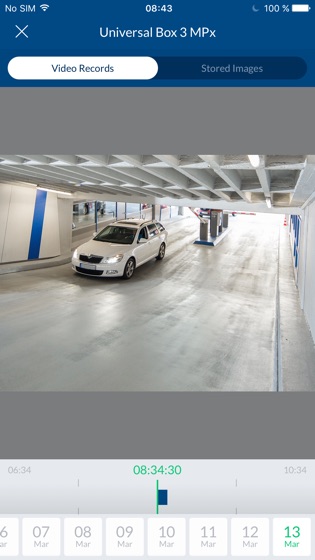
The user-friendliness of iPhones or other similar devices is of course retained; simply tilt the mobile device to the side to view videos in landscape mode. When live-streaming, simply click to switch between different quality settings.

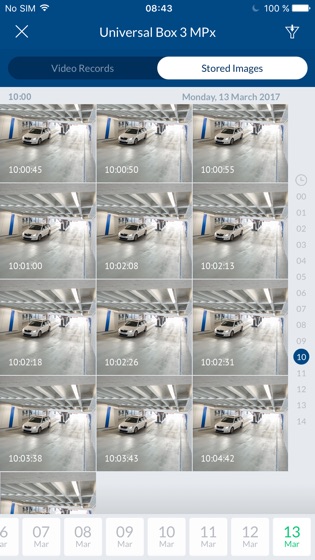
Images can also be saved from the live cast. The relevant image is stored in the image folder on the end device and can be sent easily via MMS or email. If the video files are recorded directly on the camera SD card, the recorded material can be viewed via the app. There is no need to download the entire video; the desired areas can simply be selected and then streamed on the device.

Control of PTZ cameras

A particular highlight is the ability to control pan tilt zoom cameras using the buttons displayed in the live view. The app can also be used to configure preset positions for the cameras, and to change these at any time if necessary. Complete camera tours can also be started and stopped this way.

Wide selection of languages

The app supports German, English, French, Dutch and Danish.

This application supports the following camera models:

TVIP11502, TVIP11552, TVIP11560, TVIP11561

TVIP21502, TVIP21552, TVIP21560, TVIP22500

TVIP31001, TVIP31501, TVIP31551, TVIP32500

TVIP41500, TVIP41560

TVIP52502

TVIP61500, TVIP61550, TVIP61560, TVIP62500

TVIP71501, TVIP71551, TVIP72500

TVIP81000, TVIP81100, TVIP82000, TVIP82100

TIP82900, TVIP83900, TVIP86900

TVIP91100, TVIP91300, TVIP91600, TVIP91700

TVIP92100, TVIP92300, TVIP92500, TVIP92600, TVIP92610, TVIP92700

IPCB42500, IPCB42550, IPCB71500, IPCB72500 (HTTPS and SD-Card Snapshots requires Firmware 5.3.4 or above)

IPCB42501, IPCB42551, IPCB62500, IPCB72501,

IPCB24500, IPCB34500, IPCB64500, IPCB74500,

IPCA22500, IPCA32500, IPCA52000, IPCA62500, IPCA62505, IPCA72500

IPCA33500, IPCA63500, IPCA66500, IPCA73500, IPCA76500 (HTTPS and SD-Card Snapshots requires Firmware 5.3.2 or above)

IPCS82520 (HTTPS and SD-Card Snapshots requires Firmware 5.3.3 or above)

IPCS82500 (HTTPS and SD-Card Snapshots requires Firmware 5.4.12 or above)

IPCS10020

IPCB42510A, IPCB42510B, IPCB42510C, IPCB42515A, IPCB44510A, IPCB44510B, IPCB44510C

IPCB62510A, IPCB62510B, IPCB62510C, IPCB64510A, IPCB64510B, IPCB64510C, IPCB68510A, IPCB68510B, IPCB68510C

IPCB62520, IPCB64520, IPCB68520

IPCB72520, IPCB74520, IPCB78520

Important notes:

The app requires the firmware on your network camera to be up to date, so you may have to update the firmware before you start. Intensive use of the live-streaming function can increase battery consumption, causing the end device to heat up. In the case of remote connections, additional costs may be incurred depending on your provider. The video performance will depend on the transmission bandwidth.

The privacy policy can be found here:

https://info.abus-sc.com/legal-documents/ipcam-plus/dsgvo-ipcamplus.html

The terms of use can be found here:

https://info.abus-sc.com/legal-documents/ipcam-plus/terms-ipcamplus.html