
OUTLANDER PHEV Remote Ctrl
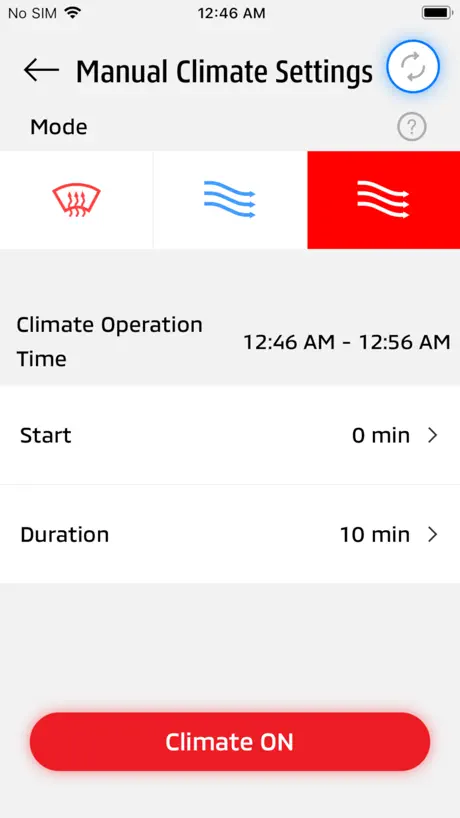
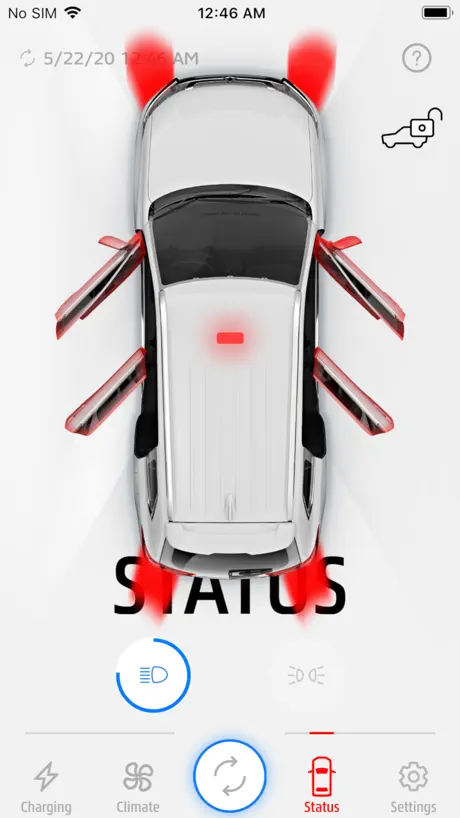
How much does OUTLANDER PHEV Remote Ctrl cost?
Prices are current as of 13 Nov 2026.
OUTLANDER PHEV Remote Ctrl has no in-app products on record in the United States.
10+ alternatives to OUTLANDER PHEV Remote Ctrl
| OUTLANDER PHEV Remote Ctrl |   Mill Norway |   Snarveien til St1 & réal |   Plejd |   Futurehome |   Ísland.is - Stafrænt Ísland |   Fixit Timebestilling |   Terra Charge EV 充電アプリ |   Cavius Alarm |   Fagforbundet medlem | |
|---|---|---|---|---|---|---|---|---|---|---|
| Rating / 5 | 1.5 | 4.3 | 4.6 | 4.2 | 3.5 | 3.3 | 3.7 | 2.4 | 2.5 | 2.4 |
| Reviews | 1.2K | 23K | 4.9K | 564 | 273 | 83 | 53 | 52 | 22 | 15 |
| Released | 2016 | 2016 | 2018 | 2016 | 2020 | 2022 | 2011 | 2022 | 2018 | 2021 |
OUTLANDER PHEV Remote Ctrl reviews
1.5 out of 5, based on 1,174 reviews.
What people like
- It works well once you get it connected.
- Free remote climate control without monthly data fees.
- Great for pre-heating the car in winter.
- The car itself is excellent and reliable.
What they complain about
- WiFi signal is too weak for range.
- You must switch WiFi networks every single time.
- Only two phones can be registered to the car.
- Recent updates removed useful timer cancel buttons.
Working now but had to completely delete and reset.
Only use the app at winter for remote defrosting heating. Every year I have to reset the whole thing. Delete the app. Get in the car and close drivers door, turn on hazard warning lights, press power button without pressing brake pedal, alternatively press LOCK and UNLOCK buttons on the key fob 10 times so 20 times in total. All must be done within 30 seconds. Connect to your home wifi but turn off auto join and download the app, then disconnect from your home wifi and follow the normal registration instructions in the app. Now working for me again. Annual faff.
Works when you know how to fix it
Thanks to Google AI I now know how to reset and clear old registrations. If only this guidance had been available before it would have saved me endless frustration and error messages.
Bißchen lahm aber tut was es soll
Funktioniert bei mir wie es soll. Nach dem Update in der Tat etwas flotter! :)
No longer functioning
This app was always a little unpredictable in regard to maintaining a stable connection to my car’s wifi network. Since updating to iOS 17.3 it is 100% predictable that it WILL NOT CONNECT. I wish there were an alternative app that actually functioned the way this one was intended to.
クルマと繋がらない
GG2WのWIFIに接続してからアプリを起動するとWIFIが切断される。 繋がるようになりました。iPhoneのWIFI設定で自動接続をオンすると繋がるようになりました。iOS18.2でも繋がります。
2019 PHEV GT
The app is working perfectly for me and connects/controls my vehicle with no issue.
I'm really frustrated because I can't seem to use the app properly.
I am unable to connect to the app consistently; it frequently disconnects, disrupting my use. Additionally, there have been no further updates released for this application, which prevents me from upgrading the software to fix bugs or add new features. This lack of updates and persistent connection issues significantly hinder my overall experience.
Only 2 phones per vehicle
The app is not bad, it works even after 6 years, and it allows you to control climate and many other vehicle settings from it. But… A totally not obvious aspect of connecting to Mitsubishi vehicles (and maybe others, who knows) is that they only allow 2 phones max to be “registered” to it. Therefore, when you get a new phone, you will need to de-register the old phone from the vehicle. If a couple of people share the vehicle then as soon as they get new phones they must deregister the old ones – otherwise this app, on the new phones, will not connect to the vehicle. If a family of 2+ shares the vehicle, then only 2 of those people can use this app with the vehicle.
Not working
Can't connect since the last ios update.
Q&Aの問題
今まで繋がっていたのに繋がらなくなる原因を特定した。再接続出来るようにする方法も特定した。何故三菱は丁寧に説明しないのだろうか、、、
Utrolig mye bedre!
Sammenlignet med den forrige appen er denne helt himmelsk. Kobler opp hver gang og endringer oppdateres fort. Så hvis du ikke liker denne så prøv og forestill den den forrige.
Wow - updated a month ago, yet still utterly awful.
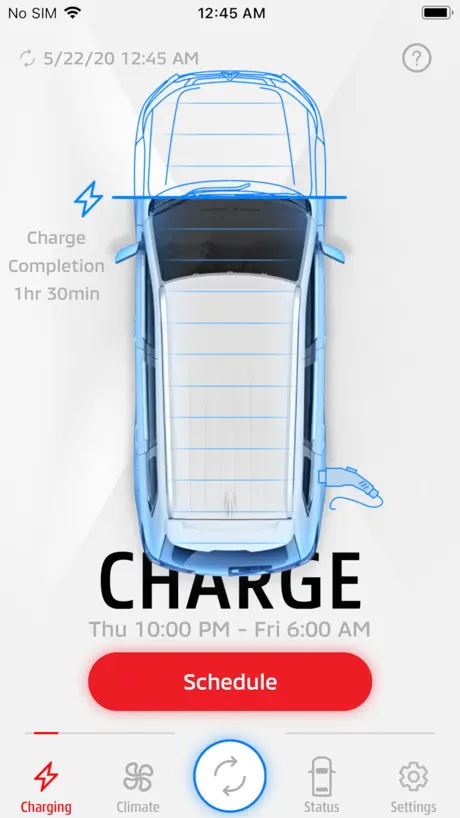
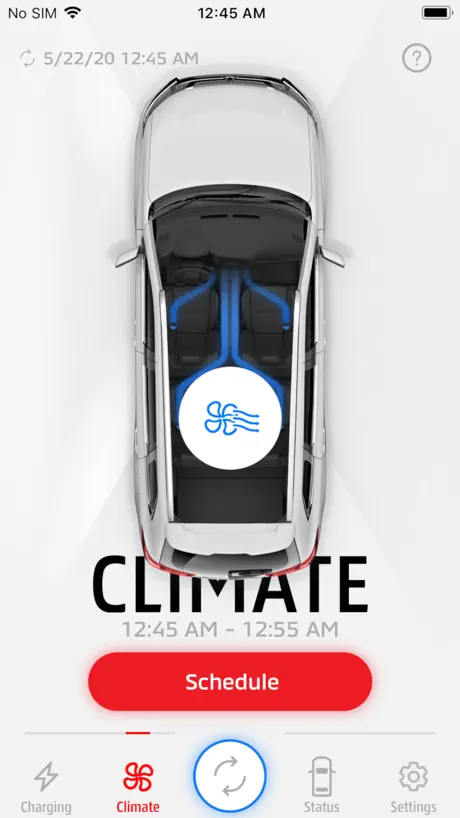
It is hard to put down in words just how utterly awful this app is. But let me try, in the hope that a product manager at Mitsubishi can be shamed into an internal decision to re-write this pile of excrement from the ground up. Let me begin: 1) Having to connect to the car wi-fi to use this app was an awful decision, but I guess one that cannot be changed. On connecting to the car wi-fi phones instantly detect there is no internet connection, so revert back to the previous wifi. This means that when trying to use the app continually getting error messages and having to leave it to reconnect to the correct wifi. 2) We need only a few functions: - Warm / defrost car - View battery level & if charging - Schedule a charge to begin / end It is extremely difficult to even know, from the app screen, if any of these things are actually happening.(for example you cant tell if the button is indicating the function is on, or if you need to press it to activate the function. Please, get a real professional (not the office cleaner) to re-write this app.
***HOW TO FIX***
You need to turn PRIVATE WIFI ADDRESS OFF and I turned off Limit IP tracking also, IN THE WIFI’s settings on your PHONE. If you have these on it will not connect properly! It is still finicky but it now works once again!
充電残量がわかりにくい
以前のバージョンに比べて、充電残量が分かりにくいです。何で車を背景にする必要があるのでしょうか。しかも左ハンドル。16のメモリを4分割してはっきりと色付けして欲しい。出来れば走行可能距離を表示すると助かるのですが。
Add more functions
I like the idea of it but it would be good to have more functionality. The app lag a lot. Please improve the app.
WiFi
The reason why this car uses WiFi is because it doesn’t have a cellular network connection.
Timer cancel removed!
The instructions say that you can use a button on the key to cancel the current timer, but my 2015 model doesn’t have that button! So i have to fiddle with the schedule in the app every time I need to preheat the car while plugged in in the morning! If you don’t it will warm up but will use battery range to do it even though it is plugged in. Please put it back!
Working good
For me the app works quite well, I don’t understand the other negative feedback.
Not good at all
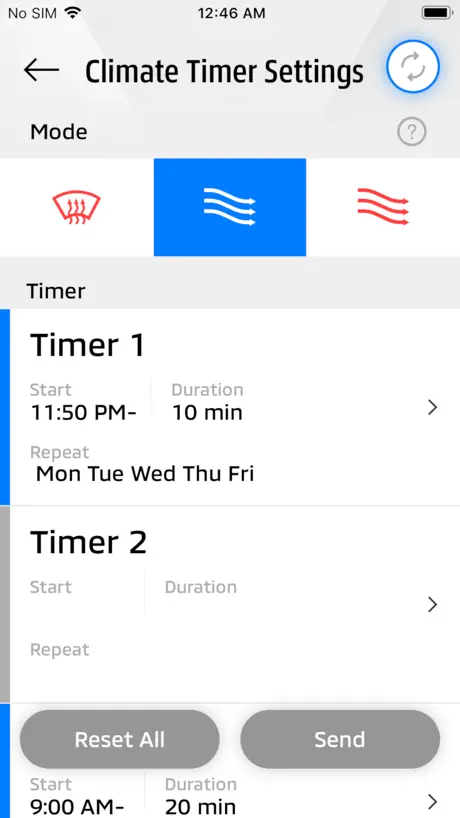
I bought this car new. I have to stand beside it to be able to send wifi controls to the car. The wifi signal is very weak. I also have to keep changing from my home wifi to the Outlander wifi to send controls. This is not the case with any other wifi equipment on my system. Then the password drops out often so I have to go back to the car to find it again. You can only set climate control for up to 320 minutes ahead rather than at a particular time. So if I want the car warm before I go to work I have to get up 4 hours before I head out the door. Crazy.
Latest version has lost some basic functionality
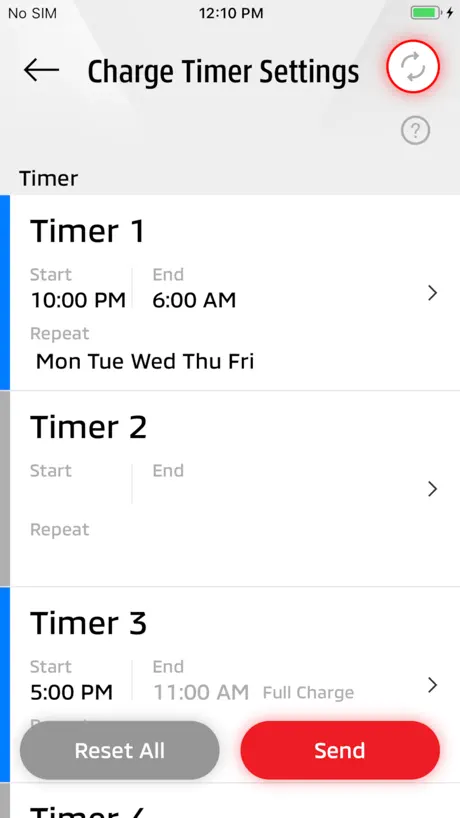
With the update to 3.1.3, the ability to change charge timers and heating timers is gone - the buttons are no longer visible. Please Mitsubishi, you had left the app alone for 3 years and although far from perfect, it at least worked (mostly). Now with the update is close to useless. Please revert or fix.
Outlander PHEV REMOTE CONTROL
Habe die App gerade installiert. Installation ohne Probleme! Auto steht in der Garage, eine Mauer/Wand zu überbrücken. Beim programmieren einer Aktion ( Heizung, laden etc) stehe ich ca. 8m. von der Garage entfernt, funktioniert. Die App selber ist komfortabel für mein Dafürhalten. Grüße Andreas
Revert back to previous update
Most recent update has caused nothing but issues. Please revert back to the previous version, also the close proximity needed to connect to the car is ridiculous. Please fix this!
Replacing old app? De register your phone!
Ok folks, I was finding this incredibly frustrating to work. Until I realised you have to Deregister your mobile phone (including if you bought this car secondhand). And if the cars wifi keeps kicking you out, even when you are stood next to it, it’s because you are using the wrong app. Kind of ridiculous that the app doesn’t give you these instructions! Note that the car Wi-Fi may disappear until you go to (re)register your new phone. I originally renamed my car Wi-Fi, after I deregistered it went back to the original. But it did still use the replacement password from when my dealer updated it for security reasons. The instructions are here: search for: unregister mobile app outlander PHEV, and look for the Fully Charged EV article. And if you haven’t discovered who fully charged are, you soon will!! Check YouTube.
Not worth the hassle
No streamlined connect. Default connection approach wants discovery on network. Lots of unrealized potential.
Update : the app works, but it needs a specific setup
To make the app work, connect your phone to the wifi first. Then, disable all privacy options in Settings > Wifi > Remotexxxx (your wifi). The car uses the MAC address (the xx:xx:xx… sort of serial number) of your phone for authentication. Once all privacy options are off, disconnect from the wifi, then log back onto it and only then you start the registration process. From there it should work. If it stops working, follow the manufacturer instruction to reset registered phones, and register your phone again. Not perfect, but it works. Finally.
アプリ更新したら全くダメに
タイマー空調をONにしたら最後、OFFを受け付けない。設定後の更新も受け付けない。ダメダメですね。タイマー空調設定オールクリアしてアプリ使用やめました。★1つ。 2020.01.17追記。3.0.1になって不具合解消しました。足りなかった無線LAN通信設定も復活。不具合対処ありがとうございます。
Not very friendly
Just got my PHEV but unable to set up the remote access although the car says connected you the app keeps saying error which is a shame as I was really looking forward to being able to do my car remotely as this is one reason why I bought the car so please Mitsubishi get this app working
Apple Watch App please!
Good job
Takes more time to connect than starting the car
An awful idea to use wifi. Bad.
Was working until Apple broke it
Was working fine until an Apple iOS update started prioritising mobile data over legacy WiFi access points automatically. That means the connection to the car is lost. Now completely useless with no way to change in Settings. Shame on you Apple.
LOVE IT!
I was a little skeptical about purchasing the PHEV from the reviews on here, but after speaking with the sales lady, like most technology, some vehicle-computers needed an update. I bought mine the day before Christmas and have never had a problem with the car or App. I’m in love with this car and the App is a great feature!
Constant switching WiFi and poor communication range.
Requires switching of WiFi network on phone settings every time I want to check charge and only connects when within 5 metres of the vehicle. Could be so much more convenient.
Fonctionne bien si...
Fonctionne bien si vous désactivé les données cellulaires lorsque vous êtes branché sur le Wifi de la voiture. 4 étoiles, car le signal Wifi de la voiture n'est pas très fort. Comme le signal n'est pas très fort, je vous conseil d'utiliser un iPad. Vous allez gagner en distance, car le Wifi du iPad est plus fort.
Funktioniert leider nicht mehr nach iOS 14.1 Update
Bitte fixen, sobald man das iOS Update macht geht nichts mehr. Die Kommunikation und auch ein erneutes Registrieren geht nicht mehr.
Fremgang
Fantastisk fremgang fra den tidligere appen, fra terningkast 1 til 3, slettes ikke verst…
Don’t waste your time
It’s simply don’t work.
Ist jetzt besser
Nach dem neuen Update ist der Bedienkomfort wirklich gestiegen Die Optik hat auch an Wertigkeit gewonnen. Ob man eine Prozent Angabe für den Akku braucht, darüber lässt es sich streiten, ich brauche es nicht. Das man das W LAN immer manuell wechseln muß ist sicherlich lästig, gibt schlimmeres, könnte regnen :-) Ich bin zufrieden
WiFi connectivity has limited range
The WIFI connectivity has issues. The car can be parked in my garage and still not connect. Unless I literally walk up to the car. By this time u might as well just use the the key to get into the car. The idea of the APP is good but execution is poor. Mitsubishi needs to look at what Chevy is doing with the Onstar, or Tesla connectivity excellence, or BMW is doing with BMW connect, or Audi, or Mercedes Benz, Ford, etc. I am pretty sure, the connectivity can be improved, if Mitsubishi puts forth the effort to look at rival systems. My recommendations is to use Tesla as the bench mark for this connectivity issue and to improve the phev 2 app. Add features that allow u to start the car, and reverse out of tight spots, and connect via even cellular connectivity and not just rely on WiFi.
Add battery percentage
Instead of just 16 blocks in that battery image
Not again!
The summer 2024 update just got worse again: “What’s new Version 3.1.5. 3w ago “The Timer Charge/Climate Cancel Switch has been deleted from the home screen…”. - Why??? It worked! “After updating the app, if you want to turn schedules ON/OFF, set them on the Timer schedule screen…”. - far more hassle for no benefit! “If you want to charge immediately when the Timer charging is enabled, use the side switch of the keyless operation key. Refer to the owner's manual or website.”…. There is no side switch on my key, and I have just downloaded the most recent PHEV manual, which doesn’t show a remote side switch nor refer to one… I believe some remotes do have a side button, but for those of us who don’t, PLEASE PUT THE CANCEL SWITCHES BACK IN THE APP!
Version 3 is getting better
True, the wifi range is low, but you don’t need to pay anyone for some data service. Version 3.0 of the app looks like what I would expect of such an app. The first connection to the vehicle is still buggy, but once done, the app behaves itself and seems to be bug free.
2.1.2 version force closes
Lots of negative reviews about the app, & I agree to an extent, but I also understand the benefits of a Wi-fi based system over cellular or Bluetooth, & the drawbacks. I’m okay with the limitations considering I’ll never have to pay to turn my car on and off. My suggestion would be to set your schedule, push it to the car, & only worry about pre heating/ cooling on those random occasions where you are stepping out (assuming a fairly normal daily routine). My issue & the current 2 star rating: after updating to the new 2.1.2 version, my app sometimes won’t let me in & closes itself immediately. I have a couple friends with the PHEV & have the exact same issue, starting the exact same time. I’ve found that force closing the app usually works, & restarting my phone always works- but nobody should have to do this. Squish these bugs & I’ll add another star or two. This review is for the app only- The car is phenominal. 20 months of ownership, 28,100 kms & ive only spent $155 on fuel & my commute is over an hour each way to work & i drive it like i stole it. Absolutely mind boggling.
Review
A bit complicated to set up, I looked on you tube and was able to get it done in 3 min. Biggest downside is distance only works within 20-30 feet of vehicle. Will be useful in winter when I’m at home. U also have to disconnect from your home wifi and connect to vehicle wifi in order for it to work. Love concept but they still have lots of work to do before it can compete with similar apps out there.
Won’t connect
Disappointing App. This car 2019 deserves better
Pretty good
It’s just intended to be a remote control for basic settings, primarily activating the climate control on a timer. I’d LOVE to see status details like TIRE PRESSURE, cabin temp, and battery health. It works well as intended. Next generation of course should be via internet/web service instead of direct.
Basic control, barely usable
I’ve had my Outlander PHEV for a year now, after having a Volt for 3 years with onstar. This PHEV app does some very basic things such as remote heat/cool and parking lights. Remote control relies on a built-in wireless access point in the Outlander to connect. That WiFi is exceedingly poor in coverage. If you have direct line of sight to the car you might connect from 20 feet away. Otherwise, like myself, you might need to purchase a WiFi extender and plug it in nearest the car to even activate heating in the cold winter from the comfort of your own home. Don’t have high expectations using this remote when in a store or shopping mall parking lot. The controls are very basic. But when they work it is nice to get into a car which has been warmed in the freezing cold winter. Mitsubishi could have done so much better. No supported after market device exists which could improve the connectivity. Some enthusiasts post about implementing make shift solutions using android phones plugged into the USB port and accessing third party remote software. This isn’t Onstar, not by a long shot. The two star rating acknowledges the basic functionality. Very basic.
Remote app
Kanske inte den bästa appen men den funkar. Betydlig mer irriterad över att det endast är över WiFi som man kan köra remote. Mitsubishi måste komma med en lösning över mobilnätet precis som alla andra biltillverkare.
OUTLANDER PHEV Remote Ctrl FAQ
- Is OUTLANDER PHEV Remote Ctrl free?
- Yes. The app is free, in all 175 countries it sells in, and it sells nothing inside it.
- Does OUTLANDER PHEV Remote Ctrl have a free trial?
- No. None of its offers (US) come with a free trial.
- What are the best alternatives to OUTLANDER PHEV Remote Ctrl?
- Mill Norway (4.3 from 23,054 reviews), Snarveien til St1 & réal (4.6 from 4,906 reviews) and Plejd (4.2 from 564 reviews).
OUTLANDER PHEV Remote Ctrl download
Last updated 11 months ago.
OUTLANDER PHEV Remote Ctrl sells in 175 countries. It was released 10 years and 1 month ago, on 20 Oct 2016. It holds a 1.5 rating from 1,174 reviews.
Supports 19 languages: English, Arabic, Danish, Dutch, Finnish, French, German, Indonesian, Italian, Japanese, Norwegian Bokmål, Norwegian Nynorsk, Polish, Portuguese, Russian, Chinese, Spanish, Swedish, Thai.
How much does OUTLANDER PHEV Remote Ctrl make?
Third-party estimates for the last 30 days, worldwide — not the store's own figures, which Apple publishes for nobody.